
EasyManua.ls Logo

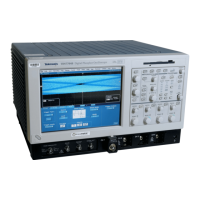
Tektronix CSA7404B - User Manual

Tektronix CSA7404B
438 pages
Print Icon
To Next Page IconTo Next Page
Loading...
User Manual
CSA7404B
Communications Signal Analyzers,
TDS7704B, TDS7404B, TDS7254B & TDS7154B
Digital Phosphor Oscilloscopes
071-1226-03
This document supports firmware version 4.0.3
and above.
www.tektronix.com

Table of Contents

Other manuals for Tektronix CSA7404B

Questions and Answers

  • J
    john38Aug 10, 2025
    What to do if Tektronix CSA7404B will not power on?
    • K
      Katherine KennedyAug 10, 2025
      If your Tektronix Measuring Instruments won't power on, first, make sure the power cord is properly plugged in. Then, check the mains power switch to ensure it's turned on. If it still doesn't power up, replace the failed fuse. If none of these steps work, the power supply might be faulty and require checking and replacement.
  • D
    David CalderonAug 22, 2025
    Why front panel light comes on, but one or more fans will not operate in Tektronix CSA7404B?
    • A
      Alexis MartinezAug 23, 2025
      If the front panel light of your Tektronix Measuring Instruments is on but one or more fans are not working, start by inspecting and repairing the fan cable. If the issue persists, replace the defective fan assembly. As a last resort, check and replace the faulty power supply.

Tektronix CSA7404B Specifications

General IconGeneral
Bandwidth4 GHz
Sample Rate20 GS/s
Sample Rate (Maximum)20 GS/s
Channels4
Vertical Resolution8 bits
Record Length100 Mpoints
Input CouplingAC, DC, GND
Power Supply100-240 VAC, 50/60 Hz
Vertical Sensitivity1 mV/div
Displaycolor LCD
Input Impedance1 MΩ
Maximum Input Voltage5 Vrms (50 Ω)
Trigger ModesEdge
InterfaceUSB, GPIB, Ethernet

Related product manuals










