ACCESSORIES
4157082 First Edition 10-17
10
Figure 10-28
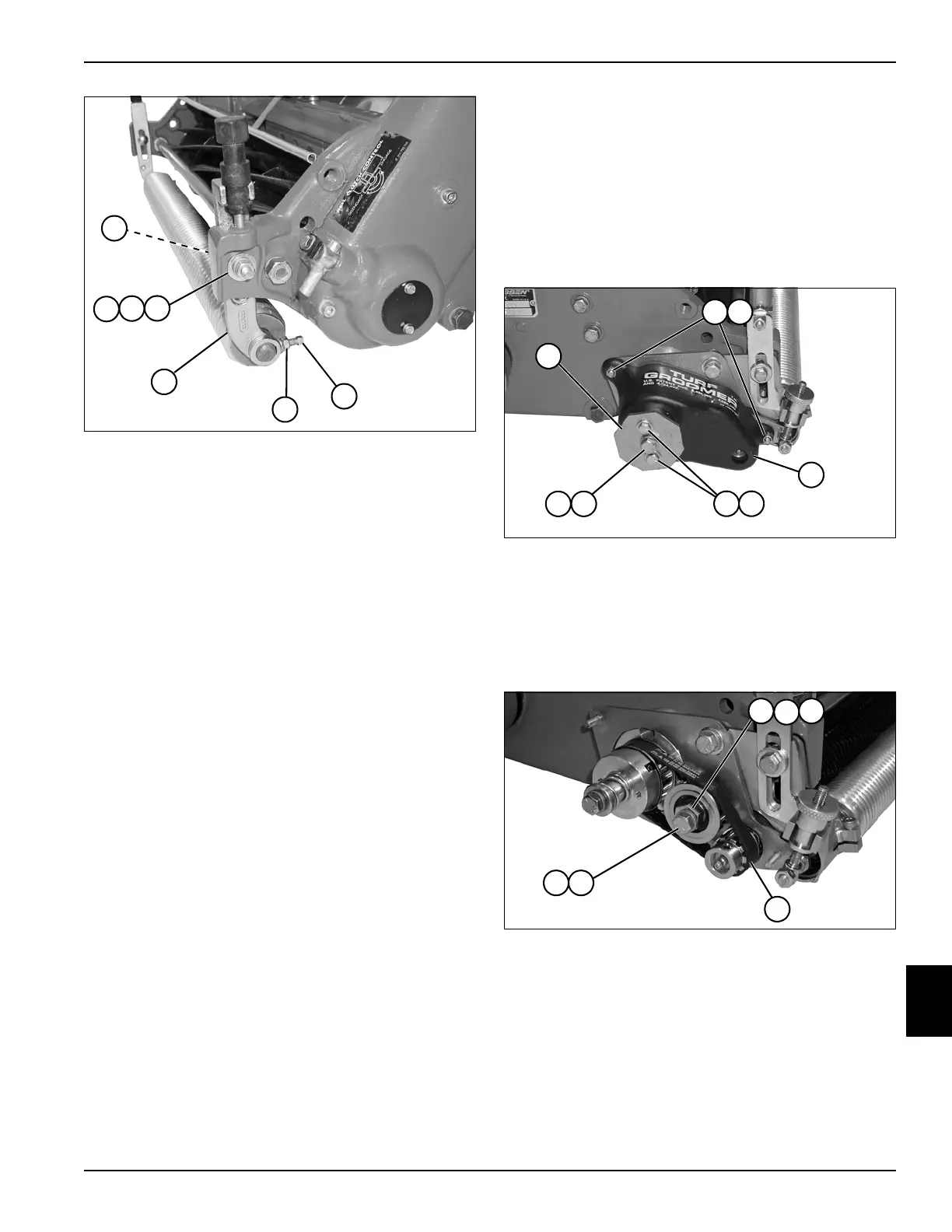
7. Install carriage bolt (10) through adjuster bracket (13)
and secure with flat washer (16), lock washer (15),
and nut (14).
8. Center roller assembly between adjuster brackets
and tighten square head bolt (11) and jam nut (12) on
both sides of machine.
9. Check height-of-cut. (See “Height-of-Cut Adjustment”
on page 8-14.)
Repair—Turf Groomer
Drive Belt
Removal and Installation
See Figures 10-29 and 10-30.
1. Park the mower safely. (See “Park Mower Safely” on
page 1-6.)
Figure 10-29
2. Remove hex head screws (5) and lock washers (6).
3. Remove hex head screw (7), lock washer (8), and
clutch control knob (1).
4. Remove lock nuts (2), flat washers (3), and belt cover
(4).
Figure 10-30
5. Remove hex head screw (9) and lock washer (10).
6. Remove eccentric adjuster nut (11), idler pulley (12),
and spacer (13).
7. Remove belt (14).
Installation Notes
• Install belt by reversing the order of removal.
• Adjust belt tension. (See “Turf Groomer Drive Belt
Tension Adjustment” on page 10-6.)
TN0068
10
16
15
14
13
12
11
TN0311
5
8
1
2
4
6
7
3
TN0333
109
12
11 13
14








 To Next Page