POWER TRAIN
4157082 First Edition 5-5
5
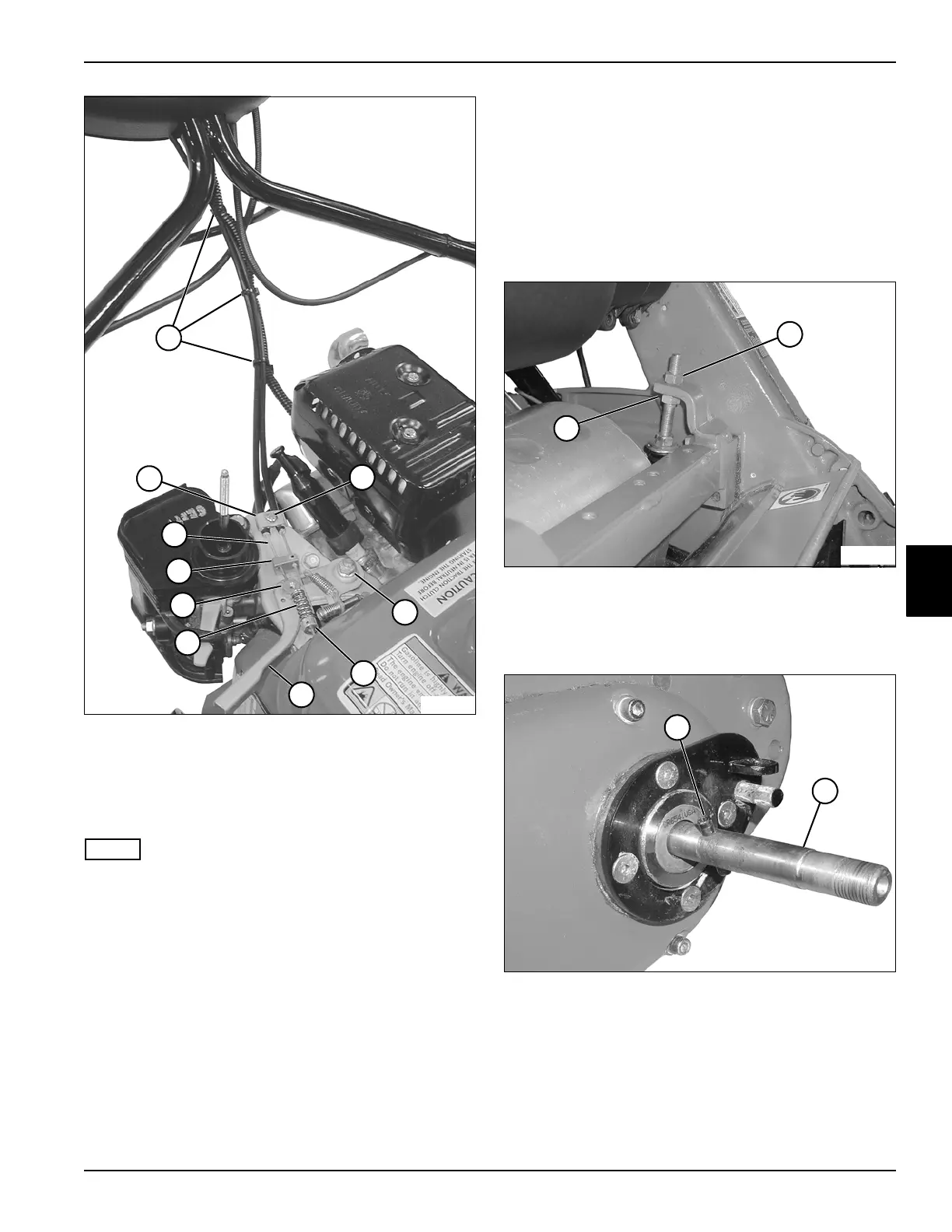
Figure 5-5
5. Loosen throttle lever pivot nut (7) until the throttle
lever (9) returns to idle by itself.
6. Route clutch control cable (13) through cable clamp
(14), cable guide (12) and swivel nut (11).
NOTE
Do not tighten the cable clamp screw (6) or throttle lever
pivot nut (7) until the cable has been properly adjusted.
7. Install spring (10) and collar (8) onto clutch control
cable (13). Slide the collar (8) until 1/4-inch of cable
extends past the collar. Tighten the collar.
8. Install cable ties (5).
9. Adjust throttle and clutch cable. (See “Throttle and
Clutch Control Cable Adjustment” on page 3-4.)
Traction/Reel Drive Clutch
The traction/reel drive clutch is serviced with the engine.
(See “Engine and Clutch” on page 3-7.)
Traction/Reel Drive Chain Case Cover
Removal
See Figures 5-6 through 5-9.
1. Park mower safely. (See “Park Mower Safely” on
page 1-6.)
2. Remove left-side park brake band. (See “Park Brake
Band” on page 7-6.)
Figure 5-6
3. Loosen nut (2) and turn nut (1) counterclockwise
1/4 turn or more to bring the bedknife into light
contact with the reel blades.
Figure 5-7
4. Using a punch, remove the roll pin (3) from the
traction drum shaft (4).
TN0010
12
6
5
8
10
11
13
7
9
14
2
TN0044
1
3
TN0085
4








 To Next Page