7-6 4157082 First Edition
BRAKES
7
Installation
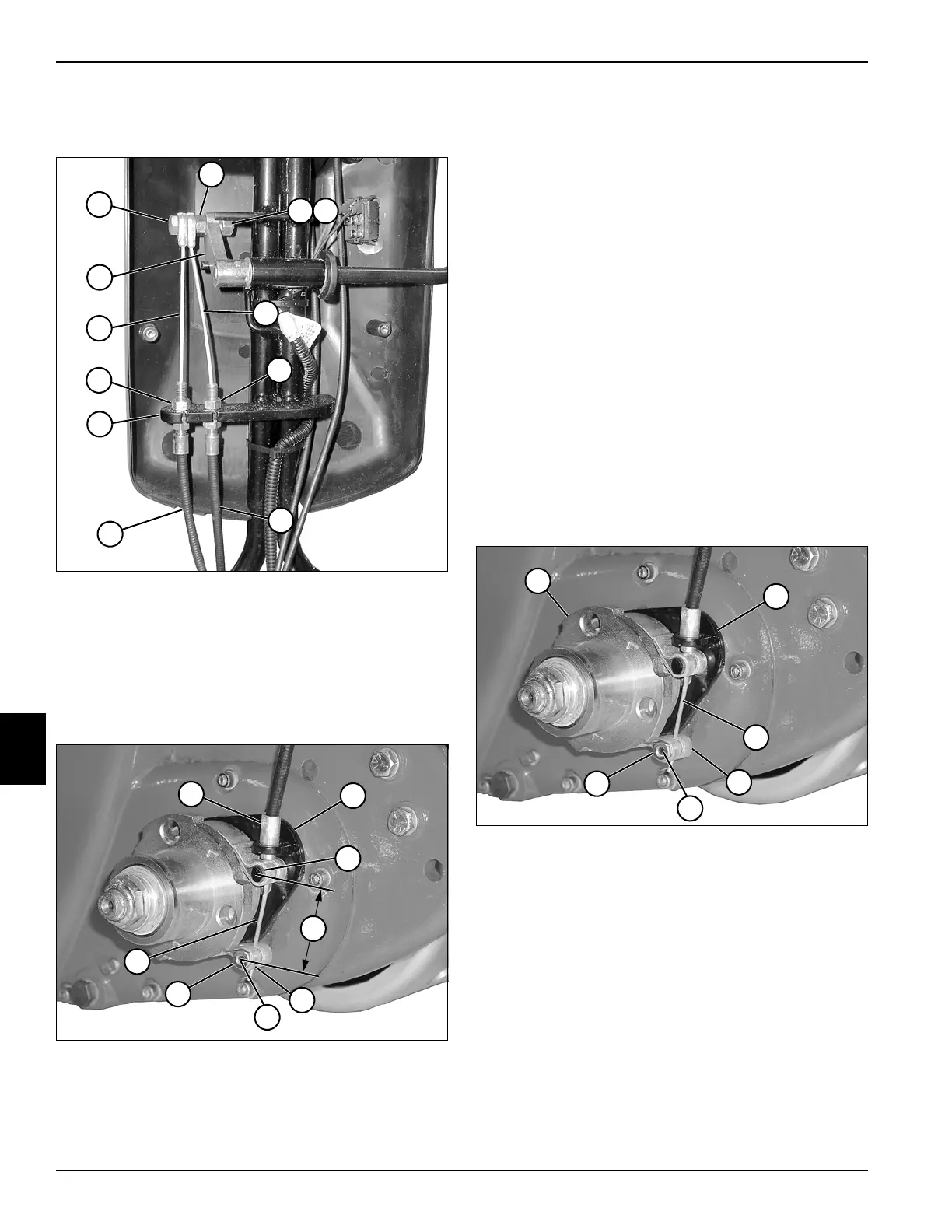
See Figures 7-8 and 7-9.
Figure 7-8
1. Slide brake cable sheath (7 or 8) into bracket (9) and
secure with jam nut (6 or 10).
2. Install screw (1) through cables (5 and 11) and install
nut (2).
3. Install screw (1) on brake lever arm (12) and secure
using lock washer (3) and nut (4).
Figure 7-9
4. Install the lower brake band pin (19) into the brake
band (17).
5. Route the end of the brake cable (20) through the
bracket (14), upper brake band pin (15), and the
lower brake band pin (19).
6. Position the brake band so the upper brake band pin
(15) rests against the end of the cable sheath (13).
7. Move the free end of the brake band until the
distance between the center of the park brake band
pins (16) is approximately 1.50 in. (38 mm). Tighten
set screw (18).
8. Check brake adjustment. (See “Park Brake Check
and Adjustment” on page 7-4.)
Park Brake Band
Removal
See Figure 7-10.
1. Park the mower safely. (See “Park Mower Safely” on
page 1-6.)
2. Remove transport wheels (if equipped). (See
“Transport Wheels (Optional)” on page 9-2.)
3. Release the park brake.
Figure 7-10
4. Loosen set screw (5) and remove the brake cable (3)
from the lower brake band pin (6) and bracket (2).
5. Remove the lower brake band pin (6).
6. Remove wheel hub (1). (See “Wheel Hubs and
Bearings” on page 9-3.)
7. Remove brake band (4) from bracket.
10
TN0013
6
1
3
12
4
2
11
5
7
8
9
16
TN0012
19
18
14
17
15
20
13
TN0012
6
5
2
4
3
1








 To Next Page