Chapter 3 Operation
3-50
Chamber Temperature
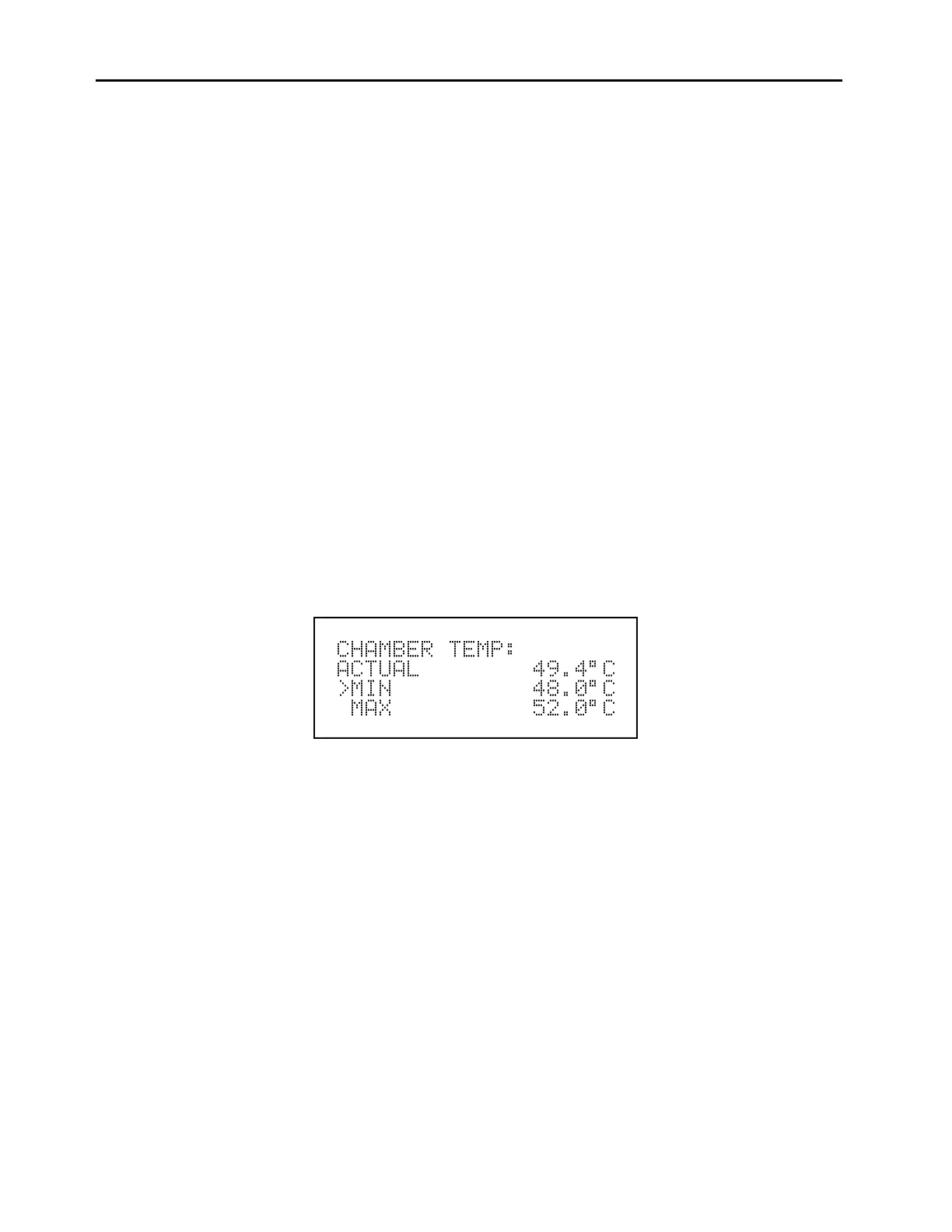
The Chamber Temperature screen, shown below, displays the current chamber
temperature and the factory-set min and max alarm limits. The min and max alarm limits
can be changed when the instrument is in the service mode. Acceptable alarm limits
range from 40 to 52
o
C. If the chamber temperature reading goes beyond either the min or
max alarm limit, an alarm is activated. The word “Alarm” appears in the Run screen and
in the Main Menu.
To display the Chamber Temperature screen:
From the Main Menu choose Alarm
From the Alarm menu choose Chamber Temperature
To use the Chamber Temperature screen:
Use the
↑
and
↓
pushbuttons to move up and down (service mode on)
Press
ENTER
to select a choice (service mode on)
Press
MENU
to return to the Alarm menu
Press
RUN
to return to the Run screen
Chamber Temperature Screen



 To Next Page