Operating Instructions
101
Selecting Sleep Mode
This feature must be enabled in Guarded Access to be
available. Sleep mode starts and stops the unit as required to
keep the unit battery in a charged condition and keep the unit
engine warm in cold ambient conditions. Sleep mode does not
maintain setpoint, it keeps the compartment temperature near
the ambient temperature when the unit is running. This is
useful in extremely cold weather or when the unit is to be out
of service for an extended time.
Sleep mode operates in both Diesel mode and Electric mode.
In Diesel mode the unit will start and stop as required to
maintain engine temperature and battery charge. In Electric
mode the unit starts and stops as necessary to maintain battery
charge only.
When Sleep mode is entered, the operator can program an
automatic Wake-up Time up to a week away. Using this
feature, the unit will automatically restart and run normally at
the determined time. If a Wake-up Time is programmed, the
operator can also program an automatic Pretrip Test when the
unit restarts.
Select Sleep Mode as follows:
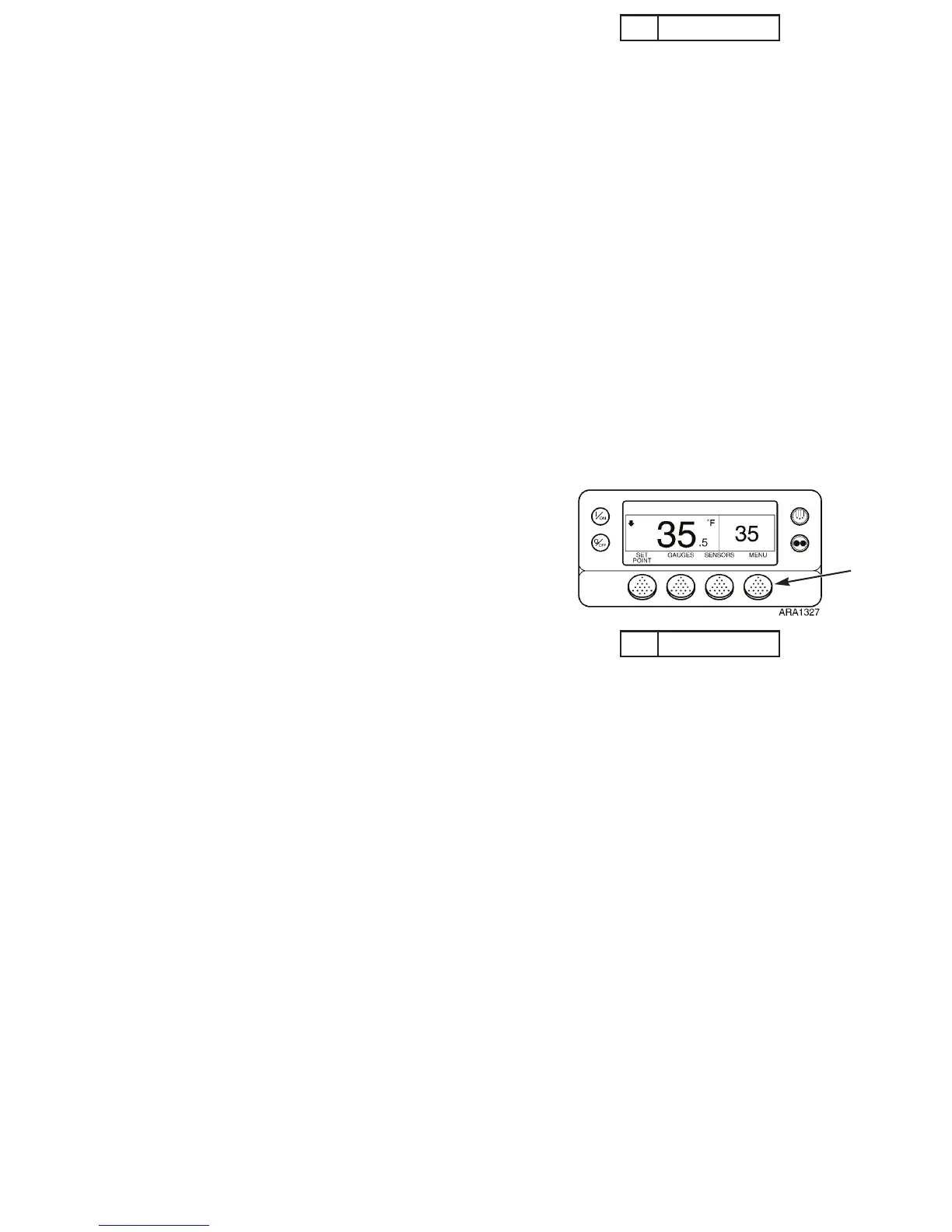
1. Begin at the Standard Display.
If the Temperature Watch Display is showing, press the
M
ENU soft key once to return to the Standard Display.
2. Press the M
ENU soft key on the Standard Display.
3. Press the N
EXT soft key until the Mode Menu appears. See
Figure 74.
4. Press S
ELECT soft key to enter the Mode Menu.
5. Press the N
EXT soft key as required to display the Sleep
Mode Screen.
6. Press the S
ELECT soft key to start the Sleep mode.
1. Menu Soft Key
Figure 73: Standard Display
1
Operating Instructions
101
Selecting Sleep Mode
This feature must be enabled in Guarded Access to be
available. Sleep mode starts and stops the unit as required to
keep the unit battery in a charged condition and keep the unit
engine warm in cold ambient conditions. Sleep mode does not
maintain setpoint, it keeps the compartment temperature near
the ambient temperature when the unit is running. This is
useful in extremely cold weather or when the unit is to be out
of service for an extended time.
Sleep mode operates in both Diesel mode and Electric mode.
In Diesel mode the unit will start and stop as required to
maintain engine temperature and battery charge. In Electric
mode the unit starts and stops as necessary to maintain battery
charge only.
When Sleep mode is entered, the operator can program an
automatic Wake-up Time up to a week away. Using this
feature, the unit will automatically restart and run normally at
the determined time. If a Wake-up Time is programmed, the
operator can also program an automatic Pretrip Test when the
unit restarts.
Select Sleep Mode as follows:
1. Begin at the Standard Display.
If the Temperature Watch Display is showing, press the
M
ENU soft key once to return to the Standard Display.
2. Press the M
ENU soft key on the Standard Display.
3. Press the N
EXT soft key until the Mode Menu appears. See
Figure 74.
4. Press S
ELECT soft key to enter the Mode Menu.
5. Press the N
EXT soft key as required to display the Sleep
Mode Screen.
6. Press the S
ELECT soft key to start the Sleep mode.
1. Menu Soft Key
Figure 73: Standard Display
1



 To Next Page