Operating Instructions
54
Standard Display
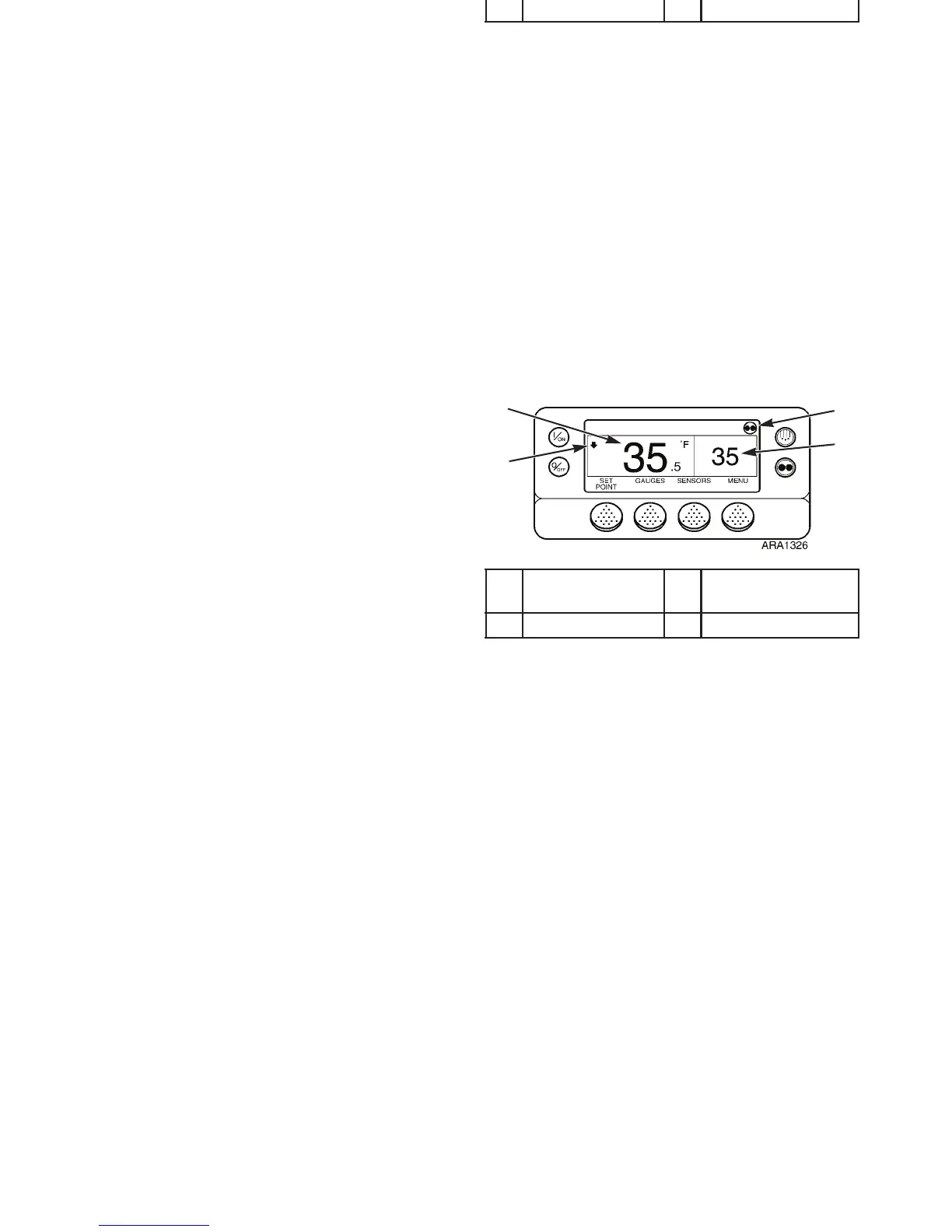
The Standard Display is the default display. It appears if no
other display function is selected. The Standard Display shows
the box temperature and setpoint. The box temperature is
measured by the controlling sensor. The return air sensor is the
controlling sensor except when the controller is programmed to
use the discharge air sensor as the controlling sensor during
modulation. The box temperature shown below in Figure 30 is
35.5 F. The setpoint shown is 35 F. The CYCLE-SENTRY
Icon in the upper right corner of the display shows the unit is
operating in the CYCLE-SENTRY mode. The arrow pointing
down indicates the unit is cooling.
NOTE: The CYCLE-SENTRY icon will appears when the
unit is operating in CYCLE-SENTRY mode as shown below.
If the CYCLE-SENTRY icon is not present the unit is
operating in Continuous mode.
1. Box Temperature 3. CYCLE-SENTRY
Icon
2. Cooling 4. Setpoint
Figure 30: Standard Display
1
4
3
2
Operating Instructions
54
Standard Display
The Standard Display is the default display. It appears if no
other display function is selected. The Standard Display shows
the box temperature and setpoint. The box temperature is
measured by the controlling sensor. The return air sensor is the
controlling sensor except when the controller is programmed to
use the discharge air sensor as the controlling sensor during
modulation. The box temperature shown below in Figure 30 is
35.5 F. The setpoint shown is 35 F. The CYCLE-SENTRY
Icon in the upper right corner of the display shows the unit is
operating in the CYCLE-SENTRY mode. The arrow pointing
down indicates the unit is cooling.
NOTE: The CYCLE-SENTRY icon will appears when the
unit is operating in CYCLE-SENTRY mode as shown below.
If the CYCLE-SENTRY icon is not present the unit is
operating in Continuous mode.
1. Box Temperature 3. CYCLE-SENTRY
Icon
2. Cooling 4. Setpoint
Figure 30: Standard Display
1
4
3
2



 To Next Page