Optional Rear Remote Control Panel
140
Viewing and Clearing Alarm
Codes
Alarm Codes can be displayed and cleared using the Select
Key.
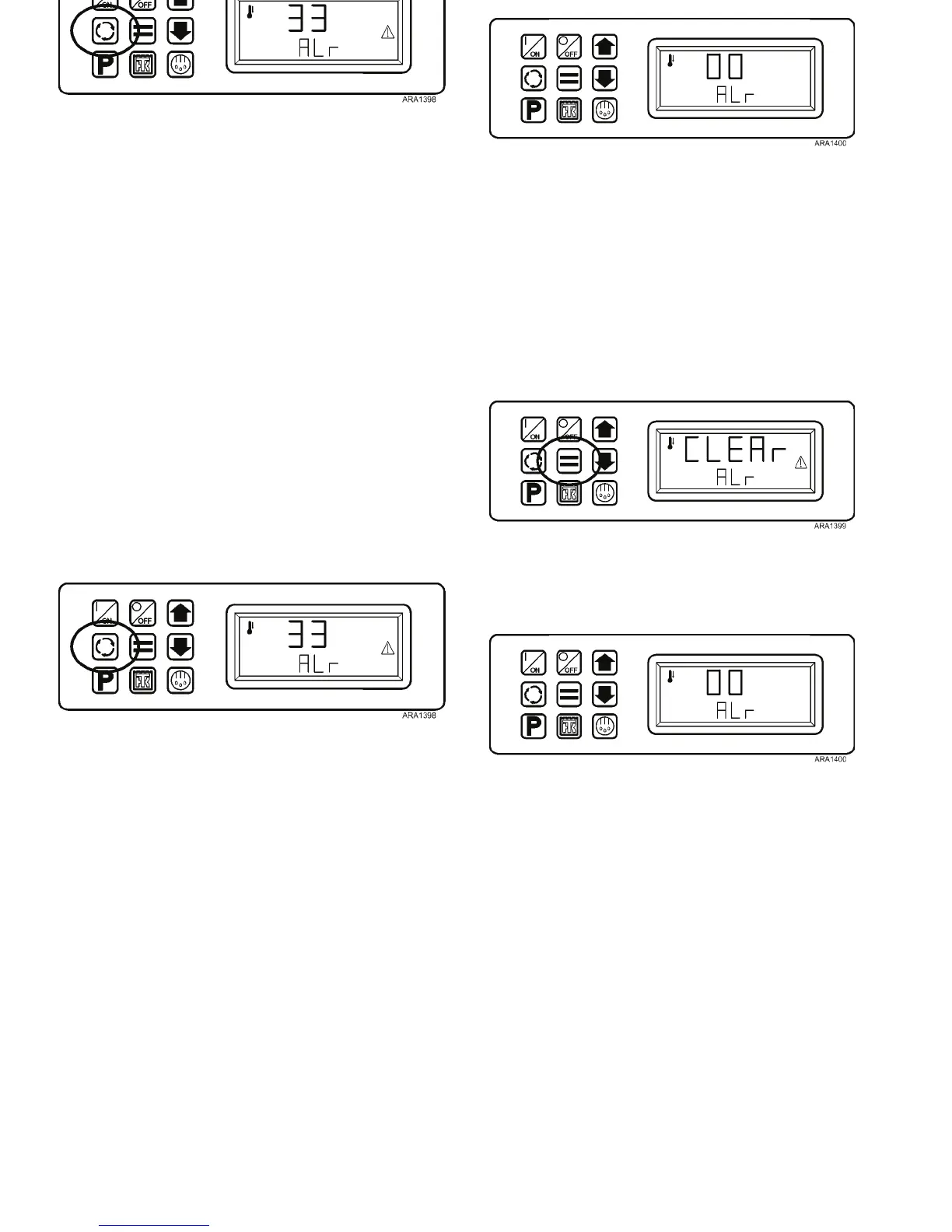
1. Press the Select Key three times. Any alarm codes present
will be shown in the display, with the most recent alarm
code shown first. If no alarm codes are present the display
will show [00].
Figure 109: Press Select Key Three Times
2. To clear a displayed alarm code, press the Enter Key. The
display will briefly show CLEAr ALm.
Figure 110: Press Enter Key
3. If any additional alarms are present, the next alarm will be
shown. If no other alarms are present the display will
briefly show [00].
Figure 111: No Alarms Display
4. The display will then return to the Remote Standard
Display.
Optional Rear Remote Control Panel
140
Viewing and Clearing Alarm
Codes
Alarm Codes can be displayed and cleared using the Select
Key.
1. Press the Select Key three times. Any alarm codes present
will be shown in the display, with the most recent alarm
code shown first. If no alarm codes are present the display
will show [00].
Figure 109: Press Select Key Three Times
2. To clear a displayed alarm code, press the Enter Key. The
display will briefly show CLEAr ALm.
Figure 110: Press Enter Key
3. If any additional alarms are present, the next alarm will be
shown. If no other alarms are present the display will
briefly show [00].
Figure 111: No Alarms Display
4. The display will then return to the Remote Standard
Display.



 To Next Page