Operating Instructions
109
Electric Standby/Diesel Mode
The Electric Standby/Diesel Mode display allows the operator
to manually select Electric Standby or Diesel Mode operation.
The unit can also be programmed to automatically select
Electric Standby operation when standby power is available
and Diesel Mode operation if standby power fails or is
removed. Contact your Thermo King dealer for information
about programming the controller.
NOTE: Manual selection is the default setting for both
Electric Standby and Diesel Mode.
A screen asking if you wish to switch to Electric Standby will
appear if the unit is connected to standby power when in the
Diesel Mode.
A screen asking if you wish to switch to Diesel Mode will
appear if standby power is disconnected when in Electric
Standby. Pressing the Y
ES soft key will switch unit operation to
the Diesel Mode. Pressing the N
O soft key will force the unit to
remain in Electric Standby even though standby power is not
available. The unit will not run and Alarm Code 91 Check
Electric Ready Input will be set as a prevent alarm.
Select Electric Standby or Diesel Mode as follows:
1. Begin at the Standard Display.
If the Temperature Watch Display is showing, press the
M
ENU soft key once to return to the Standard Display.
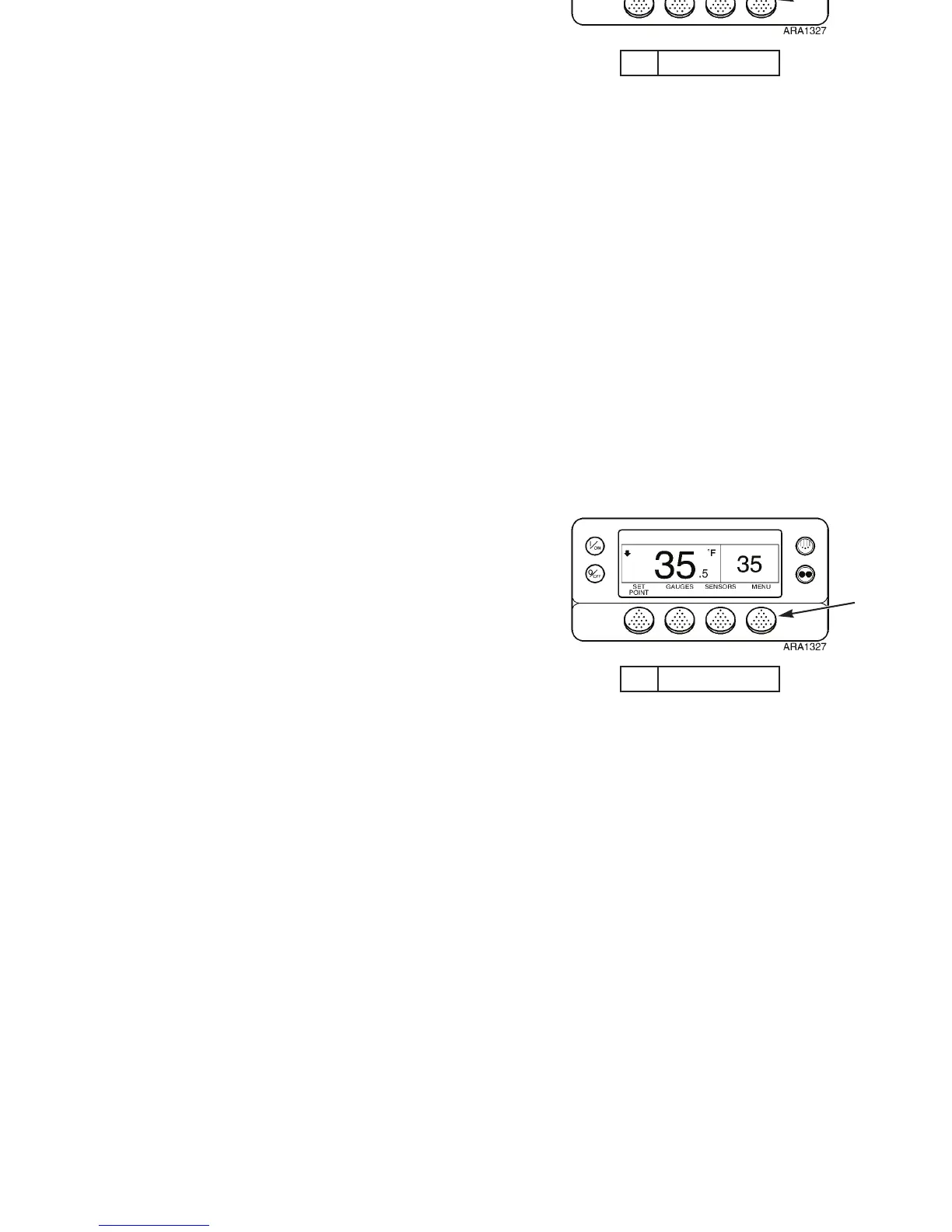
2. Press the M
ENU soft key on the Standard Display.
1. Menu Soft Key
Figure 78: Standard Display
1
Operating Instructions
109
Electric Standby/Diesel Mode
The Electric Standby/Diesel Mode display allows the operator
to manually select Electric Standby or Diesel Mode operation.
The unit can also be programmed to automatically select
Electric Standby operation when standby power is available
and Diesel Mode operation if standby power fails or is
removed. Contact your Thermo King dealer for information
about programming the controller.
NOTE: Manual selection is the default setting for both
Electric Standby and Diesel Mode.
A screen asking if you wish to switch to Electric Standby will
appear if the unit is connected to standby power when in the
Diesel Mode.
A screen asking if you wish to switch to Diesel Mode will
appear if standby power is disconnected when in Electric
Standby. Pressing the Y
ES soft key will switch unit operation to
the Diesel Mode. Pressing the N
O soft key will force the unit to
remain in Electric Standby even though standby power is not
available. The unit will not run and Alarm Code 91 Check
Electric Ready Input will be set as a prevent alarm.
Select Electric Standby or Diesel Mode as follows:
1. Begin at the Standard Display.
If the Temperature Watch Display is showing, press the
M
ENU soft key once to return to the Standard Display.
2. Press the M
ENU soft key on the Standard Display.
1. Menu Soft Key
Figure 78: Standard Display
1



 To Next Page