Optional Rear Remote Control Panel
133
Keypad
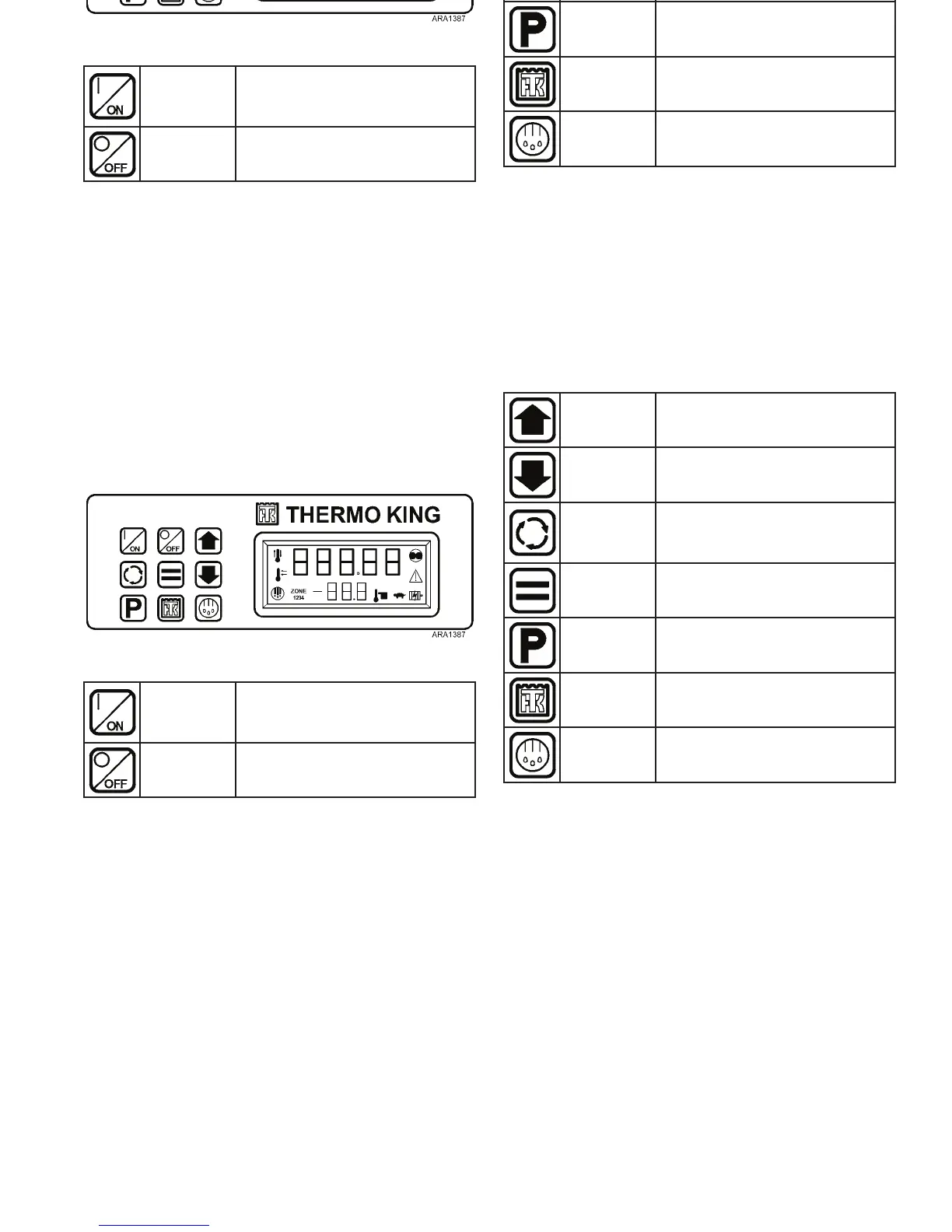
The nine touch sensitive keys are used to turn the unit on and
off. They also allow the setpoint to be changed and control
other functions.
Figure 97: Rear Remote Control Panel
ON Key
Turns the unit on as determined
by the setting of Rear Remote
Control Action.
OFF Key Turns the unit off.
Up Arrow
Key
Increases setpoint or changes
other setting.
Down
Arrow Key
Decreases setpoint or changes
other setting.
Select Key
Allows Cycle-Sentry to be turned
on and off, displays the discharge
air temperature and alarms.
Enter Key
Executes a prompt or loads a
new setpoint or other setting.
Pretrip Key Initiates a Pretrip Test.
TK Logo
Key
Sends a Start of Trip marker to
the data logger.
Defrost Key
Initiates a defrost cycle if
conditions allow.
Optional Rear Remote Control Panel
133
Keypad
The nine touch sensitive keys are used to turn the unit on and
off. They also allow the setpoint to be changed and control
other functions.
Figure 97: Rear Remote Control Panel
ON Key
Turns the unit on as determined
by the setting of Rear Remote
Control Action.
OFF Key Turns the unit off.
Up Arrow
Key
Increases setpoint or changes
other setting.
Down
Arrow Key
Decreases setpoint or changes
other setting.
Select Key
Allows Cycle-Sentry to be turned
on and off, displays the discharge
air temperature and alarms.
Enter Key
Executes a prompt or loads a
new setpoint or other setting.
Pretrip Key Initiates a Pretrip Test.
TK Logo
Key
Sends a Start of Trip marker to
the data logger.
Defrost Key
Initiates a defrost cycle if
conditions allow.



 To Next Page