Operating Instructions
73
Viewing Gauge Readings
Use the following steps to view the gauge readings:
1. Begin at the Standard Display.
If the Temperature Watch Display is showing, press the
M
ENU soft key once to return to the Standard Display.
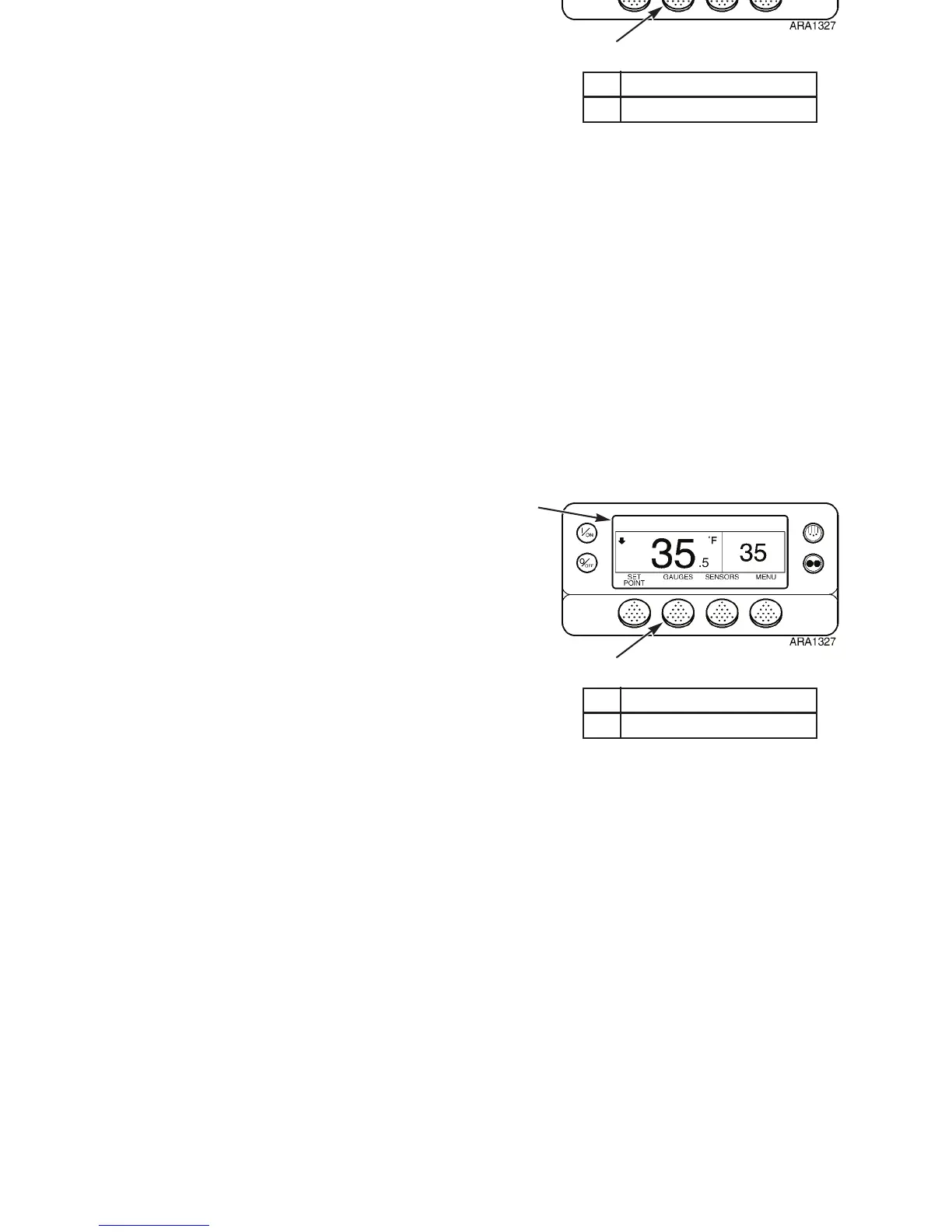
2. Press the G
AUGES soft key to enter the Gauges Menu. See
Figure 48.
3. Press B
ACK or NEXT soft keys to scroll through following
gauges: Coolant Temperature, Coolant Level, Oil
Pressure, Oil Level, Amps, Battery Voltage, Engine RPM,
Fuel Level Sensor, Discharge Pressure, Suction Pressure,
ETV Position, and I/O. Selecting I/O enters a group of
screens that are used only by technicians. See Figure 49. If
no keys are pressed within 30 seconds, the screen will
return to the standard display.
NOTE: Units without an Electronic Throttling Valve
(ETV) will not display the Discharge Pressure, Suction
Pressure, and ETV Position. See “Electronic Throttling
Valve” on page 28 for more information about the ETV
and how to tell if the unit has an ETV.
4. Press the L
OCK soft key to display any Gauge Screen for
an indefinite period. Press the key again to unlock the
screen.
5. Press the E
XIT soft key to return to the Standard Display.
1. Standard Display Screen
2. Gauges Soft Key
Figure 48: Viewing Gauges
1
2
Operating Instructions
73
Viewing Gauge Readings
Use the following steps to view the gauge readings:
1. Begin at the Standard Display.
If the Temperature Watch Display is showing, press the
M
ENU soft key once to return to the Standard Display.
2. Press the G
AUGES soft key to enter the Gauges Menu. See
Figure 48.
3. Press B
ACK or NEXT soft keys to scroll through following
gauges: Coolant Temperature, Coolant Level, Oil
Pressure, Oil Level, Amps, Battery Voltage, Engine RPM,
Fuel Level Sensor, Discharge Pressure, Suction Pressure,
ETV Position, and I/O. Selecting I/O enters a group of
screens that are used only by technicians. See Figure 49. If
no keys are pressed within 30 seconds, the screen will
return to the standard display.
NOTE: Units without an Electronic Throttling Valve
(ETV) will not display the Discharge Pressure, Suction
Pressure, and ETV Position. See “Electronic Throttling
Valve” on page 28 for more information about the ETV
and how to tell if the unit has an ETV.
4. Press the L
OCK soft key to display any Gauge Screen for
an indefinite period. Press the key again to unlock the
screen.
5. Press the E
XIT soft key to return to the Standard Display.
1. Standard Display Screen
2. Gauges Soft Key
Figure 48: Viewing Gauges
1
2



 To Next Page