Operating Instructions
55
Standard Display Variations
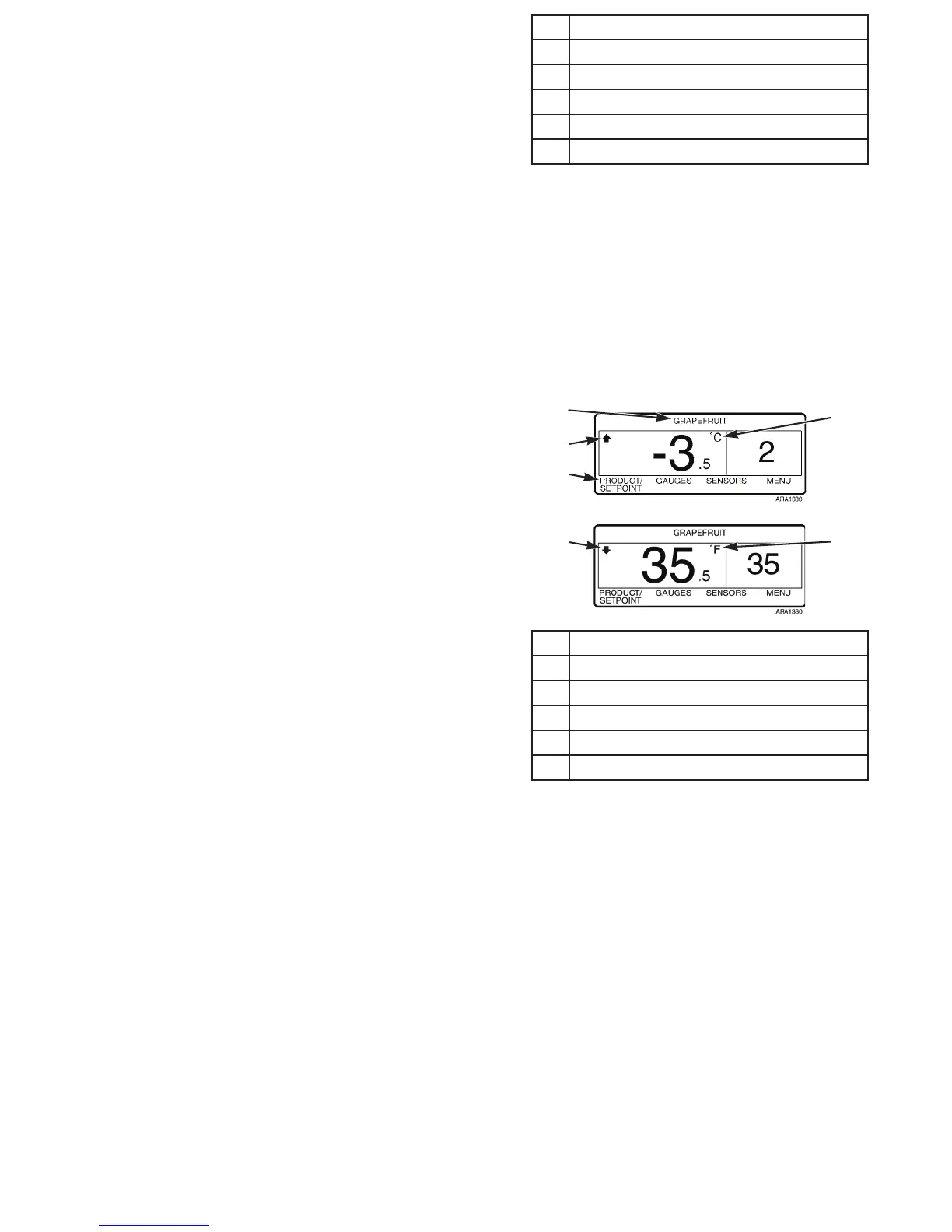
The Standard Display has variations. A display showing any of
the following variations is still considered a Standard Display
(see Figure 31).
The top of the display may show a named product if the
controller has been programmed with OptiSet Plus temperature
profiles. The far left soft key may display P
RODUCT or
P
RODUCT/SETPOINT if the controller has been programmed
with OptiSet Plus temperature profiles. See “OptiSet Plus” on
page 115 for information about selecting or changing the
named product or the setpoint if the controller has been
programmed with OptiSet Plus temperature profiles. Contact
your Thermo King dealer for information about programming
the controller with OptiSet Plus temperature profiles.
The temperature can be displayed in degrees Fahrenheit (F) or
degrees Celsius (C). An arrow pointing upwards indicates the
unit is heating. An arrow pointing downwards indicates the
unit is cooling.
1. Named Product
2. Heating
3. P
RODUCT or PRODUCT/SETPOINT Soft Key
4. Degrees Celsius
5. Cooling
6. Degrees Fahrenheit
Figure 31: Standard Display Variations
4
2
1
6
5
3
Operating Instructions
55
Standard Display Variations
The Standard Display has variations. A display showing any of
the following variations is still considered a Standard Display
(see Figure 31).
The top of the display may show a named product if the
controller has been programmed with OptiSet Plus temperature
profiles. The far left soft key may display P
RODUCT or
P
RODUCT/SETPOINT if the controller has been programmed
with OptiSet Plus temperature profiles. See “OptiSet Plus” on
page 115 for information about selecting or changing the
named product or the setpoint if the controller has been
programmed with OptiSet Plus temperature profiles. Contact
your Thermo King dealer for information about programming
the controller with OptiSet Plus temperature profiles.
The temperature can be displayed in degrees Fahrenheit (F) or
degrees Celsius (C). An arrow pointing upwards indicates the
unit is heating. An arrow pointing downwards indicates the
unit is cooling.
1. Named Product
2. Heating
3. P
RODUCT or PRODUCT/SETPOINT Soft Key
4. Degrees Celsius
5. Cooling
6. Degrees Fahrenheit
Figure 31: Standard Display Variations
4
2
1
6
5
3



 To Next Page