Optional Rear Remote Control Panel
141
Starting a Manual Defrost Cycle
If conditions allow, a manual defrost cycle can be initiated
using the Defrost Key.
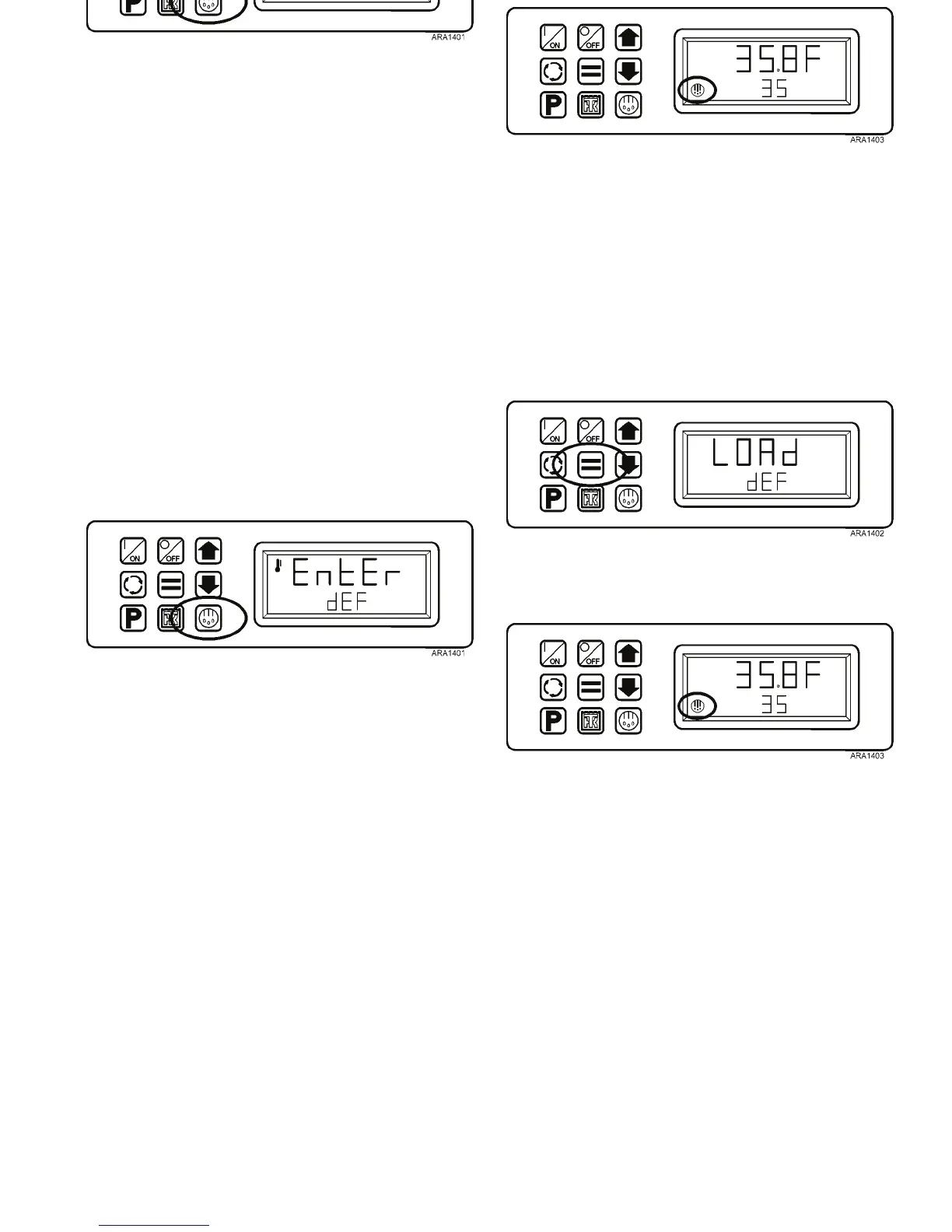
1. Press the Defrost Key. The defrost prompt [EnTEr dEF]
will appear in the display.
Figure 112: Press Defrost Key
2. When the defrost prompt is shown, press the Enter Key to
start a manual defrost. The display will briefly show
LOAd dEF and then a defrost cycle will begin if
conditions allow.
Figure 113: Press Enter Key
3. The display will return to the Remote Standard Display.
The Defrost Icon will be shown in the display.
Figure 114: Defrost Icon Displayed
4. The defrost cycle will terminate automatically.
Optional Rear Remote Control Panel
141
Starting a Manual Defrost Cycle
If conditions allow, a manual defrost cycle can be initiated
using the Defrost Key.
1. Press the Defrost Key. The defrost prompt [EnTEr dEF]
will appear in the display.
Figure 112: Press Defrost Key
2. When the defrost prompt is shown, press the Enter Key to
start a manual defrost. The display will briefly show
LOAd dEF and then a defrost cycle will begin if
conditions allow.
Figure 113: Press Enter Key
3. The display will return to the Remote Standard Display.
The Defrost Icon will be shown in the display.
Figure 114: Defrost Icon Displayed
4. The defrost cycle will terminate automatically.



 To Next Page