Operating Instructions
82
Language Menu
If the Language feature is activated in the controller
programming, an alternate language can be selected from the
Language Menu. After a new language is chosen all displays
will appear in that language. If the language feature is not
enabled this menu does not appear.
The languages available are dependant on the HMI control
panel software revision. Languages currently supported by
software revision 65xx are English, Spanish, French, German,
Italian, Dutch, Portuguese, Greek, Turkish, Arabic and
Hebrew. Languages currently supported by software revision
66xx are English, Russian, Polish, Hungarian, Romanian,
Bulgarian, Czech, Danish, Swedish, Norwegian and Finnish.
Other than languages supported, software revisions 65xx and
66xx are identical.
The default language is English. Only languages that have
been activated in the controller programming will appear on
this menu. Contact your Thermo King dealer for information
about programming the controller.
To select an alternate language:
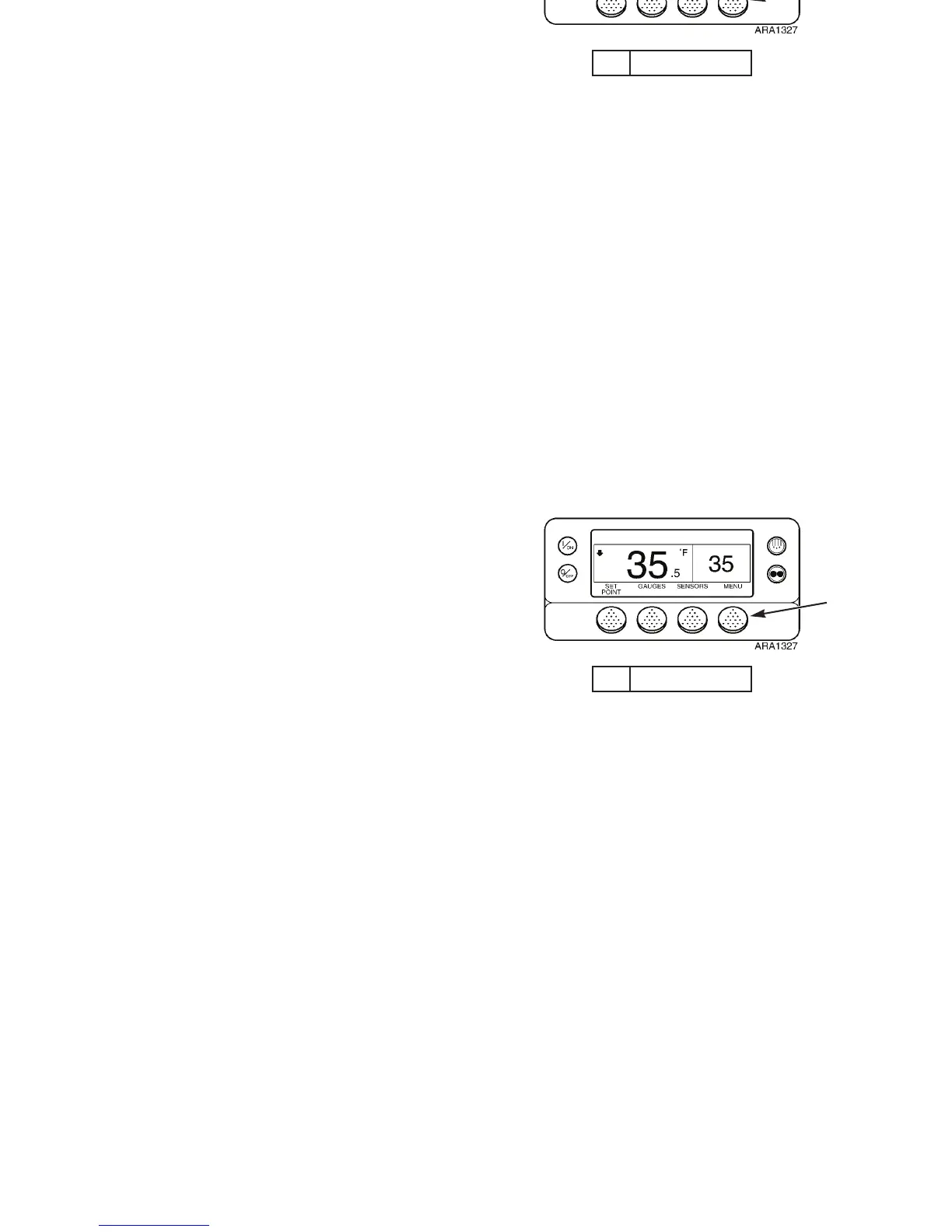
1. Begin at the Standard Display.
If the Temperature Watch Display is showing, press the
M
ENU soft key once to return to the Standard Display.
2. Press the M
ENU soft key on the Standard Display.
3. If enabled, the Language Menu Screen appears. Press the
S
ELECT soft key to choose the Language Menu Screen.
See Figure 57.
1. Menu Soft Key
Figure 55: Standard Display
1
Operating Instructions
82
Language Menu
If the Language feature is activated in the controller
programming, an alternate language can be selected from the
Language Menu. After a new language is chosen all displays
will appear in that language. If the language feature is not
enabled this menu does not appear.
The languages available are dependant on the HMI control
panel software revision. Languages currently supported by
software revision 65xx are English, Spanish, French, German,
Italian, Dutch, Portuguese, Greek, Turkish, Arabic and
Hebrew. Languages currently supported by software revision
66xx are English, Russian, Polish, Hungarian, Romanian,
Bulgarian, Czech, Danish, Swedish, Norwegian and Finnish.
Other than languages supported, software revisions 65xx and
66xx are identical.
The default language is English. Only languages that have
been activated in the controller programming will appear on
this menu. Contact your Thermo King dealer for information
about programming the controller.
To select an alternate language:
1. Begin at the Standard Display.
If the Temperature Watch Display is showing, press the
M
ENU soft key once to return to the Standard Display.
2. Press the M
ENU soft key on the Standard Display.
3. If enabled, the Language Menu Screen appears. Press the
S
ELECT soft key to choose the Language Menu Screen.
See Figure 57.
1. Menu Soft Key
Figure 55: Standard Display
1



 To Next Page