Operating Instructions
75
Viewing Sensor Readings
Use the following steps to view the sensor readings.
1. Begin at the Standard Display.
If the Temperature Watch Display is showing, press the
M
ENU soft key once to return to the Standard Display.
2. Press the S
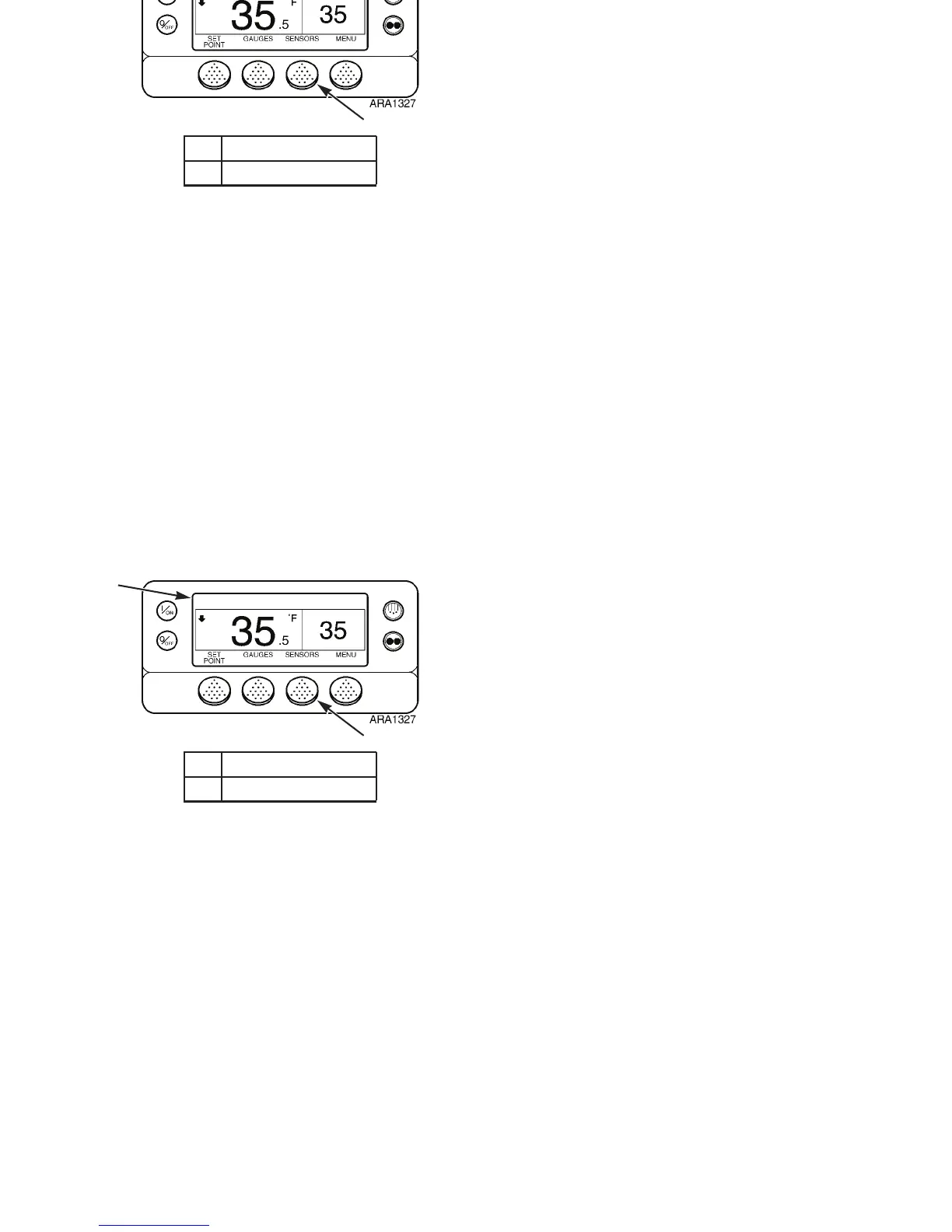
ENSOR soft key to enter the Sensor Menu. See
Figure 50.
3. Press the B
ACK or NEXT soft keys to scroll through the
following sensor screens:
• Control Return Air Temperature
• Display Return Air Temperature
• Control Discharge Air Temperature
• Display Discharge Air Temperature
• Temperature Differential – The Temperature
Differential is the difference between the Control
Return Air Temperature and the Control Discharge
Air Temperature.
• Evaporator Coil Temperature
• Ambient Air Temperature
• Spare 1 Temperature
• Optional Datalogger Sensor 1-6 Temperatures – The
Datalogger Sensor Temperature screens display
dashes (– – –) unless optional sensors are installed.
1. Standard Display
2. Sensors Soft Key
Figure 50: Viewing Sensors
1
2
Operating Instructions
75
Viewing Sensor Readings
Use the following steps to view the sensor readings.
1. Begin at the Standard Display.
If the Temperature Watch Display is showing, press the
M
ENU soft key once to return to the Standard Display.
2. Press the S
ENSOR soft key to enter the Sensor Menu. See
Figure 50.
3. Press the B
ACK or NEXT soft keys to scroll through the
following sensor screens:
• Control Return Air Temperature
• Display Return Air Temperature
• Control Discharge Air Temperature
• Display Discharge Air Temperature
• Temperature Differential – The Temperature
Differential is the difference between the Control
Return Air Temperature and the Control Discharge
Air Temperature.
• Evaporator Coil Temperature
• Ambient Air Temperature
• Spare 1 Temperature
• Optional Datalogger Sensor 1-6 Temperatures – The
Datalogger Sensor Temperature screens display
dashes (– – –) unless optional sensors are installed.
1. Standard Display
2. Sensors Soft Key
Figure 50: Viewing Sensors
1
2



 To Next Page