Operating Instructions
97
Turning CYCLE-SENTRY On or Off
The easiest way to switch between CYCLE-SENTRY and
Continuous Run is to press the Mode key (see page 69). But,
you can also switch modes in the Mode Menu as follows:
1. Begin at the Standard Display.
If the Temperature Watch Display is showing, press the
M
ENU soft key once to return to the Standard Display.
2. Press the M
ENU soft key on the Standard Display.
3. Press the N
EXT soft key until the Mode Menu appears.
4. Press S
ELECT soft key to enter the Mode Menu. See Figure
69.
5. Press the S
ELECT soft key, to switch between modes.
6. The new mode is then confirmed for 10 seconds.
7. The display then returns to the Mode Menu. Press the
S
ELECT soft key again to change the mode again.
CAUTION: If the unit is in CYCLE-SENTRY null
and the mode is switched to Continuous mode, the
unit will start automatically.
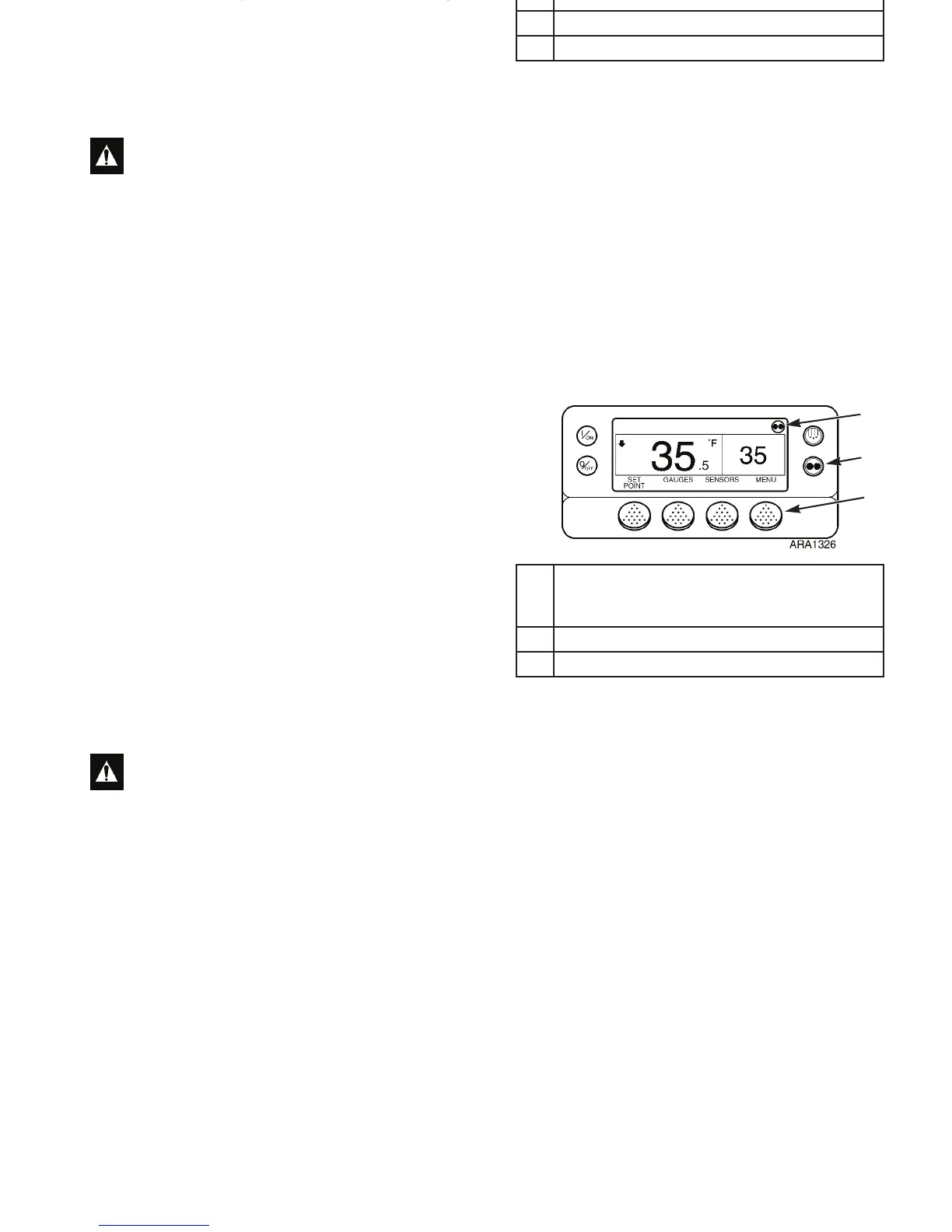
1. CYCLE-SENTRY Icon Shows Current Mode
Displayed for CYCLE-SENTRY Mode
Not Displayed for Continuous Mode
2. Mode Key
3. Menu Soft Key
Figure 68: Standard Display
1
2
3
Operating Instructions
97
Turning CYCLE-SENTRY On or Off
The easiest way to switch between CYCLE-SENTRY and
Continuous Run is to press the Mode key (see page 69). But,
you can also switch modes in the Mode Menu as follows:
1. Begin at the Standard Display.
If the Temperature Watch Display is showing, press the
M
ENU soft key once to return to the Standard Display.
2. Press the M
ENU soft key on the Standard Display.
3. Press the N
EXT soft key until the Mode Menu appears.
4. Press S
ELECT soft key to enter the Mode Menu. See Figure
69.
5. Press the S
ELECT soft key, to switch between modes.
6. The new mode is then confirmed for 10 seconds.
7. The display then returns to the Mode Menu. Press the
S
ELECT soft key again to change the mode again.
CAUTION: If the unit is in CYCLE-SENTRY null
and the mode is switched to Continuous mode, the
unit will start automatically.
1. CYCLE-SENTRY Icon Shows Current Mode
Displayed for CYCLE-SENTRY Mode
Not Displayed for Continuous Mode
2. Mode Key
3. Menu Soft Key
Figure 68: Standard Display
1
2
3



 To Next Page