Operating Instructions
110
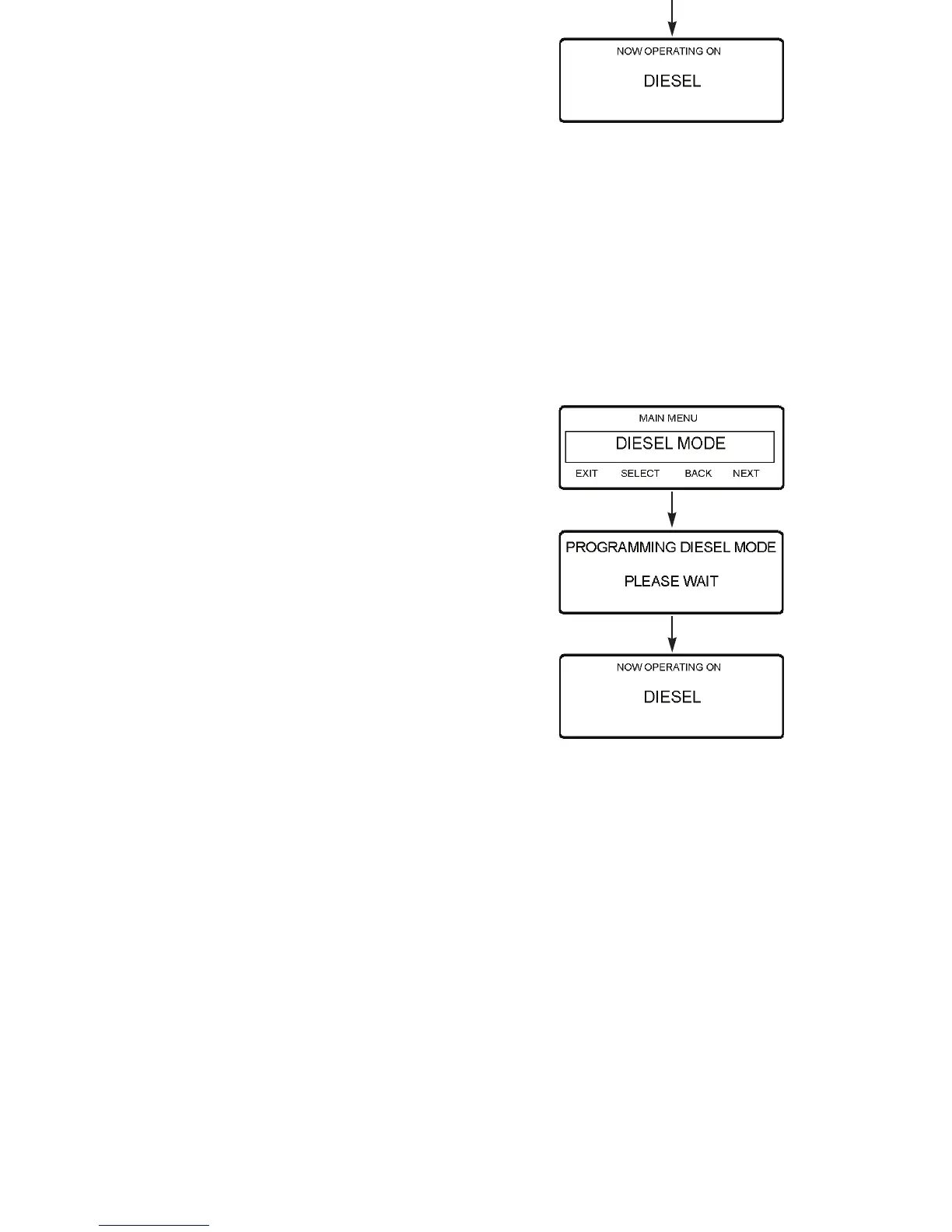
3. Press the NEXT soft key until the Electric Standby/Diesel
Mode Screen appears. See Figure 79 and Figure 80.
NOTE: The Electric Standby Screen will not appear if
diesel to electric switchover is enabled. The Diesel Mode
Screen will not appear if electric to diesel switchover is
enabled.
4. Press the S
ELECT soft key to select the mode shown on the
display.
Figure 79: Programming Diesel Mode
S
ELECT
Key
Operating Instructions
110
3. Press the NEXT soft key until the Electric Standby/Diesel
Mode Screen appears. See Figure 79 and Figure 80.
NOTE: The Electric Standby Screen will not appear if
diesel to electric switchover is enabled. The Diesel Mode
Screen will not appear if electric to diesel switchover is
enabled.
4. Press the S
ELECT soft key to select the mode shown on the
display.
Figure 79: Programming Diesel Mode
S
ELECT
Key



 To Next Page