11.11. Entering / modifying the product name
A product name can be entered or modified with the machine at a
standstill only.
Task: The product name of "piece of roast" is to be entered in a free
program storage location.
Selecting the program storage location:
(cf. chapter 11.4:Program softkeys)
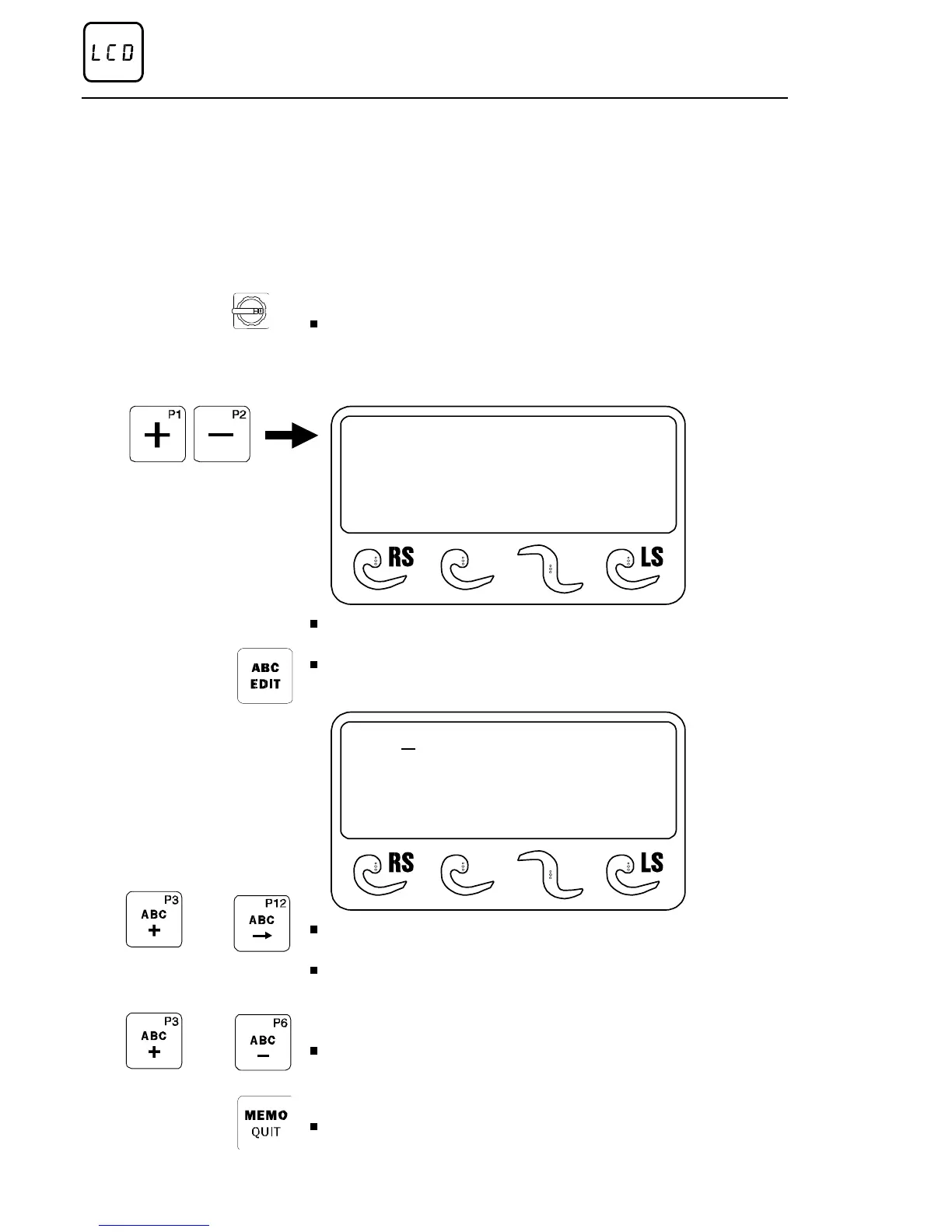
Set the main switch to »ON«.
After display of the program version, the control system automatically
performs a ’reference run’, in order to determine required length parame-
ters. Cutting program "P1" appears a few seconds later.
P12
CUTTING THICKNESS
12,0 mm (0,5-250)
*
Press program selector key "+" as often as required until a free program
storage space is attained.
Press the "ABC edit" key:
The input cursor will start flashing in the uppermost line of the display.
P12 B
CUTTING THICKNESS
12,0 MM (1-250)
- ABC - EDIT -
Press "ABC +" key as long as necessary until the first letter of the word
"BRATENSTUECKE", thus a "B" is attained.
Use the scroll key "arrow to the right" (P9) to move the input cursor to the
next input field.
NOTE With the "ABC edit" mode active, the two program softkeys P8
and P9 are used as cursor keys for the input of the product name !
Press key "ABC +" or "ABC " as long as necessary until the next letter of
the word is attained.
When the product name has been entered completely:
Press the "Memo" key, and the product name will be saved.
Method of operation of the control
Page 40 02/2005 123842-GB


 To Next Page