11. Method of operation of the control
The control of PUMA-CE “electronic” provides a multitude of functions
and adjustment possibilities.
We recommend that you carefully read the next two chapters in order to
be able to take advantage of all possibilities of the machine.
Tip:
It is recommended to note the storage locations with the different products.
This is a great help in finding the modes later !
At the end of these operating instructions, you will find corresponding
tables for your entries.
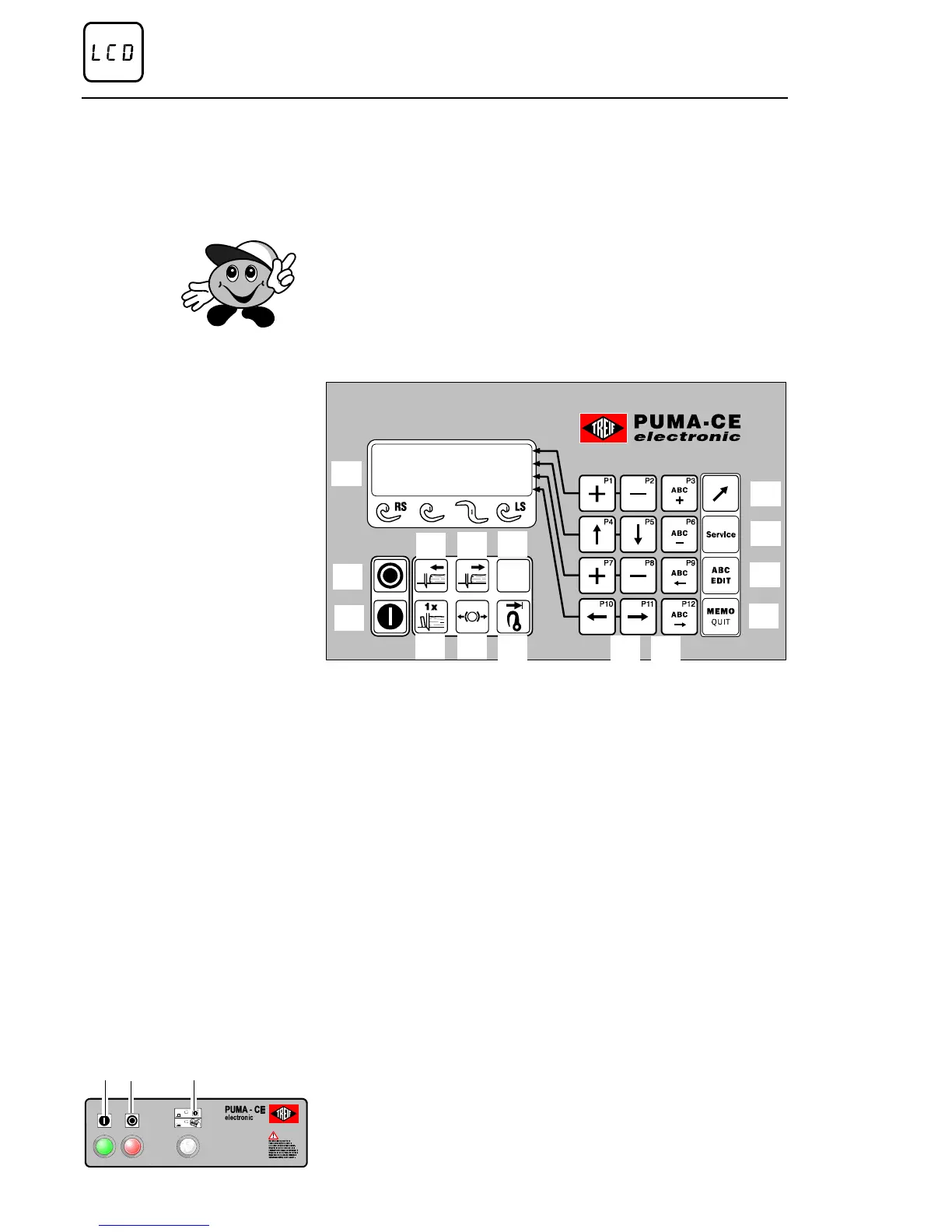
11.1. Control panel - Overview
1 LCD display
2 STOP - push-button
3 START - push-button
4 product holder forwards
5 product holder return
6 Reserve
7 SINGLE-CUT button
8 Release the brak
(only in case of a failure or, if a new knife
needs to be mounted)
9 Return travel limitation for the product feed holder
10 Program softkeys P1 to P12
11 EDIT keys
12 SHIFT key (edit / fast programme selection)
13 SERVICE key
14 ABC EDIT key
15 MEMO / QUIT button
11.2. Additional operator console
1 START - push-button
2 STOP - push-button
3 Function ’LID START’ ON / OFF
13
14
15
12
2
1
3
7
9
8
11
10
4
5
6
1 2 3
Method of operation of the control
Page 32 02/2005 123842-GB


 To Next Page