•
•
9. Refer to Trellix Intrusion Prevention System Installation Guide for detailed procedure to install the Manager application.
:
Add the Sensor to the Manager
Steps:
1. Log on to the Manager using the default user name (admin) and password (admin123).
2. Go to Devices → <Admin Domain Name> → Global → Device Manager.
The Device Manager page is displayed.
3. Select the Sensors tab and then click .
You do not require a license le to enable IPS on NS-series Sensors.
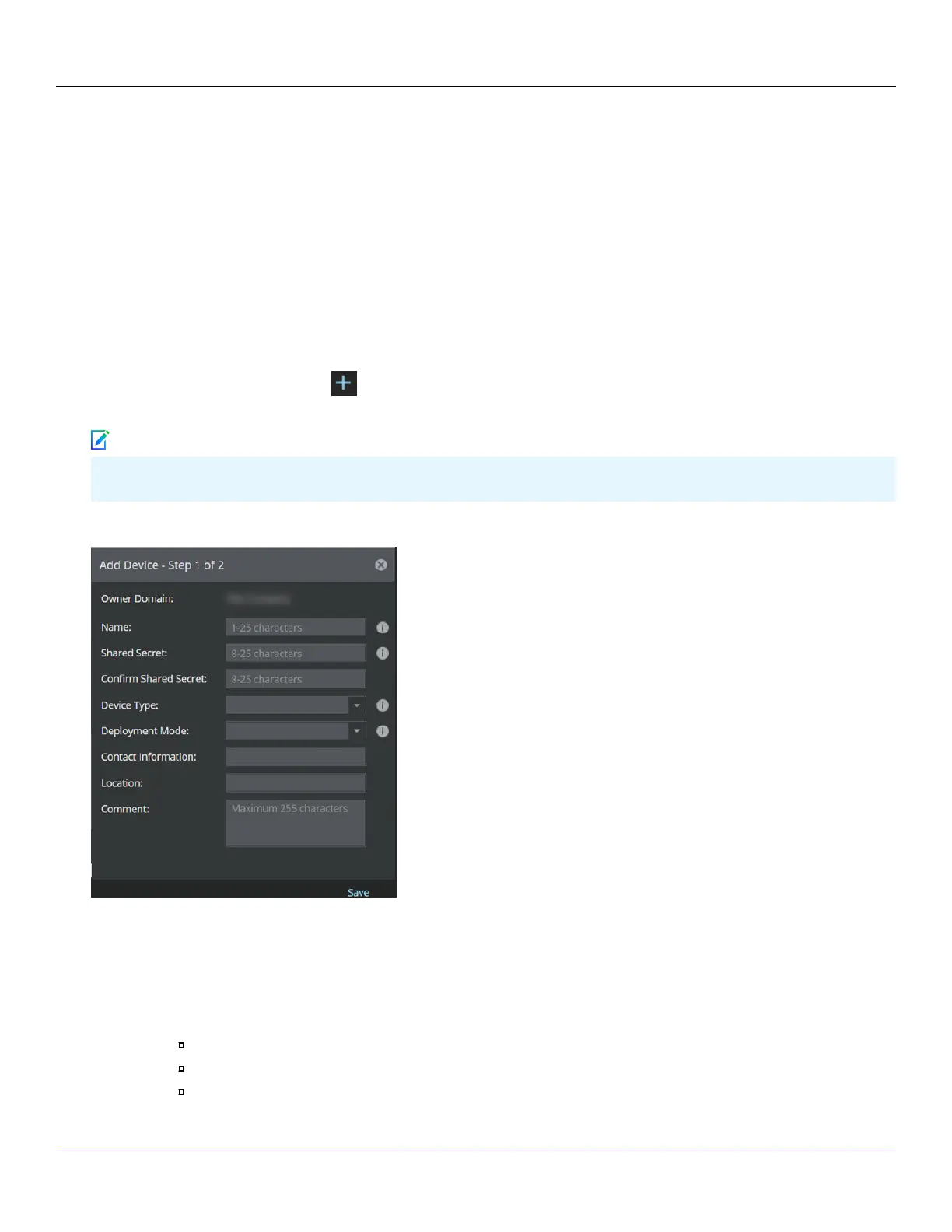
The Add Devices - Step 1 of 2 panel is displayed.
4. Enter the following mandatory information in the appropriate elds:
Name — The Sensor name must begin with a letter. The maximum length of the name is 25 characters.
Shared Secret — The shared secret must be a minimum of 8 characters and maximum of 25 characters in length.
The key cannot start with an exclamation mark nor can have any spaces. The parameters that you can use to dene
the key are listed below:
26 alphabets: Uppercase and lowercase (A, B, C,...Z and a,b,c,...z)
10 digits: 0 1 2 3 4 5 6 7 8 9
32 symbols: ~ ` ! @ # $ % ^ & * ( ) _ + ‑ = [ ] { } \ | ; : " ' , . <? /
| NS5x00 Sensors6
Trellix Intrusion Prevention System NS-series Sensor Product Guide
255
Note



 To Next Page