Place the Sensor in a physically secure location, close to the switches or routers it will be monitoring. Ideally, the Sensor should
be located within a standard communications rack. To mount the Sensor on a rack, you will attach two mounting rails to the
Sensor as described in the subsequent sections of this guide.
:
Install the slide rails and rack mount the Sensor
Follow this procedure to assemble the slide rails and position the Sensor on it.
Due to the weight of the appliance, Trellix recommends that two people place the chassis into the rail cabinet.
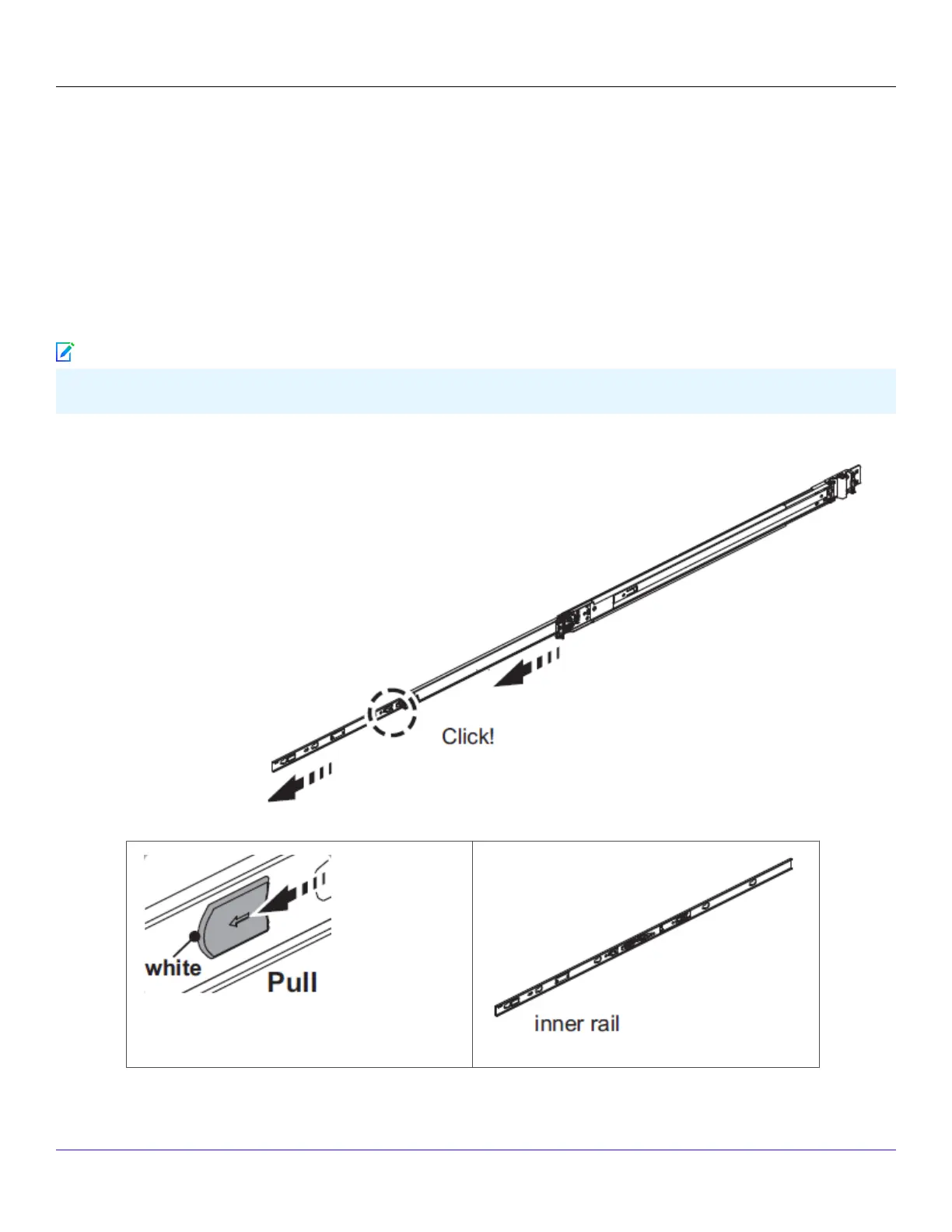
1. Disassemble the inner slide rails from the rail assemblies.
a. Pull the inner rail out.
b. Click and pull the white tab (lock on inner rail) forward to disconnect inner rail from the middle rail.
Trellix Intrusion Prevention System NS-series Sensor Product Guide
| NS9500 Sensors1
24
Note



 To Next Page