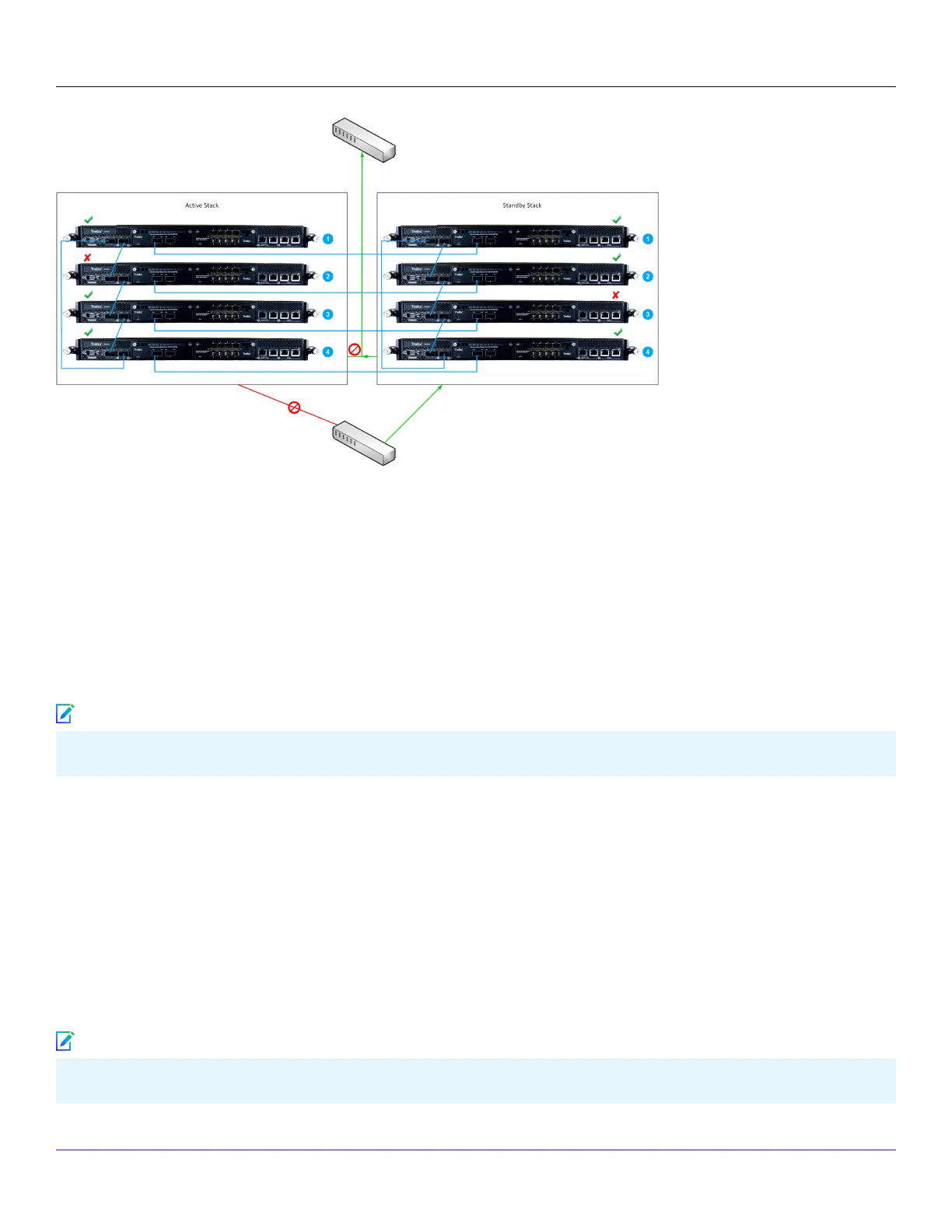
In this scenario, the workow is as follows:
1. Node 2 in the active becomes unresponsive.
2. During the heartbeat exchange between the stacks, the capacity of the of the active stack is lower that the standby stack.
3. The monitoring ports on the active stack is deactivated.
4. The standby stack starts processing the trac.
5. Node 3 in the standby stack becomes unresponsive.
6. During the heartbeat exchange between the stacks, the capacity of the of the active stack is equal to the standby stack.
7. The standby stack continues to process the trac.
Switch over occurs only when the current capacity of standby stack is lower than the active stack.
:
Congure the Sensor and Manager for deployment
:
Install the Manager Software
Following steps briey explain the Manager installation:
You must have administrator privileges on the target Windows or Linux server to install the Manager software.
| NS9500 Sensors1
Trellix Intrusion Prevention System NS-series Sensor Product Guide
73
Note
Note



 To Next Page