Smart Plus (PHT-35LHS)
Technical Manual
VT-TECH-Smart Plus-001
COPYRIGHT© 2018 VATECH.
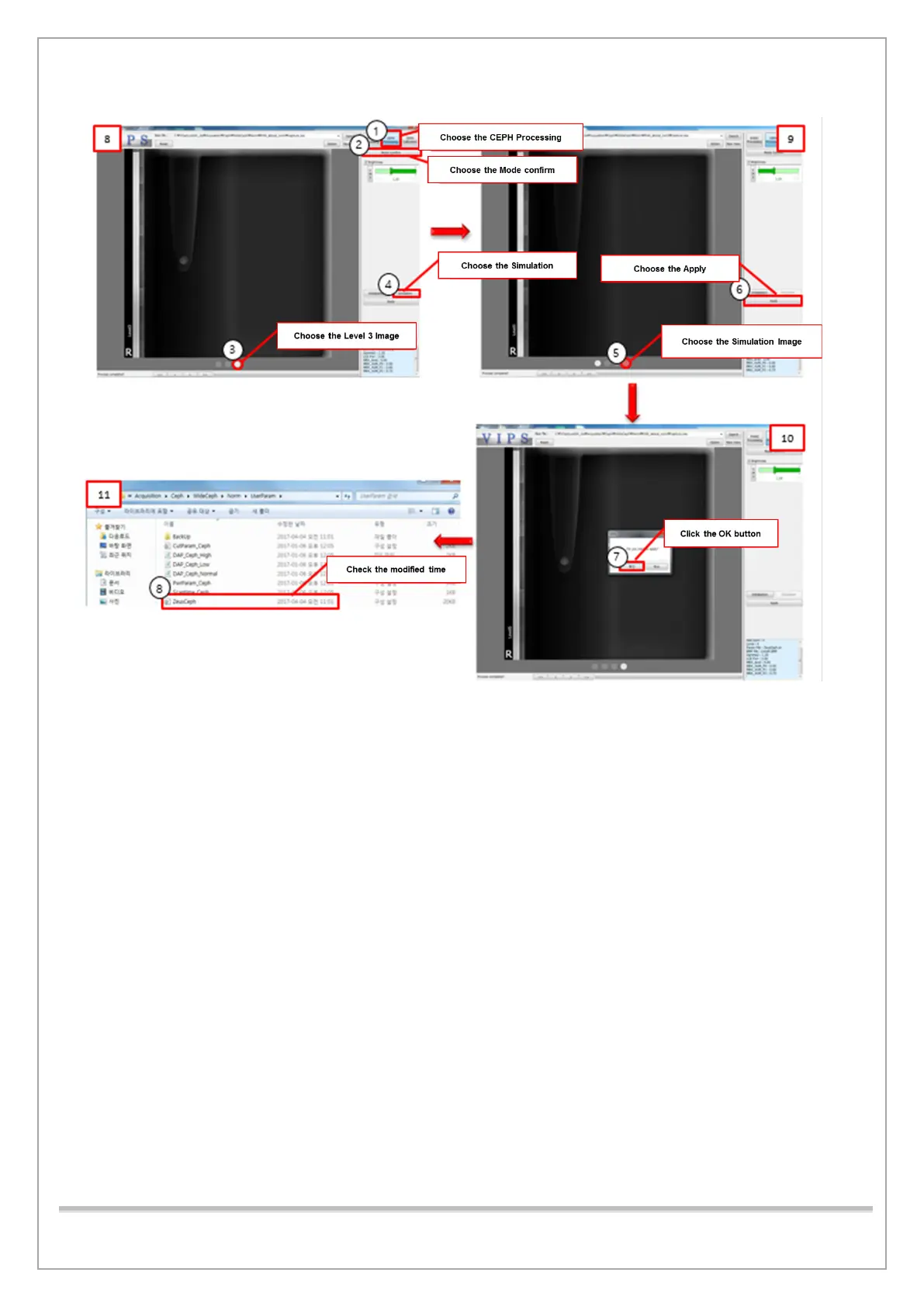
11) After completing the CEPH Calibration, select the ① CEPH Processing button, as shown in
[8].
12) ②:When the Mode Confirm button is selected, Level 1~3 images are created.
* Level 1~3: Level 3 has the highest contrast due to the difference in contrast.
13) Select the O mark on the far right of ③, which is an image of Level 3 among the created
images.
14) ④ When the Simulation button is selected, an image of O marked in red, as shown in [9], is
created.
15) ⑤ Select O marked in red and ⑥ click the Apply button.
16) When a pop-up window is created, as shown in [10], ⑦ click the OK button.
17) As shown in [11], check that the time of the modified date of Acquisition / WideCEPH / Norm
or Fast / UseParam / ZeusCEPH is the same as the time when the work is completed.














 To Next Page