Smart Plus (PHT-35LHS)
Technical Manual
VT-TECH-Smart Plus-001
COPYRIGHT© 2018 VATECH.
10) Make sure that the Median value meets the standard and close View16.
CBCT Sensor Dark Calibration Standard Value
- Dark data file median value: 700 ~ 2300
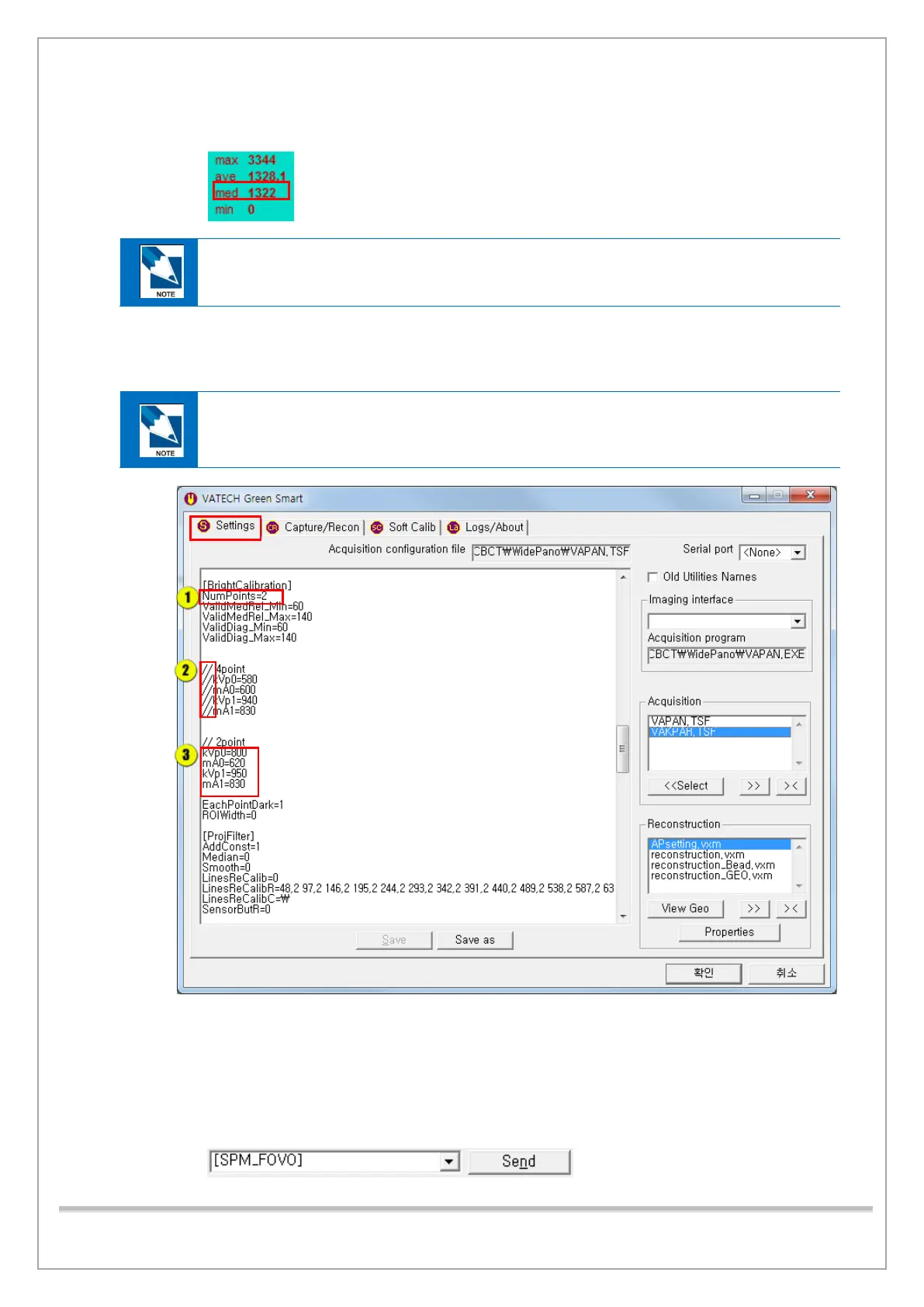
11) Click the Settings tab and ensure that the bright calibration’s kVp and mA are set
as the picture below. Change the parameters if kVp and mA values are different
from the example in the note.
BrightCalibration kVp & mA Parameter Initial-Value
kVp0 = 800 / kVp1 = 950, mA0 = 620 / mA1 = 830
① Numpoints = 2
② Add line comments to 4point lines.
③ Delete line comments in 2point lines and make sure that kVp and mA are as shown in the
figure.
12) Click the Soft Calib tab and type [SPM_FOVO]. Then click Send to open
all 4-axis Collimators.














 To Next Page