Smart Plus (PHT-35LHS)
Technical Manual
VT-TECH-Smart Plus-001
COPYRIGHT© 2018 VATECH.
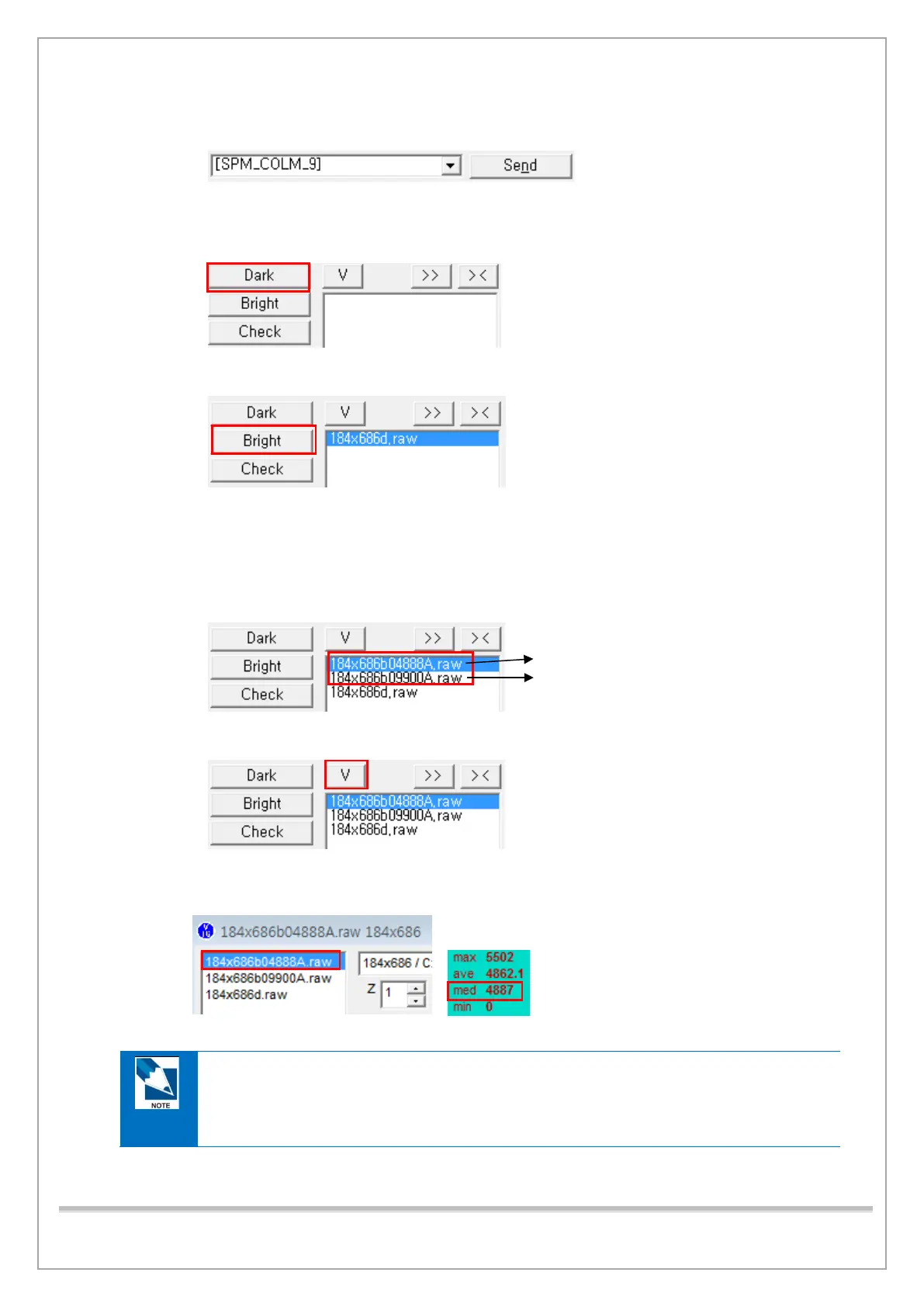
13) Type [SPM_COLM_9] and click Send to cover the opened collimator area by AI filter
14) Type [SPM_CSON] and click Send to supply power to the CT Sensor.
15) Click Dark to acquire Dark Calibration Data.
16) Wait for 5-second click Bright.
17) When the “HOLD THE BUTTON FOR ~3 SEC” message shows up on the status window,
press the X-ray Exposure switch button. Release the button when you see
“RELEASE THE BUTTON” command on the window.
18) Repeat step 17) repeatedly until 2-point bright calibration data are acquired.
19) Click V to open View16.
20) Click the 1 Point Bright Calibration data file on View16 and make sure
that the Median value is within the permitted range of the standard value.
CBCT Sensor Bright Calibration Standard Value
(2 points: Without 1 mm Copper Filter)
- Point 1 Bright data file median value: 4500 ~ 5500
- Point 2 Bright data file median value: 9500 ~ 10500














 To Next Page