102 Vectorworks 2010 Products
Vectorworks Spotlight 2010 Getting Started Guide
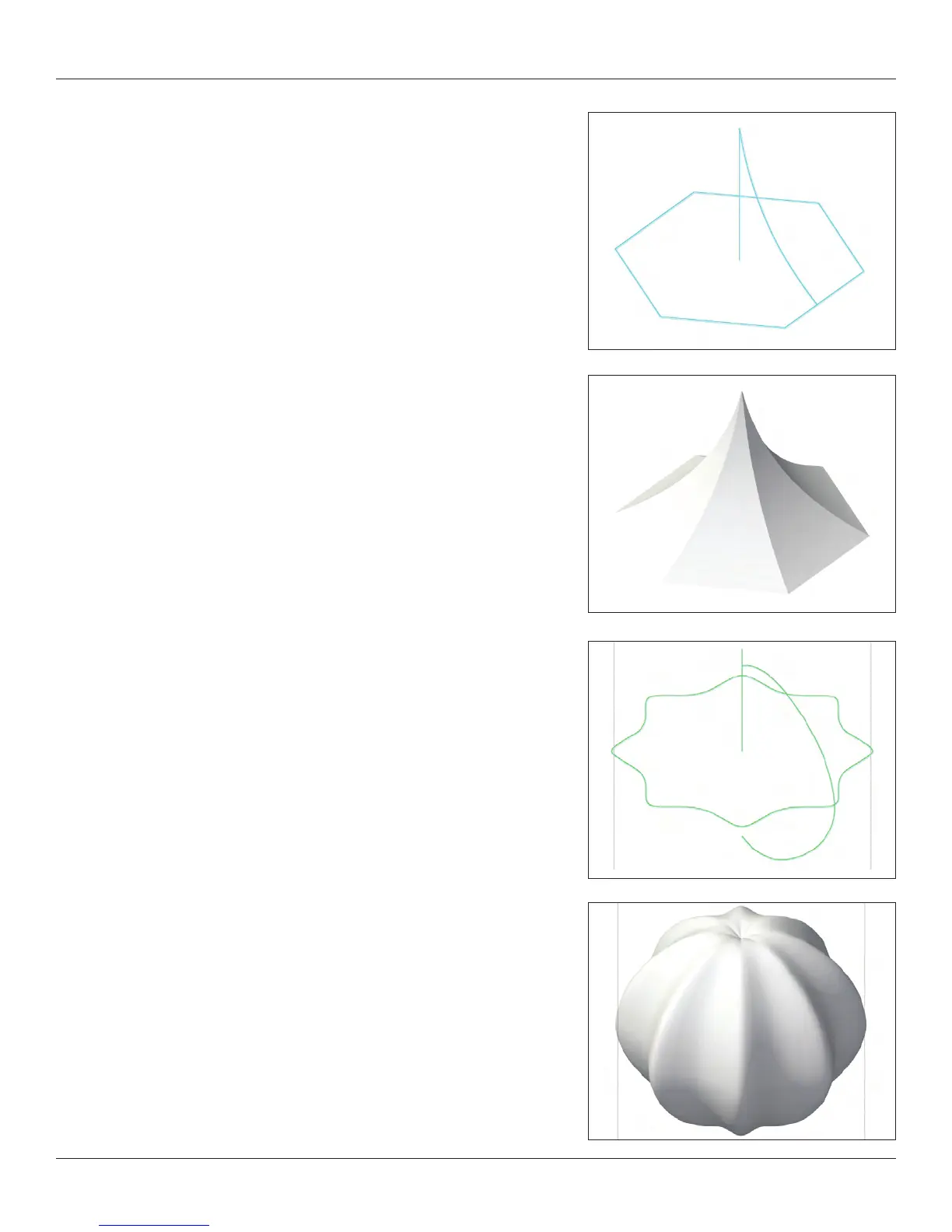
Revolve with Rail
This is not simple to understand, but very useful for many shapes and
creating tents.
Complex NURBS surfaces can be created by revolving a prole along a
guide curve (rail).
The Revolve with Rail command creates the NURBS surface by revolving a
planar NURBS curve about an axis. The revolution is guided by a rail curve
on a plane perpendicular to the plane containing the prole curve and axis.
To create a NURBS surface with prole and rail:
1.
Create an axis, rail and prole out of NURBS curves.
The axis must be a linear NURBS curve•
The prole must be a planar NURBS curve•
The prole cannot intersect the axis, though it can touch•
The axis must lie on the same plane as the prole•
The rail must be a planar NURBS curve perpendicular to the axis •
and prole
2. Select Model > 3D Power Pack > Revolve with Rail
. Select, in
order, the axis, prole and rail.
3. The NURBS surfaces are created.



 To Next Page