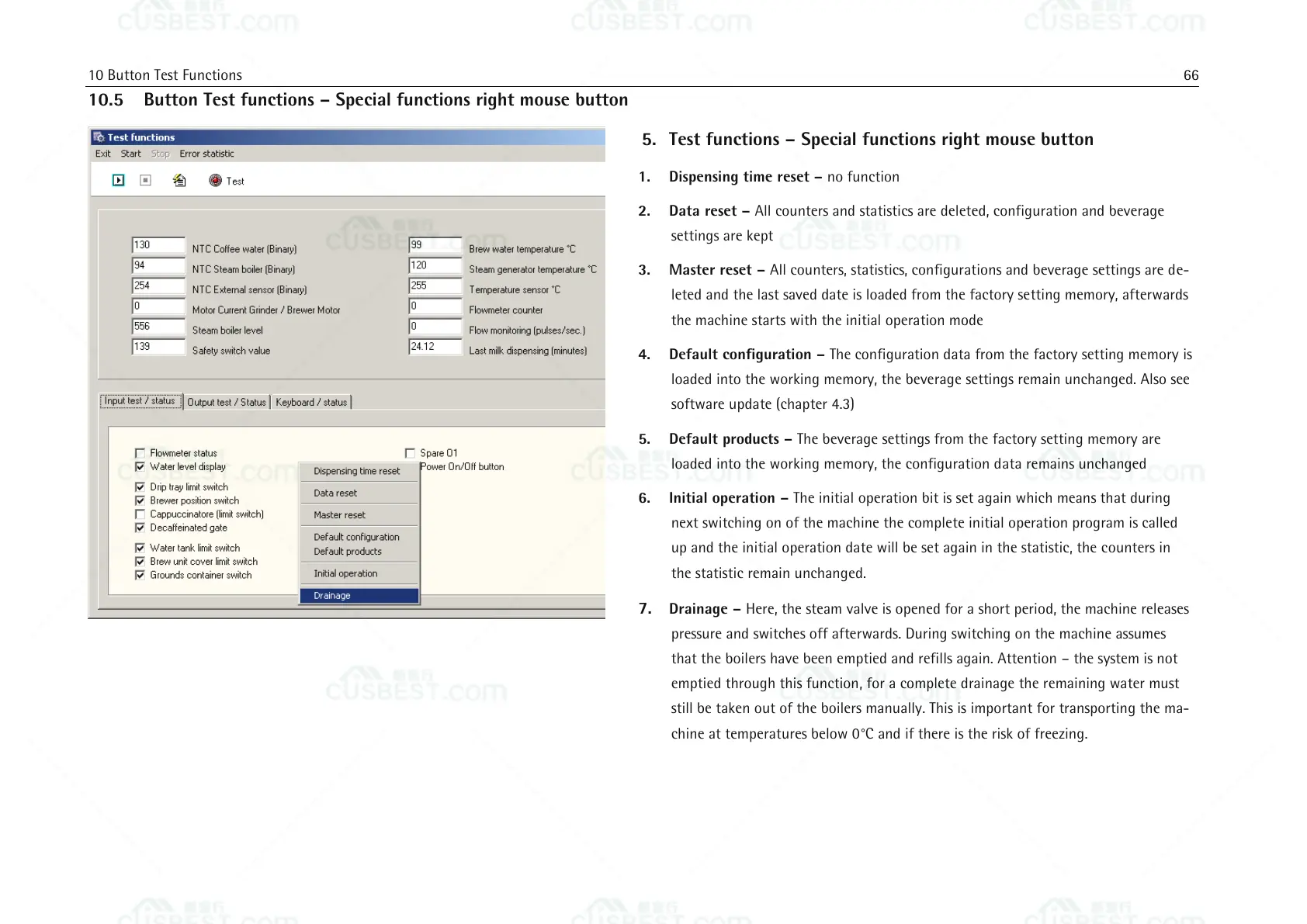
5. Test functions – Special functions right mouse button
1. Dispensing time reset – no function
2. Data reset – All counters and statistics are deleted, configuration and beverage
settings are kept
3. Master reset – All counters, statistics, configurations and beverage settings are de-
leted and the last saved date is loaded from the factory setting memory, afterwards
the machine starts with the initial operation mode
4. Default configuration – The configuration data from the factory setting memory is
loaded into the working memory, the beverage settings remain unchanged. Also see
software update (chapter 4.3)
5. Default products – The beverage settings from the factory setting memory are
loaded into the working memory, the configuration data remains unchanged
6. Initial operation – The initial operation bit is set again which means that during
next switching on of the machine the complete initial operation program is called
up and the initial operation date will be set again in the statistic, the counters in
the statistic remain unchanged.
7. Drainage – Here, the steam valve is opened for a short period, the machine releases
pressure and switches off afterwards. During switching on the machine assumes
that the boilers have been emptied and refills again. Attention – the system is not
emptied through this function, for a complete drainage the remaining water must
still be taken out of the boilers manually. This is important for transporting the ma-
chine at temperatures below 0°C and if there is the risk of freezing.















 To Next Page