Administrator’s Guide for SIP-T2 Series/T19(P) E2/T4 Series/CP860 IP Phones
490
Account->Advanced->BLA Subscription Period
Phone User Interface:
None
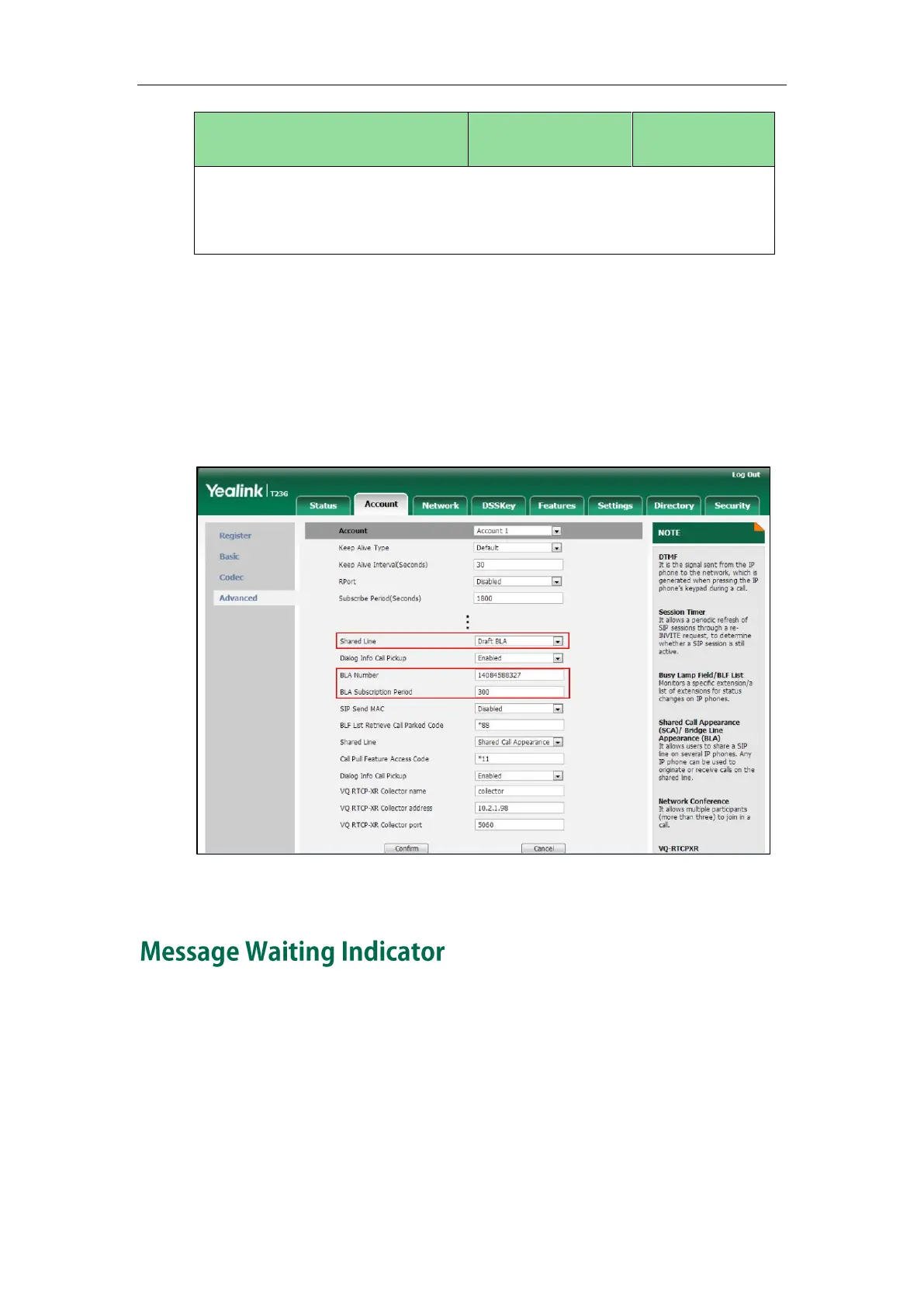
To configure the BLA feature via web user interface:
1. Click on Account->Advanced.
2. Select the desired account from the pull-down list of Account.
3. Select Draft BLA from the pull-down list of Shared Line.
4. Enter the desired value in the BLA Number field.
5. Enter the desired value in the BLA Subscription Period field.
6. Click Confirm to accept the change.
Message Waiting Indicator (MWI) informs users of the number of messages waiting in
their mailbox without calling the mailbox. IP phones support both audio and visual MWI
when receiving new voice messages. MWI will be indicated in four ways: a warning
tone, an indicator message (including a voice mail icon) on the LCD screen, the power
indicator LED slow flashes red and the MESSAGE key LED lights up (MESSAGE key LED
is only applicable to SIP-T29G/T27P/T23P/T23G/T21(P) E2 IP phones). For more information
on power indicator LED, refer to Power Indicator LED on page 97.
IP phones support both solicited and unsolicited MWI.


 To Next Page
 Loading...