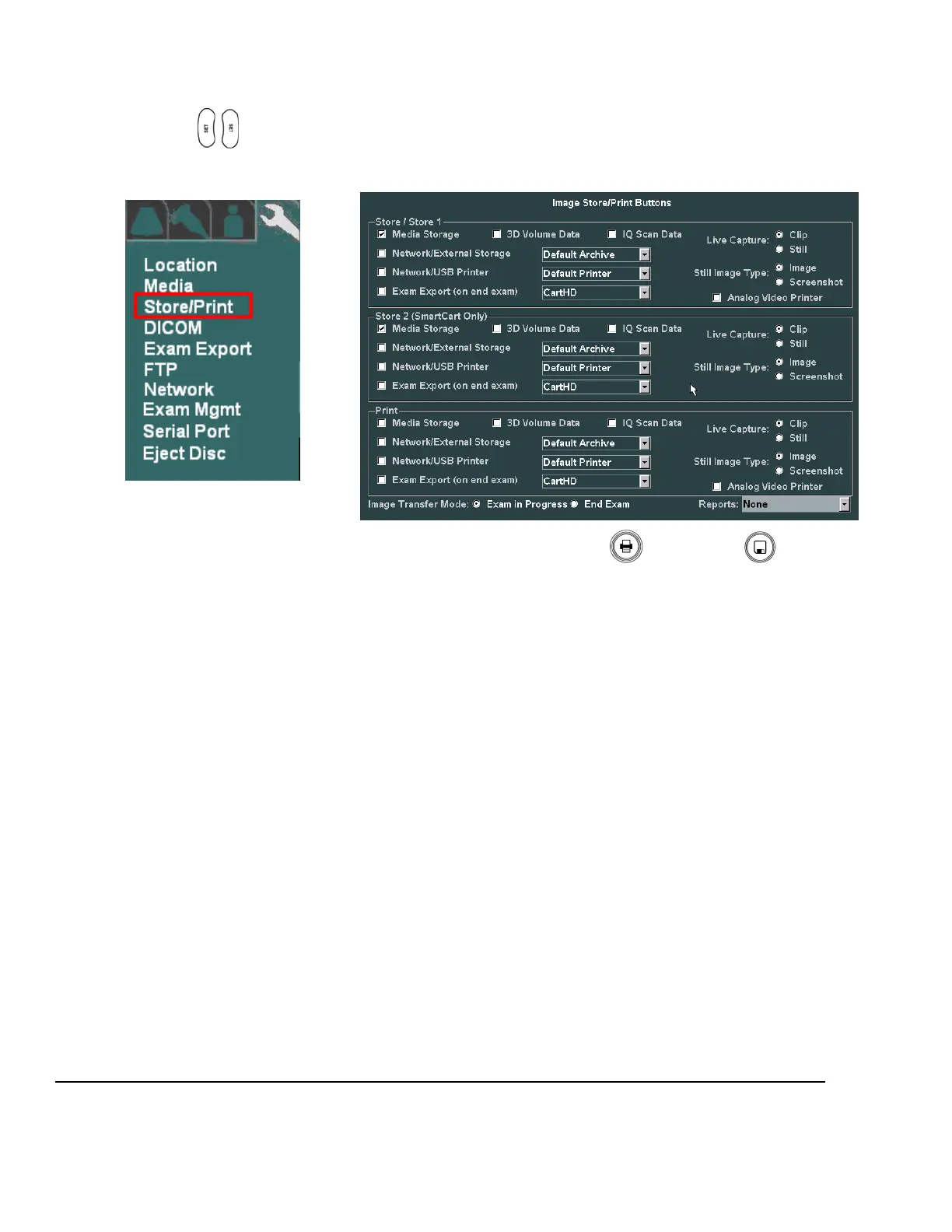
“STORE/PRINT” BUTTON CONFIGURATION
1. Within the ARCHIVE menu, use the Menu Control to backlight Store/Print selection, press one of the
SET keys to bring up this menu.
ARCHIVE Sub-Menu IMAGE STORE/PRINT BUTTONS Sub-Menu
2. Based upon what functions are desired to occur when the PRINT and STORE buttons on the
z.one
pro
are pressed, configure the settings in this menu.
3. In order to have the ability to transfer all aspects of the image data captured using the 3D technology
transducer, the “3D Volume Data” box must be checked for the corresponding STORE/PRINT button.
4. In order to have the ability to capture raw IQ data images, the “IQ Scan Data” box must be checked
for the corresponding STORE/PRINT button.
5. Using the “Live Capture” option, the STORE/PRINT buttons can be configured to disable capture of
“CLIP” storage, in the case that the button is pushed while the system is NOT in “Freeze” mode.
Clip If checked, the system will capture live clips when the corresponding
STORE/PRINT key is depressed while the system is in live imaging (“Freeze”
not pressed) mode.
Still If checked, the system will ONLY grab a single still frame, when the
corresponding STORE/PRINT key is depressed while the system is in live
imaging (“Freeze” not pressed) mode.
6. Using the “Still Image Type” option, the STORE/PRINT buttons can be configured to determine the
amount of display area that is captured when pressed.
Image If checked, only the ultrasound image window (800 x 600 area) is captured.
Screenshot If checked, the entire screen area (1280 x 1024), including the dashboard and
thumbnail area, is captured.
7. Configure the “Image Transfer Mode” selection to reflect the desired image transfer behavior on the
Customer’s system.



 To Next Page