5-132
CELL-DYN
®
3200 System Operator’s Manual
9140181H—October 2001
Operating Instructions
Using The Data Log
Section 5
Customize Data Log
The [CUSTOMIZE DATA LOG] key is used to customize the Data Log display. The
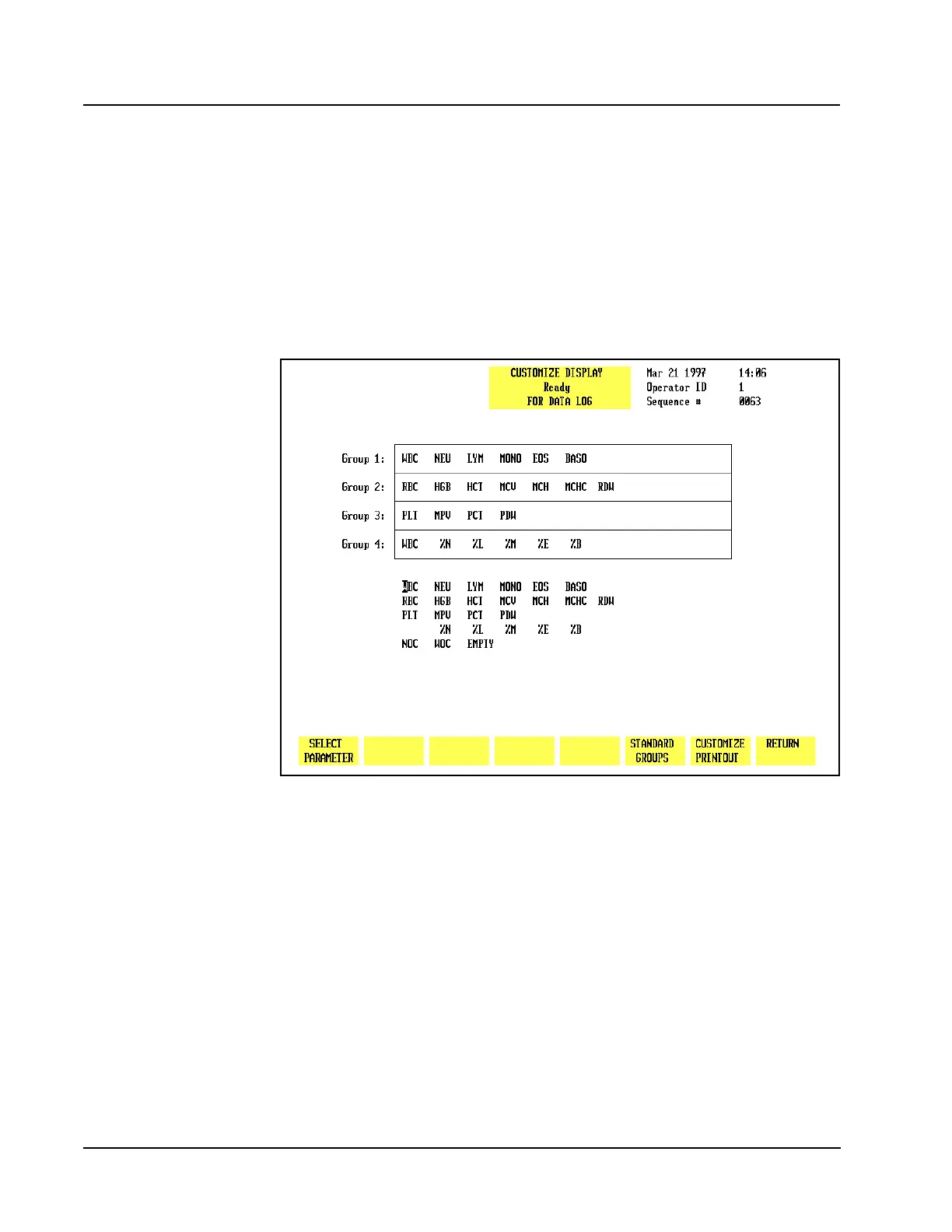
CUSTOMIZE DISPLAY FOR DATA LOGscreen (see Figure 5.49) and the following
soft key labels are displayed when the [CUSTOMIZE DATA LOG] key is pressed:
SELECT PARAMETER/
PLACE PARAMETER (The key alternates between the selections.)
STANDARD GROUPS/
CUSTOM PLACEMENT (The key alternates between the selections.)
CUSTOMIZE PRINTOUT
RETURN
Figure 5.49 Customize Display for Data Log Screen Showing Standard Groups
The CUSTOMIZE DISPLAY FOR DATA LOGscreen displays a matrix showing the four
parameter groups and a list of the available parameters. Parameter Group 1 is
displayed (in the order indicated from left to right) on the second DATA LOG screen.
The remaining groups are displayed on subsequent screens that are accessed by
pressing the Right Arrow key on the keyboard. The Left Arrow key is used to page
back through the screens to the first screen. Figure 5.50 shows a customized Data
Log display screen.



 To Next Page