CELL-DYN
®
3200 System Operator’s Manual
11-7
9140181H—October 2001
Section 11 Quality Control
View QC Log
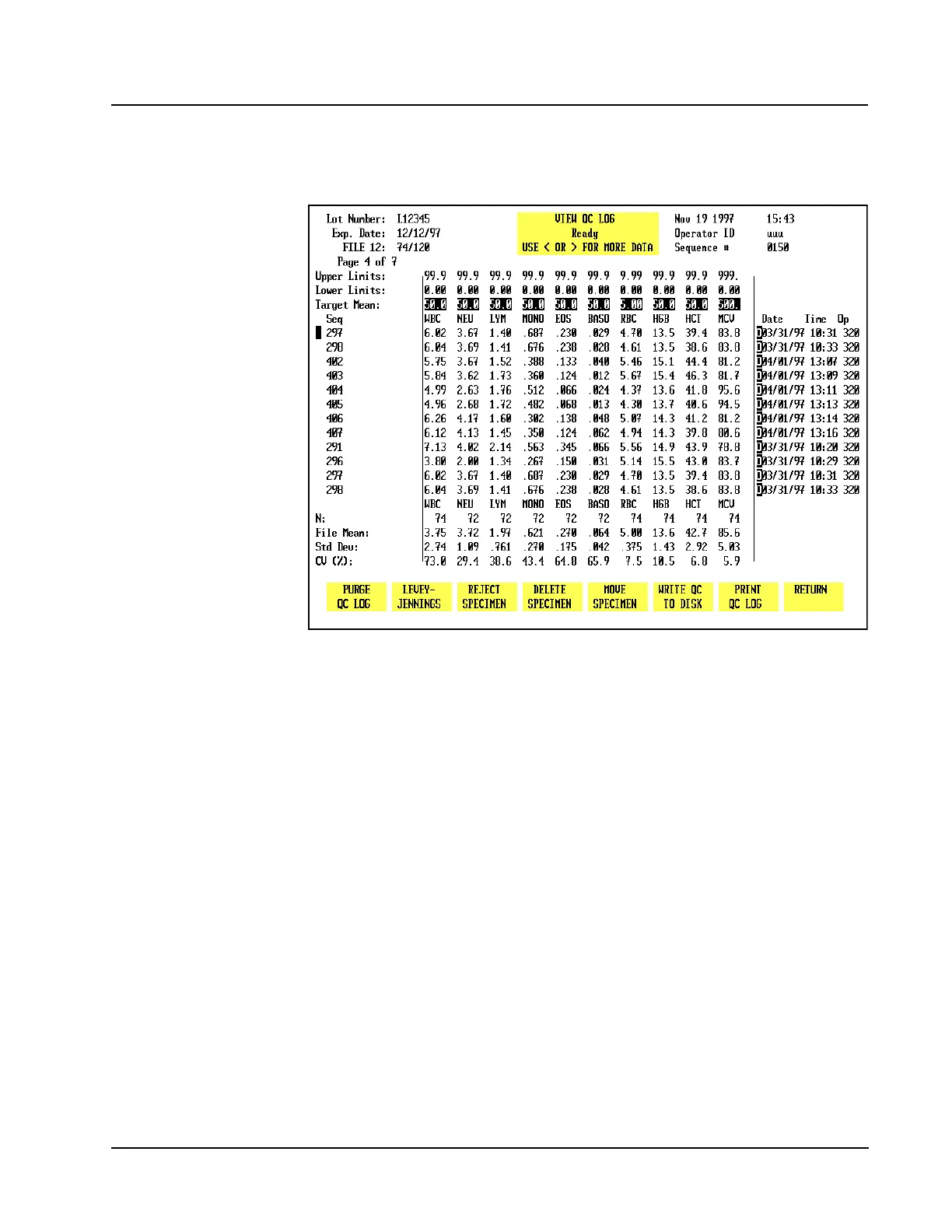
The [VIEW QC LOG] key is used to display the QC Log indicated by the position of
the cursor.
Figure 11.5 The View QC Log Screen
Each QC Log display shows the following information (see Figure 11.5):
1. Upper Left Corner
LOT NUMBER and EXPIRATION DATE if the file was configured for this
type of control. If the file was configured for a REPLICATE ID, it is
displayed instead of the lot number and expiration date.
File name, the number of runs currently in the file and the file capacity
(e.g., 39/120 indicates that the file contains 39 runs out of a possible 120).
The page number of the display and the total number of pages in the file.
2. Status Box
USE < OR > FOR MORE DATA. This message indicates that the Left and
Right Arrow keys on the keyboard should be used to display the other groups
of data.
3. Upper Right Corner
The current DATE, TIME and OPERATOR ID are displayed along with the
last SEQUENCE NUMBER that was used.



 To Next Page