Data Analysis Features 151
Marker Table
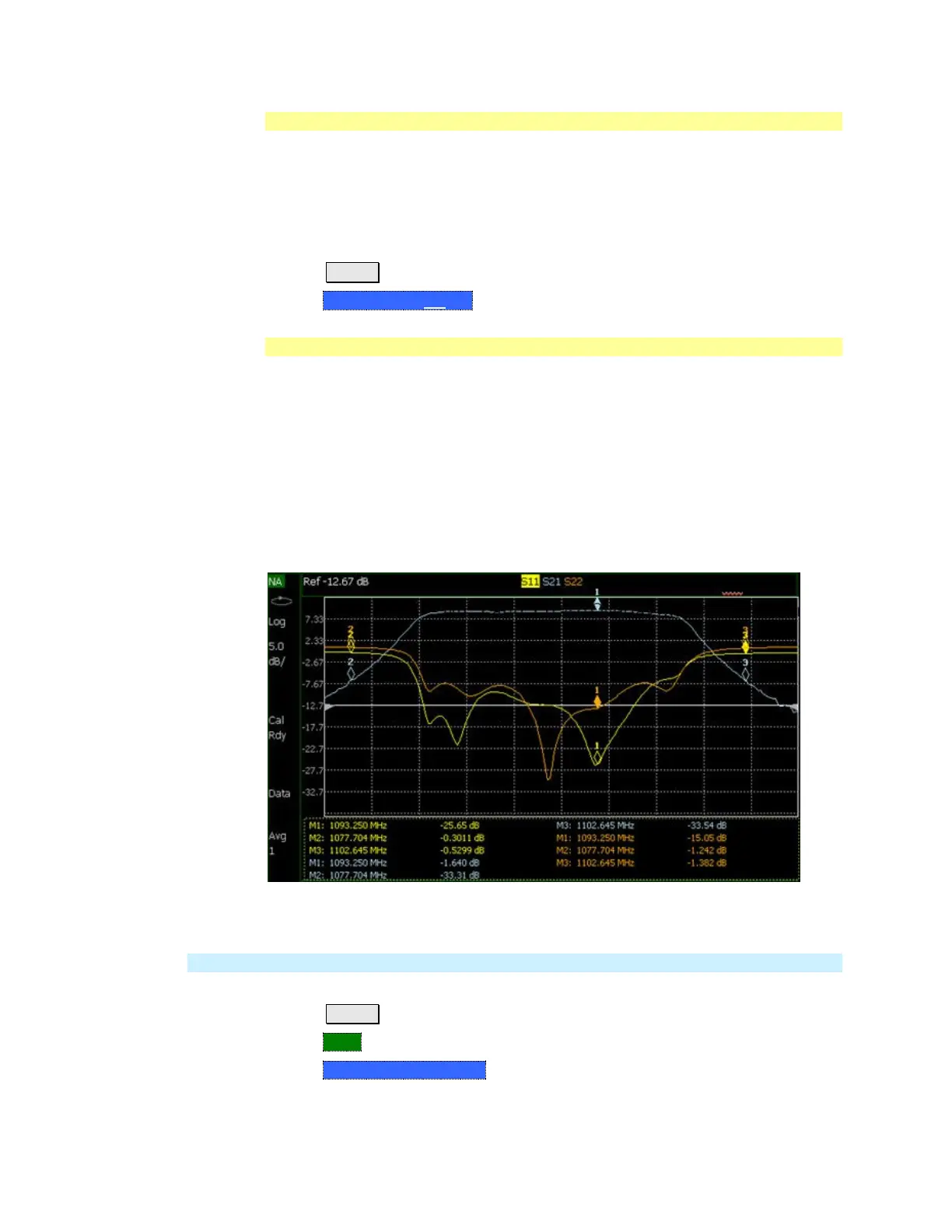
The Marker Table can be displayed at the bottom of the FieldFox screen. It can
display information for up to 6 markers in a full-width window, and up to 3
markers for a half-width window (NA mode). The marker table “squeezes” the
graticule area when activated.
How to display the Marker table
Press Marker.
Then Marker Table On Off.
Coupled Markers
Coupled Markers, available in NA mode only, allows you to simultaneously create
and move markers that have the same number for all traces. For example, when
marker 2 is created on a trace, a marker 2 is created for ALL traces. When any
marker 2 is moved, they all move together to the same X-axis position.
Coupled markers are allowed only in NA mode and are relevant only in multi-
trace configurations.
You can have markers that are coupled and others that are uncoupled.
Peak functions move the marker to the peak on the active trace, while all other
markers move to the same X-axis position.
Coupled Markers move on ALL traces at the same time.
How to create Uncoupled Markers
NOTE Markers are coupled by default.
To create markers that are NOT coupled (move independently on each trace):
Press Marker
Then More
Then Coupled Markers OFF


 To Next Page
 Loading...