MM-400A
7. Basic Operation
7-3
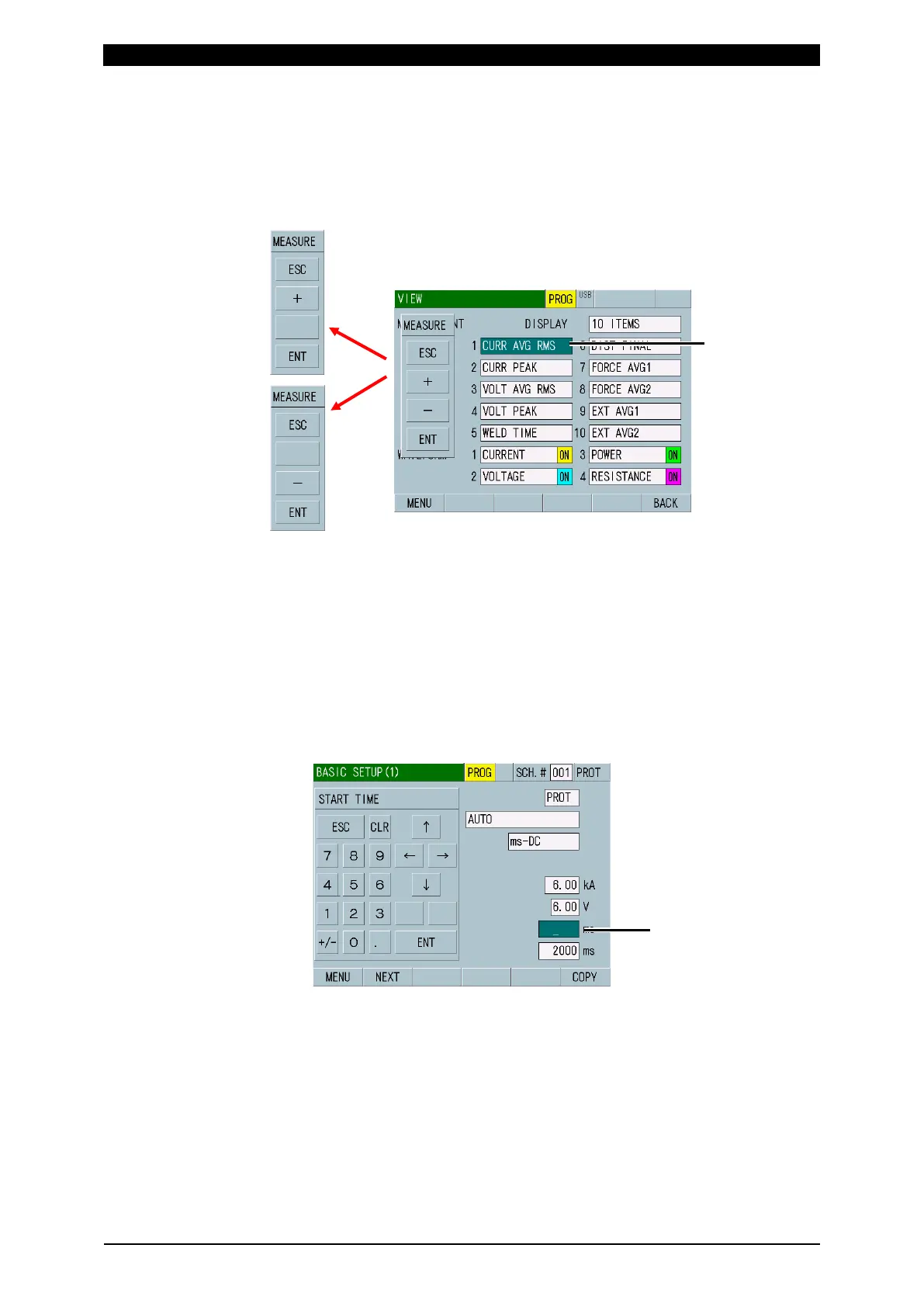
• Selecting an item in the VIEW screen
In this screen example, the cursor is positioned at the DISPLAY selection field.
The settable item is switched by “+” and “-.” Since the setting items do not loop,
only “+” or “-” appears when the setting limit is reached. After selection, touch
ENT to determine. To exit a ten-key display without determining setting, touch
ESC.
• Inputting a value
In this screen example, the cursor is positioned at the START TIME setting
field. Set a value using numbers and decimal point, and touch ENT to
determine. To exit a ten-key display without determining setting, touch ESC.
Touching ↑ ↓ moves the input field up and down. Touching ← → moves the
digit of the input number right and left. Touching CLR deletes the input letters
and numbers one by one.
When an unsettable value is input and determined, it returns to the original
setting value.
(State of being input:
green background)
(green background)
limit



 To Next Page