MM-400A
7. Basic Operation
7-4
• Selecting a mode
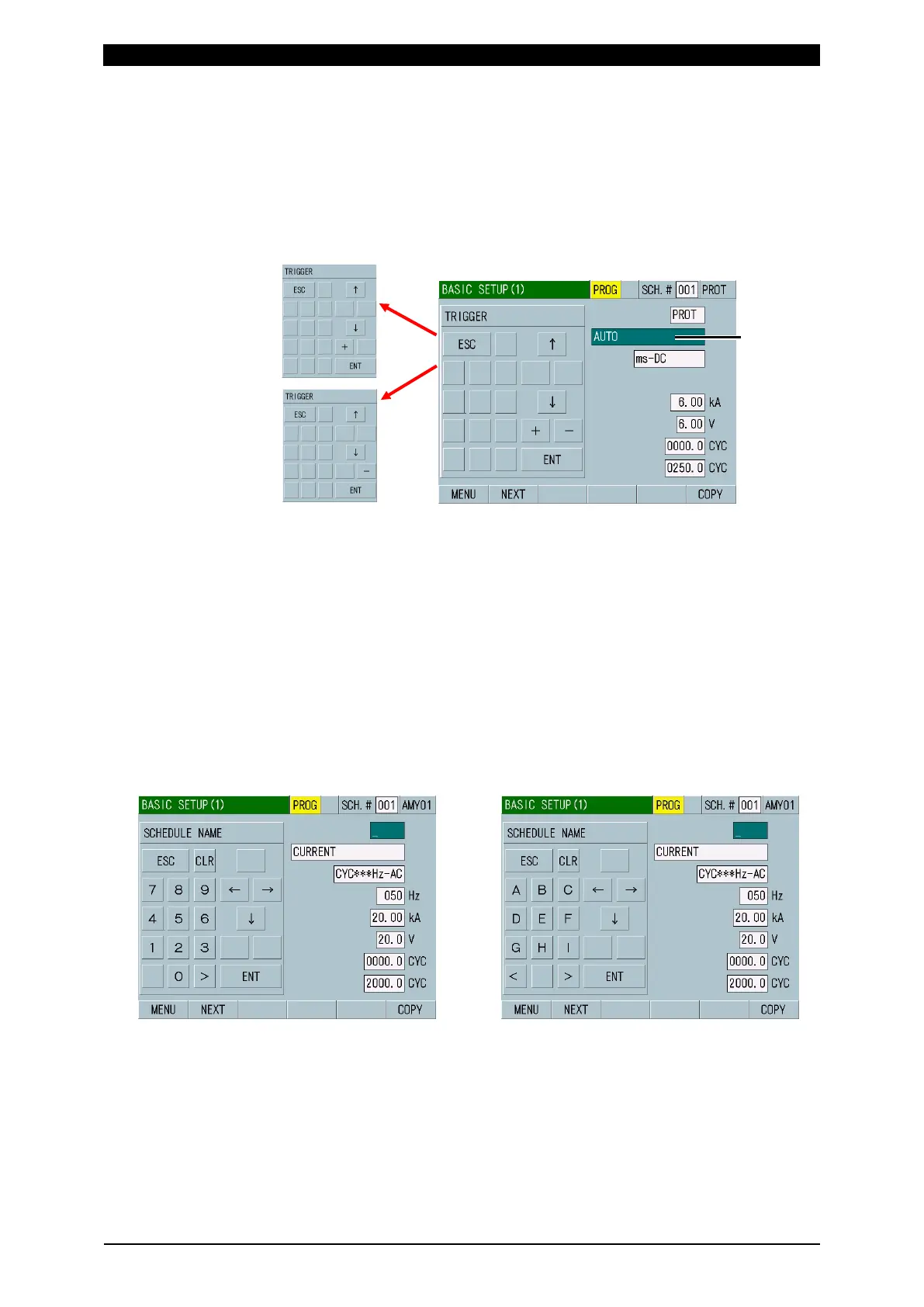
In this screen example, the cursor is positioned at the TRIGGER selection field.
The settable item is switched by “+” and “-.” Since the setting items do not loop,
only “+” or “-” appears when the setting limit is reached. After selection, touch
ENT to determine. To exit a ten-key display without determining setting, touch
ESC.
Touching ↑ ↓ moves the input field up and down.
• Setting the SCHEDULE NAME
For SCHEDULE NAME in the BASIC SETUP (1) screen, select up to five
letters among numbers of 0 to 9 and alphabetical characters of A to Z using
five kinds of ten-keys. After selection, touch ENT to determine. To exit a
ten-key display without determining setting, touch ESC.
Touching ↑ ↓ moves the input field up and down. Touching ← → moves the
digit of the input number right and left. Touching CLR deletes the input letters
and numbers one by one.
Touching < > moves between ten-keys (i) to (iv).
(i) Numbers (0 to 9)
Move to the next ten-key (ii) by >.
(ii) Alphabetical characters (A to I)
Move to (iii) by > and (i) by <.
(State of being input:
green background)
limit



 To Next Page