MM-400A
8. Operation Screens
8-57
(4) Function keys
MENU: Touching this displays the MENU screen.
FORCE: Touching this displays the ALL CYCLE screen (Force).
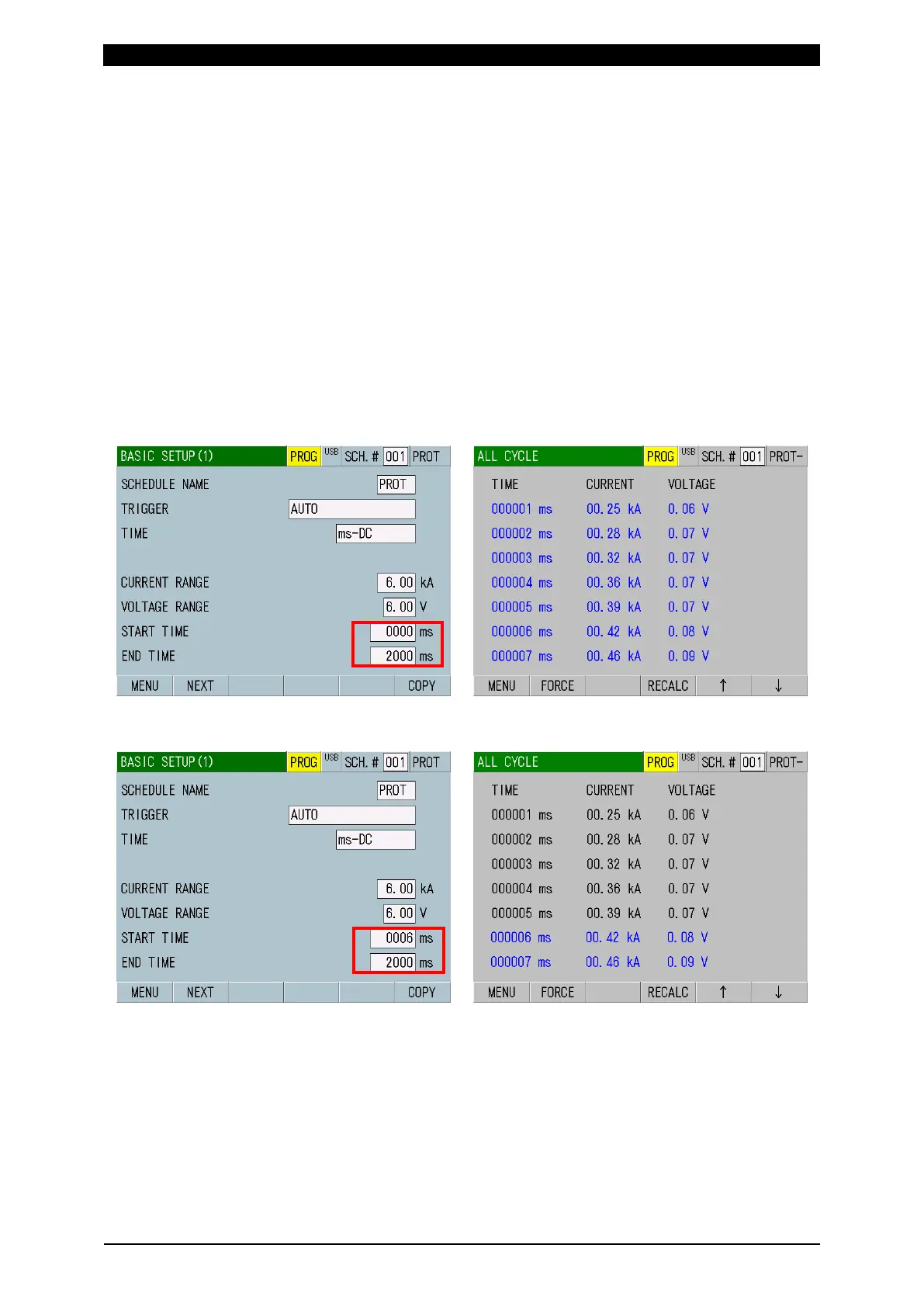
RECALC: Touching this recalculates the measured current and voltage. Use
this function to redo the calculation of the arithmetic mean over a new
calculation interval after changing the start and end cycle (MEAS START,
MEAS END) settings in the BASIC SETUP (1) screen.
: Touching this moves a page of the screen.
*1: Conduction angle appears only when CYC-AC, CYC***Hz-AC or LONG
CYC-AC is selected for TIME in the BASIC SETUP (1) screen.
*2: The measured value does not appear in the ALL CYCLE screen if SHORT
ms-DC is selected for TIME in the BASIC SETUP (1) screen.
(*) How to execute RECALC of current, voltage and conduction angle
1) Before executing RECALC: Measurement range 0 to 2000 ms
2) Change the measurement start to 6 ms and touch the RECALC key. The color
of range omitted from calculation (1 to 5 ms) changes from blue to black.



 To Next Page