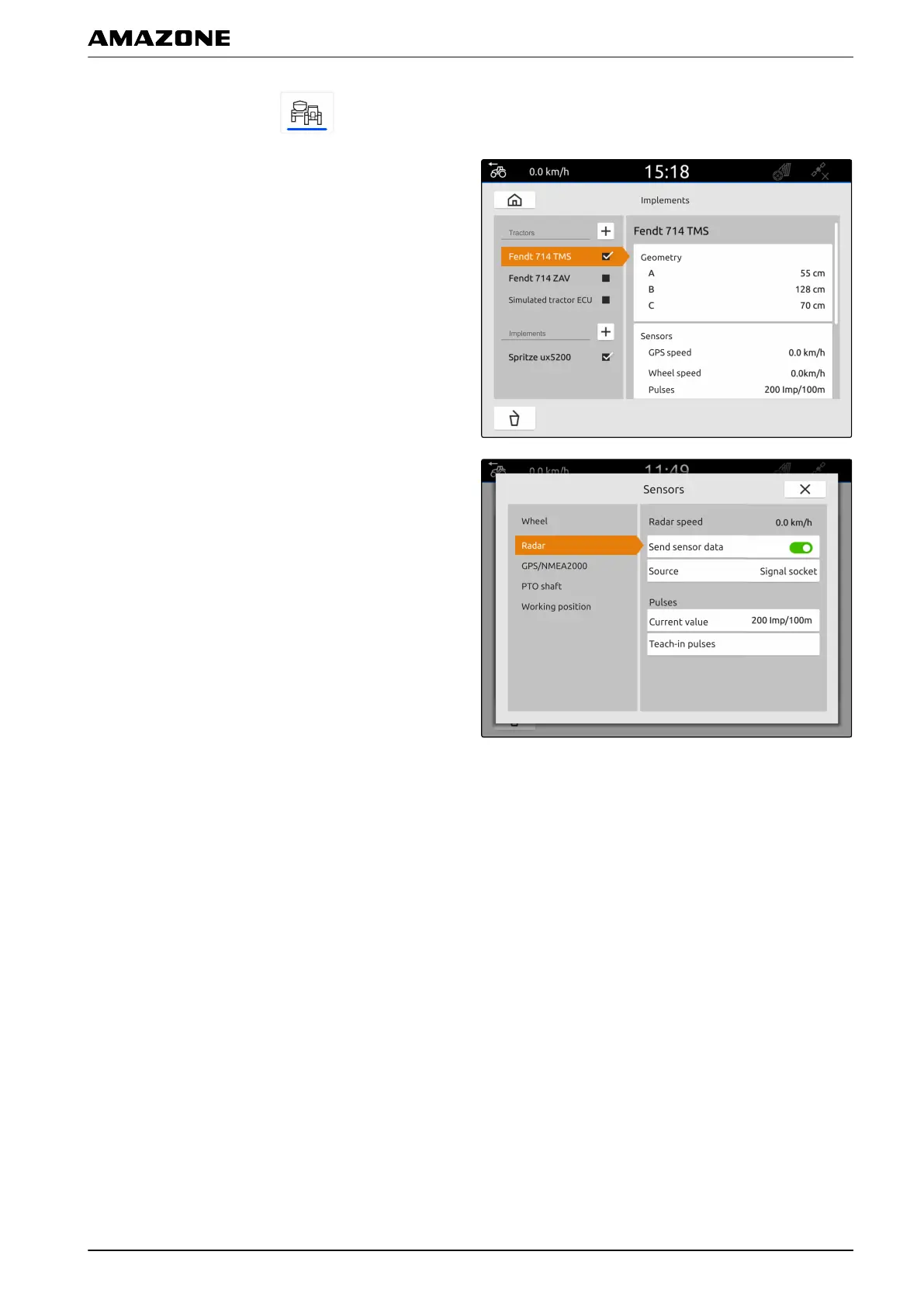
1. In the main menu, select .
2. Select the desired tractor under "Tractors".
3. Select "Sensors".
4. Select "Radar".
5. If the radar sensor signal should be used,
activate "Send signal".
6. If the radar sensor signal should be simulated by
the GPS signal,
select "GPS receiver" under "Source"
or
If the radar sensor signal comes from a radar
sensor,
select "Signal socket" under "Source".
7. If the radar sensor signal comes from a radar
sensor,
enter the number of pulses per minute under
"Current value"
or
To determine the number of pulses per minute,
follow the instructions on the display under "Teach-in
pulses".
3.3
Activating GPS NMEA2000
The speed can be sent directly to connected implement
through the GPS signal. To do so, the connected
implement must be able to process the speed signal
through the NMEA2000 protocol.
CMS-T-00000316-C.1
L | Configuring tractors | Configuring the tractor sensors
MG6010-EN-GB | G.1 | 13.12.2018
47



 To Next Page