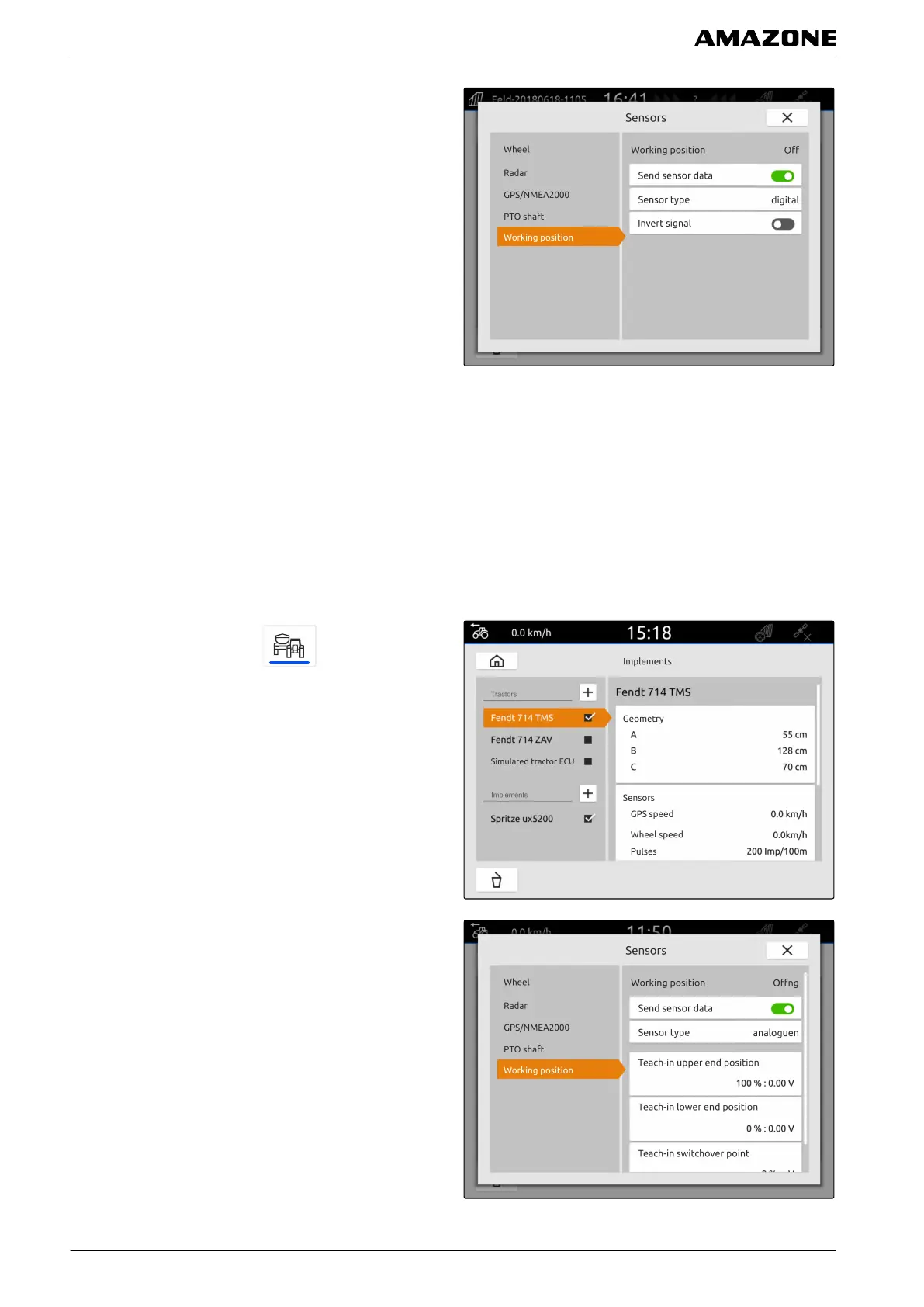
4. Select "Working position".
5. If the working position should be sent,
select "Send signal".
6. Under "Sensor type", select "Digital".
7. If the displayed working position does not match
the actual working position,
activate "Invert signal".
3.5.2 Configuring analogue working position sensors
If an analogue working position sensor is connected, the
AmaTron 4 can determine if the implement is in working
position based on the voltage values. To do so, the
voltage values for the different positions must be taught-
in on the AmaTron 4. Moreover, the switchover point
between the upper and lower end position must be
taught-in on the AmaTron 4.
1. In the main menu, select .
2. Select the desired tractor under "Tractors".
3. Select "Sensors".
4. Select "Working position".
5. If the working position should be sent,
select "Send signal".
6. Under "Sensor type", select "Analogue".
7. Move the tractor lifting device to the upper end
position.
8. Select "Teach-in upper end position".
9. Move the tractor lifting device to the lower end
position.
CMS-T-00000313-C.1
L | Configuring tractors | Configuring the tractor sensors
MG6010-EN-GB | G.1 | 13.12.2018
50



 To Next Page