Home
Amazone
Touch terminals
AmaTron 4
Page 58 (Automatically Creating a Safety Zone)
Amazone AmaTron 4 - Automatically Creating a Safety Zone
111 pages
Manual
Save Page as PDF
To Next Page
To Next Page
To Previous Page
To Previous Page
Loading...
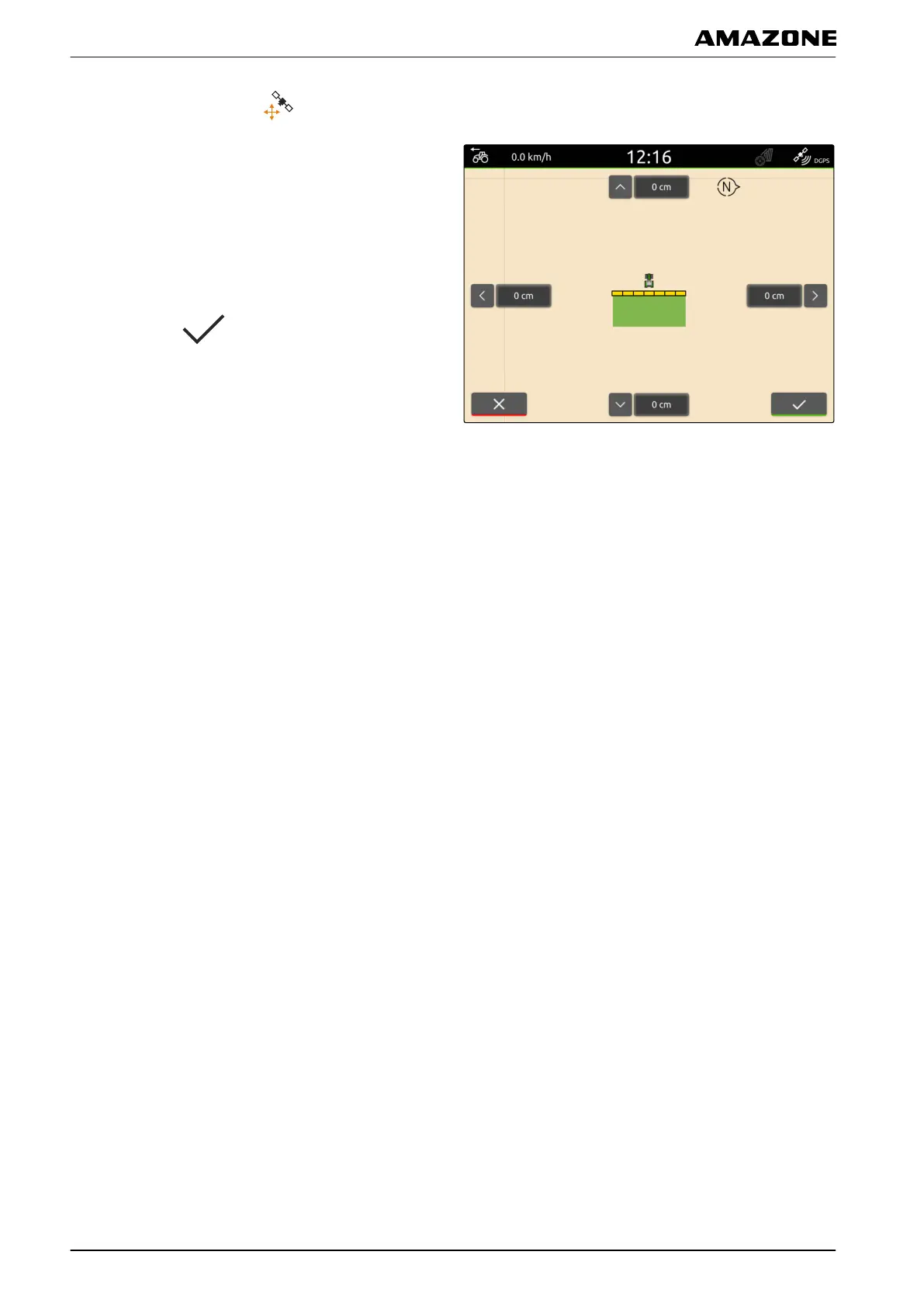
1.
In the Work menu, select
.
2.
Move the map using the arrows.
or
T
o enter a value b
y which the map should be
moved,
tap the length specifications.
3.
Confirm with
.
M | Using the map view | GPS drift correction
MG6010-EN-GB | G.1 | 13.12.2018
56
57
59
Table of Contents
Main Page
Default Chapter
3
Table of Contents
3
A about this Operating Manual
6
Meaning of the Operating Manual
6
Diagrams
6
Warnings and Signal Words
6
Further Instructions
7
Instructions
7
Lists
9
Item Numbers in Figures
9
Other Applicable Documents
9
Your Opinion Is Important
9
B Installation Instructions
10
C Amatron 4 Overview
11
Front View
11
Connections
12
D Operator Interface Overview
13
Main Menu
13
Application Carousel
14
Map View
16
Map
16
Work Menu
17
Universal Terminal
18
E Basic Operation
19
Switching the Amatron 4 on and off
19
Switching between the Applications
19
Using the Menu Buttons
19
Using the Application Carousel
20
Using Swipe Gestures
20
Configure Status Bar
21
Using the Quick-Start Menu
21
Entering Numerical Values
22
Enter Text
23
Entering the Basic Settings
24
Activating the Dynamic Button Bar
24
Setting the Date and Time
26
Setting the Display Brightness
28
Showing When the Display Is Touched
29
Activating Swipe Gesture Applications
29
Setting up the GPS Receiver
31
Setting up the A100/A101 Receiver
31
Setting up the Ag-Star Receiver
32
Resetting the GPS Receiver to Factory Settings
33
Configuring ISOBUS
35
Managing Licenses
36
Resetting to Factory Settings
39
K Configuring Implements
40
Configuring ISOBUS Implements
40
Creating Non-ISOBUS Implements
41
Configuring Non-ISOBUS Implements
41
Renaming Implements
43
Deleting Implements
44
Selecting Implements
44
Configuring Tractors
46
Creating New Tractors
46
Changing the Tractor Geometry Data
46
Configuring the Tractor Sensors
47
Configuring Wheel Sensors
47
Configuring Radar Sensors
48
Activating GPS NMEA2000
49
Configuring the PTO Shaft Sensor
50
Configuring the Working Position Sensor
51
Renaming Tractors
53
Deleting Tractors
54
M Using the Map View
55
Toggling the Button Bar
55
Showing and Hiding the Implement Information
56
Zooming the Map
56
Switching to Bird's-Eye View
57
Focusing on the Vehicle Symbol
57
GPS Drift Correction
57
N Map View Configuration
59
Activate Warnings
59
Configuring the Driving Direction Detection
59
Automatically Creating a Safety Zone
60
Configuring the Automatic Zoom
61
Defining the Map Layers
62
O Working Without Documentation
63
Creating a New Field
63
P Working with Documentation
64
Creating a New Field
64
Importing ISO-XML Job Data
65
Loading ISO-XML Field Data
66
Importing Field Data from a Shape File
67
Creating a New Job
68
Managing Products
69
Managing the Customers
72
Managing Drivers
73
Exporting ISO-XML Job Data
75
Using Part-Width Section Control
76
Overlap, Setting
76
Defining the Overlap in the Direction of Travel
76
Defining the Degree of Overlap
77
Defining the Overlap Tolerance
79
Defining the Overlap Tolerance at the Field Boundary
80
Starting a Recording
81
Terminating a Recording
83
R Managing the Field Boundaries
84
Creating the Field Boundary
84
Editing Field Boundaries
85
Managing Headlands
86
Creating Headlands
86
Editing the Headlands
87
T Marking Obstacles
88
Parallel Driving
90
Configuring Parallel Driving
90
Adjusting the Light Bar Sensitivity
90
Selecting the Track Line Pattern
91
Creating Track Lines
92
Creating an A-B Line
92
Creating Smoothed Contours
92
Creating Beds
93
Using a Light Bar
94
Using Automatic Boom Lowering
96
W Configuring AUX-N Input Devices
98
Setting up AUX-N Input Devices
98
Managing Preferred Assignments
100
Confirming the AUX-N Assignment
100
Changing the AUX-N Assignment
100
Using the Universal Terminal
105
Y Taking Screenshots
106
Z Using the Camera
107
Indexes
108
Index
108
Related product manuals
Amazone AMATRON 3
148 pages
Amazone AMAPAD
237 pages
Amazone AmaLog+
46 pages
Amazone AmaDrill+
72 pages



 To Next Page