EasyManua.ls Logo

Anser X1 - Figure 1-25. Add Object - Hold to Adjust Message Position; Table 1-5. X1 Fonts Supported

Default Icon
105 pages
Print Icon
To Next Page IconTo Next Page
To Previous Page IconTo Previous Page
Loading...
ANSER CODING INC. 25 X1 User Interface
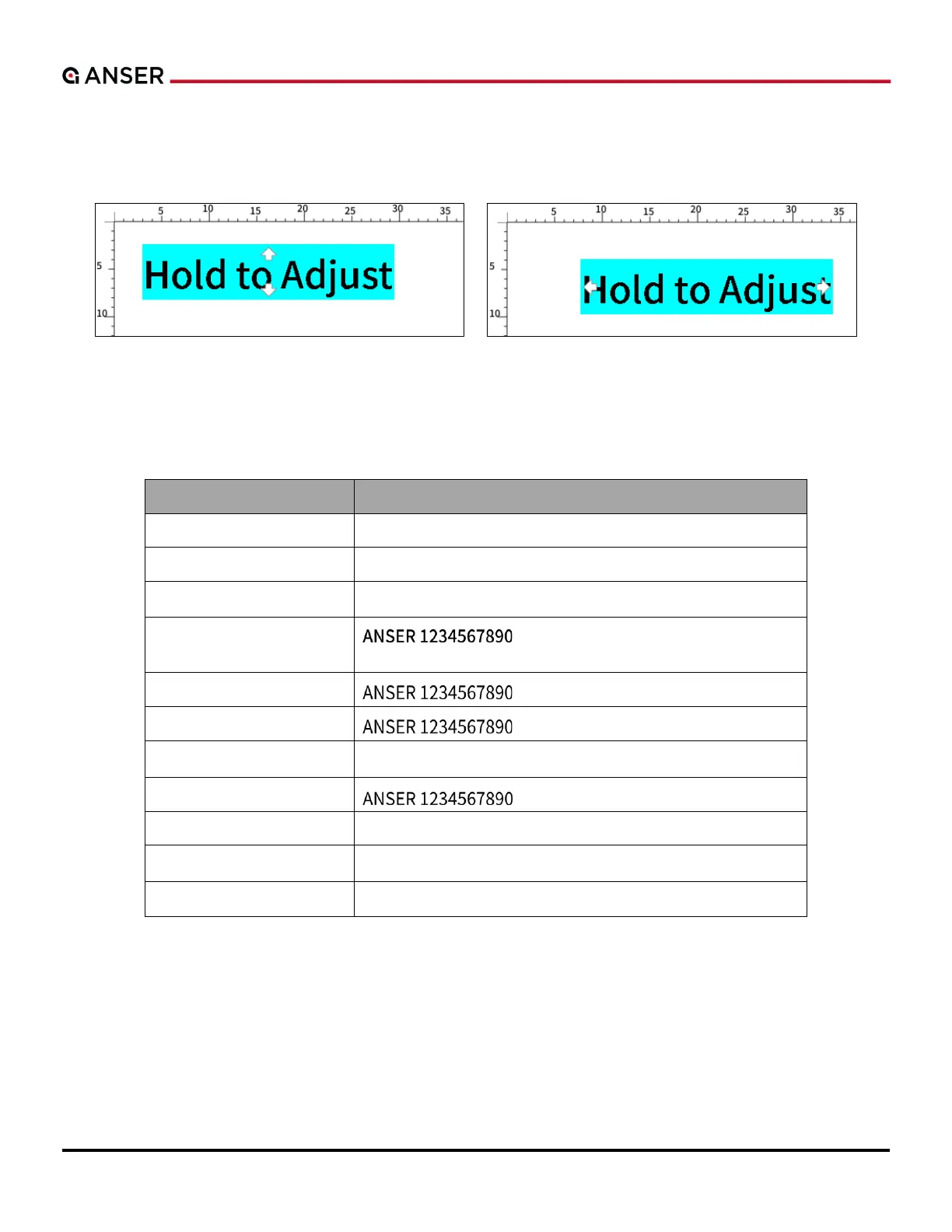
If you press and hold on a text, a pair of arrows appear horizontally or vertically. Move your finger and drag the text
along the horizontal or the vertical direction to a desired position. You can also change the position of a text or an object
by entering numbers in X-axis and Y-axis fields.
Figure 1-25. Add Object Hold to Adjust Message Position
X1 Message Editor provides eleven fonts and thirty-three system languages. Please see the following tables for details.
Table 1-5. X1 Fonts Supported

Font Type
Example
Amiri-Regular
ANSER 1234567890
Arimo-Regular
ANSER 1234567890
DejaVuSans
ANSER 1234567890
NotoSansCJKtc-Medium
(Default)
NotoSansJP-Regular
NotoSansKR-Regular
NotoSans-Regular
ANSER 1234567890
NotoSansTC-Regular
OCR-B
ANSER 1234567890
OpenSans-Regular
ANSER 1234567890
Sarabun-Regular
ANSER 1234567890
.

Table of Contents

Related product manuals