34 The Setup Menus
6.3 Set Local Hour
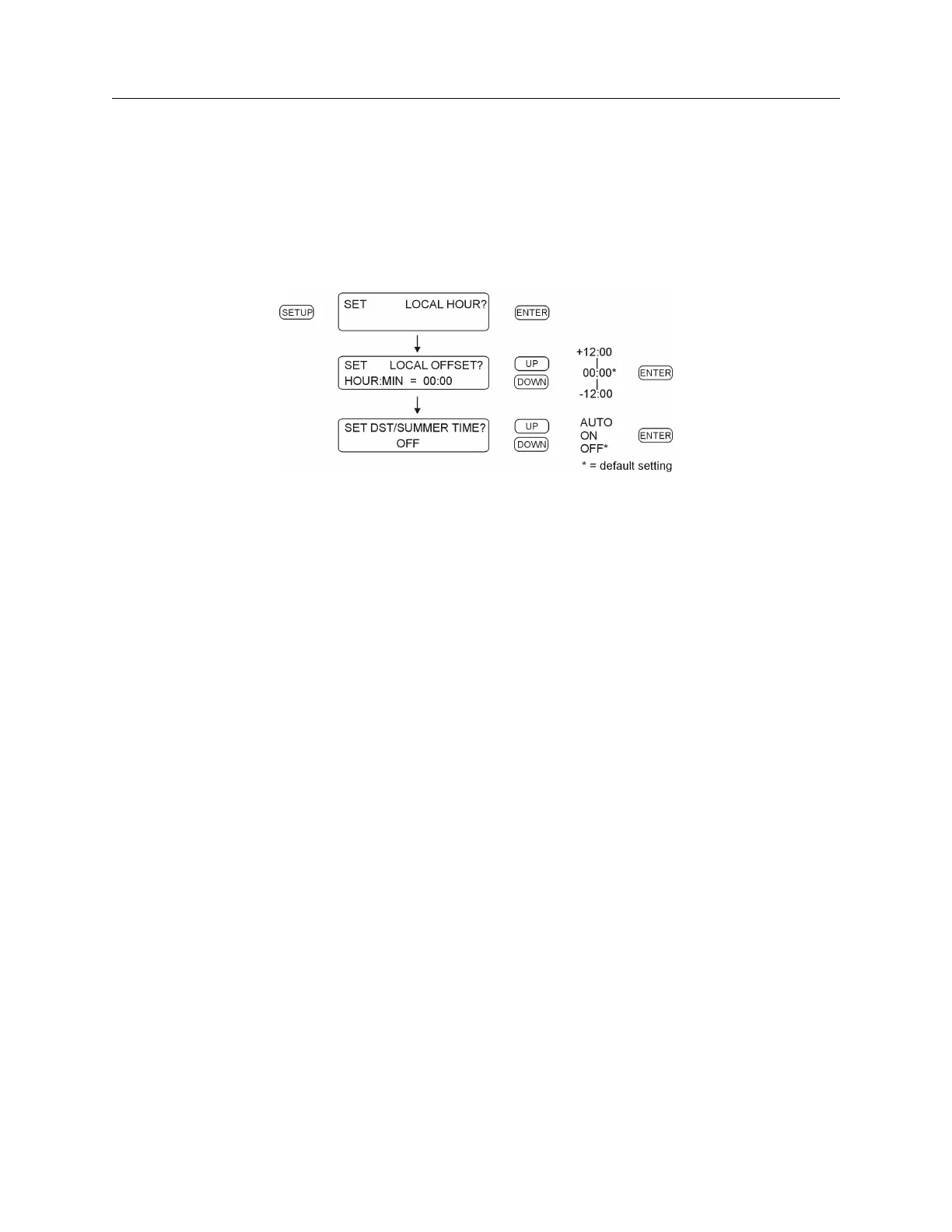
There are two local hour settings: (1) Local Offset, and (2) DST/Summertime. Use “Set Local Off-
set” to adjust the difference in time between UTC to your local standard time. Local offset may be
adjusted in 15-minute increments up to plus or minus 12 hours. Optionally, use DST/Summertime
to automatically add and remove one hour to your local time. See Section 6.3.2 to set up basic
DST features. RS-232C: see Section 9.2.4.
Figure 6.4: Local Hour Setup
6.3.1 Examples
1. Los Angeles (USA) has a local offset of -8:00. During Daylight Saving Time, Los Angeles
(USA) has an overall offset from UTC of -7:00 hours.
2. Nairobi, Kenya has a local offset of +3:00. DST/Summertime is not observed.
3. Selecting DST/Summer Time “ON” immediately adds one hour to the time and does not
change back to standard time.
4. Selecting “DST/Summer Time” to “OFF” never adds one hour to the time.


 To Next Page