i2000SR interface module Service Manual
Page 112 of 212 625798100.APS.5.doc
STEPS REFERENCES
1 Perform the controlled shutdown of
the Workcell
Refer to the “Operations Manual – SECTION 5 –
Operating Instructions” to execute the “Controlled
power shutdown” of the Workcell.
2 Disconnect the Workcell and i2000SR
IM from the AC power source.
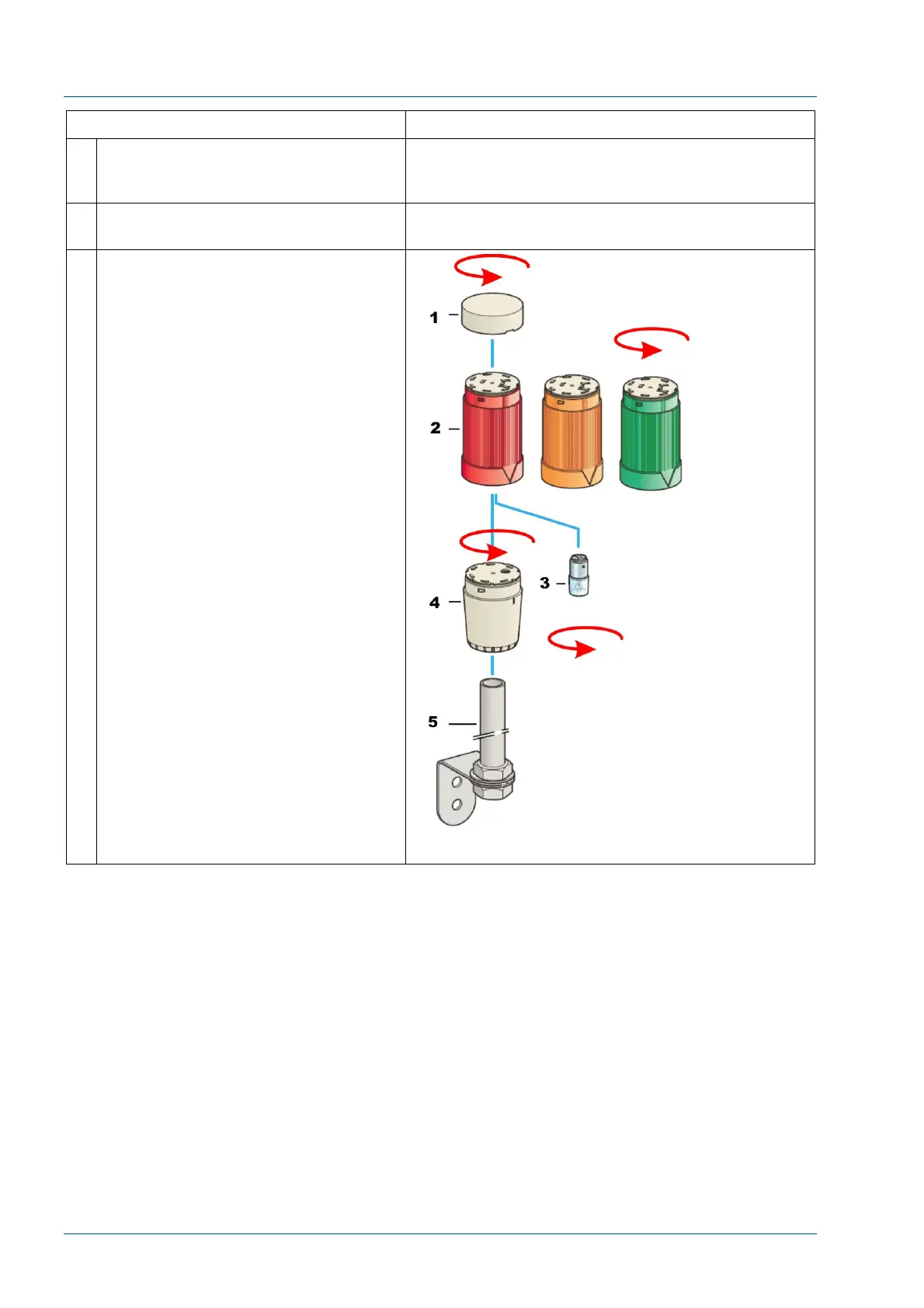
3 Locate the pole lamp near the
i2000SR IM.
The pre-assembled 45 mm diameter
indicator banks XVM is comprised of:
1 – Top cover.
2 – Three colored illuminated units
(red at the top, orange in the middle,
green at the bottom).
3 – Each illuminated unit is fitted with
an incandescent bulb lamp.
4 – Base unit.
5 – Pole.
Each element can be disassembled or
assembled by rotating one element
with respect to another.
The bulb lamp is fastened with a
bayonet lamp holder.



 To Next Page