i2000SR interface module Service Manual
Page 76 of 212 625798100.APS.5.doc
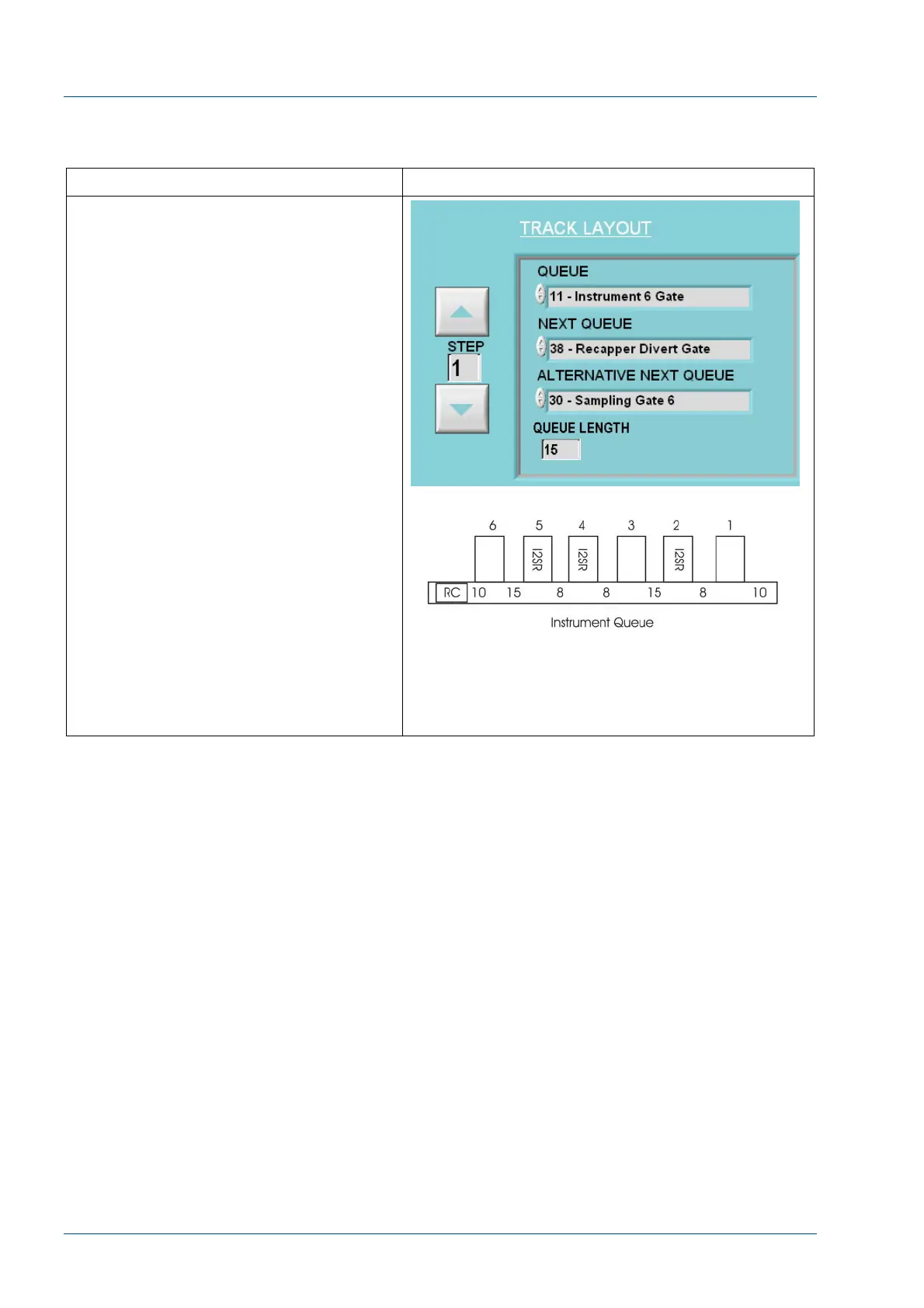
Modify Instrument Queue for instrument
following i2000SR
Action Reference
NOTE:
The instrument queue for the track non-
i2000SR instrument that follows i2000SR
must be adjusted.
1. Using the Configuration Wizard
select the Track Layout tab.
2. Use the ¿À arrows to select the
Instrument Gate of the non-i2000SR
instrument that follows an i2000SR.
(Example: If i2000SR is instrument #5
and #6 is a c8000, select Instrument 6
Gate)
3. Edit the QUEUE LENGTH to equal
15.
NOTE:
Should there be multiple i2000SR
systems, change the instrument queue
length of each following instrument that
is not an i2000SR. Refer to the reference
illustration. Note that as there is
separation between the i2000SRs, the
instrument queue for #3 is also set at
15.
NOTE:
After the i2000SR IM Gate Queues
lengths are changed, the change will not
take affect until the i2000SR IM power
has been cycled.



 To Next Page