i2000SR interface module Service Manual
Page 190 of 212 625798100.APS.5.doc
STEPS REFERENCES
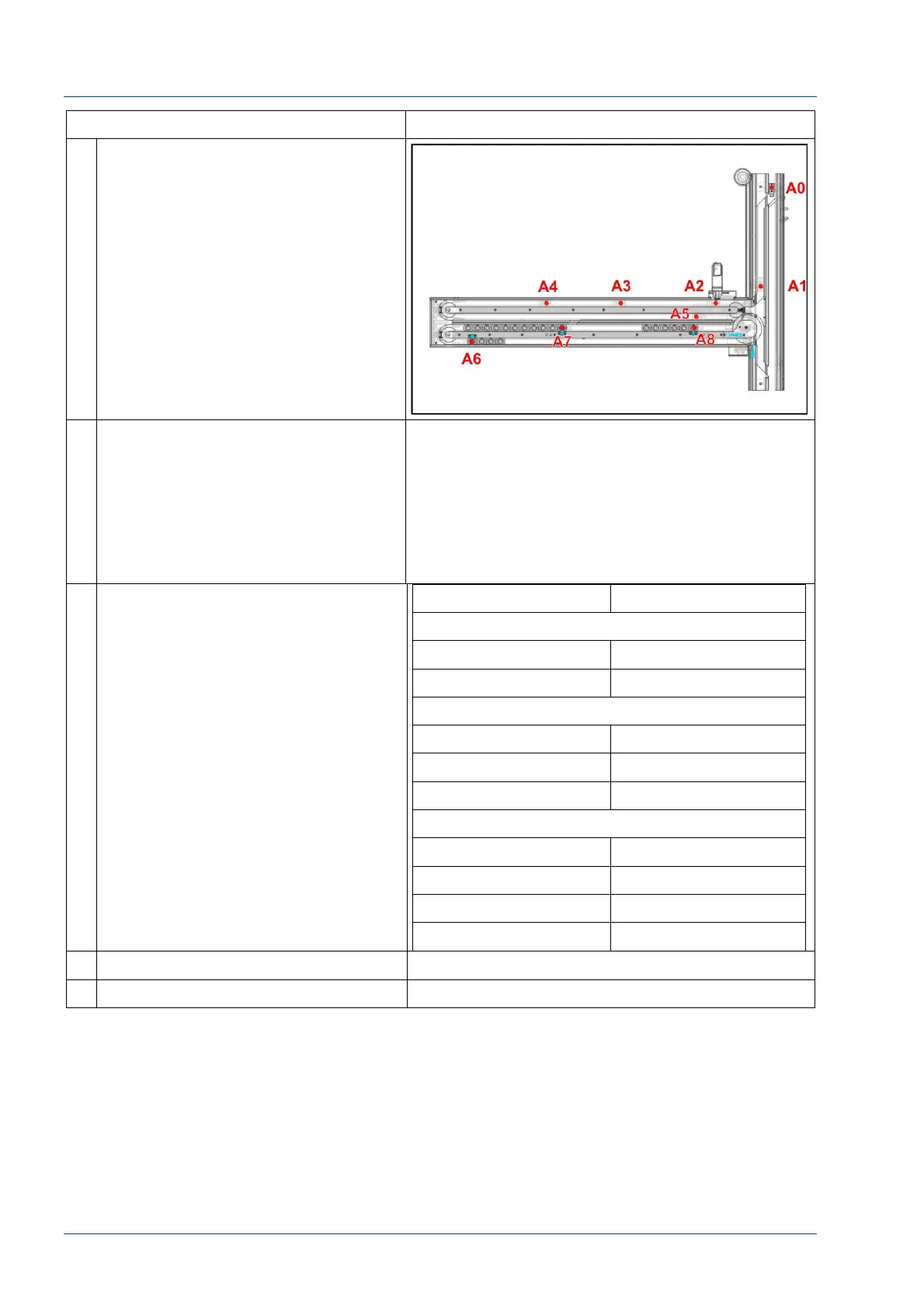
5 Move an i2000SR IM carrier (not a
Workcell carrier) near the antenna to
be tested.
Refer to the figure on the right for
antenna location and numbering.
6 Manually move the carrier along the
track towards the location of the
antenna to be tested. Ensure that the
carrier is not detected until it is about
1 cm of the antenna.
Read the number displayed on the
proper Tag Reader board.
See table below for reference:
NOTE:
If the carrier detection at a sampling gate location
is erratic, a sample presentation or sample queue
error will occur.
7 If it is impossible to read any number
on the proper display, check for
antenna cable connections or replace
antenna.
If the number appears on a wrong
display, or if the displayed number is
wrong, the antenna connector is
inverted with another.
Antenna Displayed value
MASTER Board
A3 1
A4 2
SLAVE 0 Board
A0 1
A2 2
A1 4
SLAVE 1 Board
A7 1
A6 2
A5 4
A8 8
8 Reinstall the removed covers.
9 Return APS operation to users.



 To Next Page