2: Conguring Inputs • 14
©2008 Axia Audio — Rev. 3.0
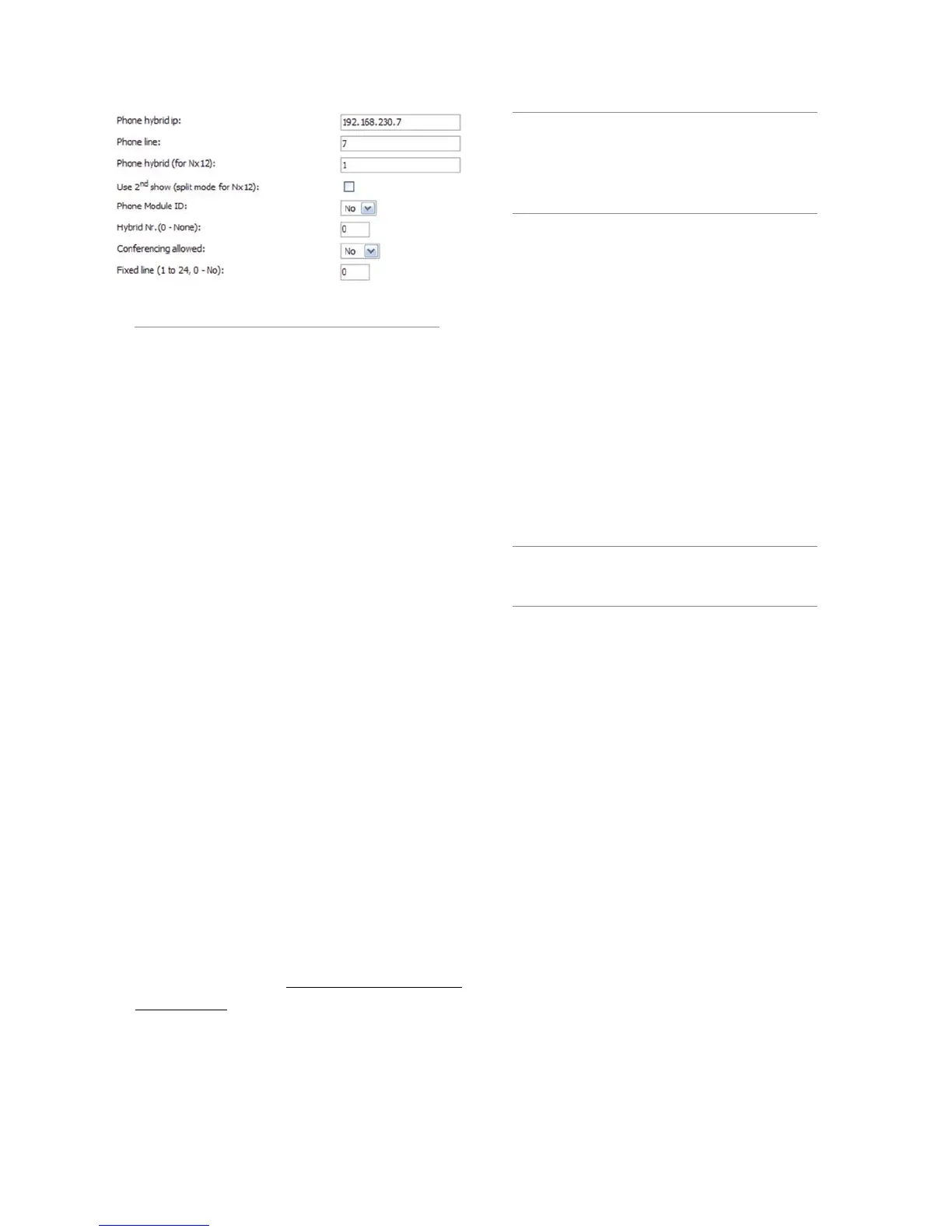
PHONE LINE: If this source is a Telos Nx12,
TWOx12, Series 2101 or Telos TWO and you will
be operating in Euro mode and wish to dedicate a
phone line to this fader, enter it here.
PHONE HYBRID (FOR NX12): Even though the
option title says “for Nx12”, if this source is a Telos
Nx12, TWOx12 or Series 2101 and you will be oper-
ating in Euro mode, you may specify hybrid 1 - 4 for
this line assignment.
USE 2ND SHOW (SPLIT MODE FOR NX12): Even
though the option title says “for Nx12”, if this source
is a Telos Nx12, TWOx12 or Series 2101 and you
will be operating in Euro mode, you may check this
to designate Split Studio Mode, where two hybrids
are assigned to one show, and the other 2 assigned to
a second show. Element will connect to the second
Show in the list.
The next 4 options are used for US mode only:
PHONE MODULE ID: For Telos Nx12, TWOx12 or
Series 2101 operating in US mode. If you are con-
structing a Source Profile for a telephone hybrid and
have multiple Phone Modules installed, this allows
you to determine which module will control this hy-
brid. For details on setting up a phone system with
Element, please refer to Appendix D: Working With
Phone Hybrids.
HYBRID NR.: For Telos Nx12, TWOx12 or Series
2101 operating in US mode. Specify which hybrid
this Source Profile will control.
•
•
•
•
•
Nx12 Users Note: For Nx12’s second show,
you would STILL enter “1” for Hybrid 3 and “2”
for Hybrid 4. Why? Because, to Nx12’s internal
logic table, Hybrid 3 is really the rst hybrid in
Show 2 and Hybrid 4 is the second hybrid in
Show 2.
CONFERENCING ALLOWED: For Telos Nx12,
TWOx12 or Series 2101 operating in US mode. Spec-
ifies whether or not “button mash” conferencing is
permitted. Select Yes to allow, No to prohibit.
FIXED LINE: For Telos Nx12, TWOx12 or Series
2101 operating in US mode. When working with a
Telos hybrid that supports it, this command lets you
assign a line permanently to a specific fader, emulat-
ing a dedicated hybrid.
0 means there is no fixed line assigned.
1 - 24 slaves the specific line to this source’s
fader.
Note: For complete instructions on setting up a
phone system with Element, please refer to Ap-
pendix D: Working With Phone Hybrids.
FADER MODE: Allows you to set the channel activa-
tion method of the fader this source is assigned to.
Normal conforms to the US method of requiring
talent to manually turn the channel on and off.
Fader Start follows the common European
standard of activating the channel and associated
machine logic when the fader is raised from ∞.
PREVIEW SWITCHING MODE: Determines what
will happen to a source’s off-air Preview assign-
ment when that source is taken to air.
Normal, Auto-Switching Disabled: The Pre-
view bus assignment will be retained even after
the fader is turned ON.
CHANNEL ON turns Preview OFF: If this
source is assigned to Preview for off-air audi-
tioning, turning its channel ON will cancel its
Preview assignment.
HYBRID ANSWER MODE: This setting allows you
to tailor Element’s Hybrid Answer mode to suit your
facility’s operating style.
•
•
»
»
•
»
»
•
»
»
•
Figure 2-2: Settings for conguring Element for
operation with Telos phone systems



 To Next Page