4: Element Operations • 69
©2008 Axia Audio — Rev. 3.0
the PGM-4 bus.
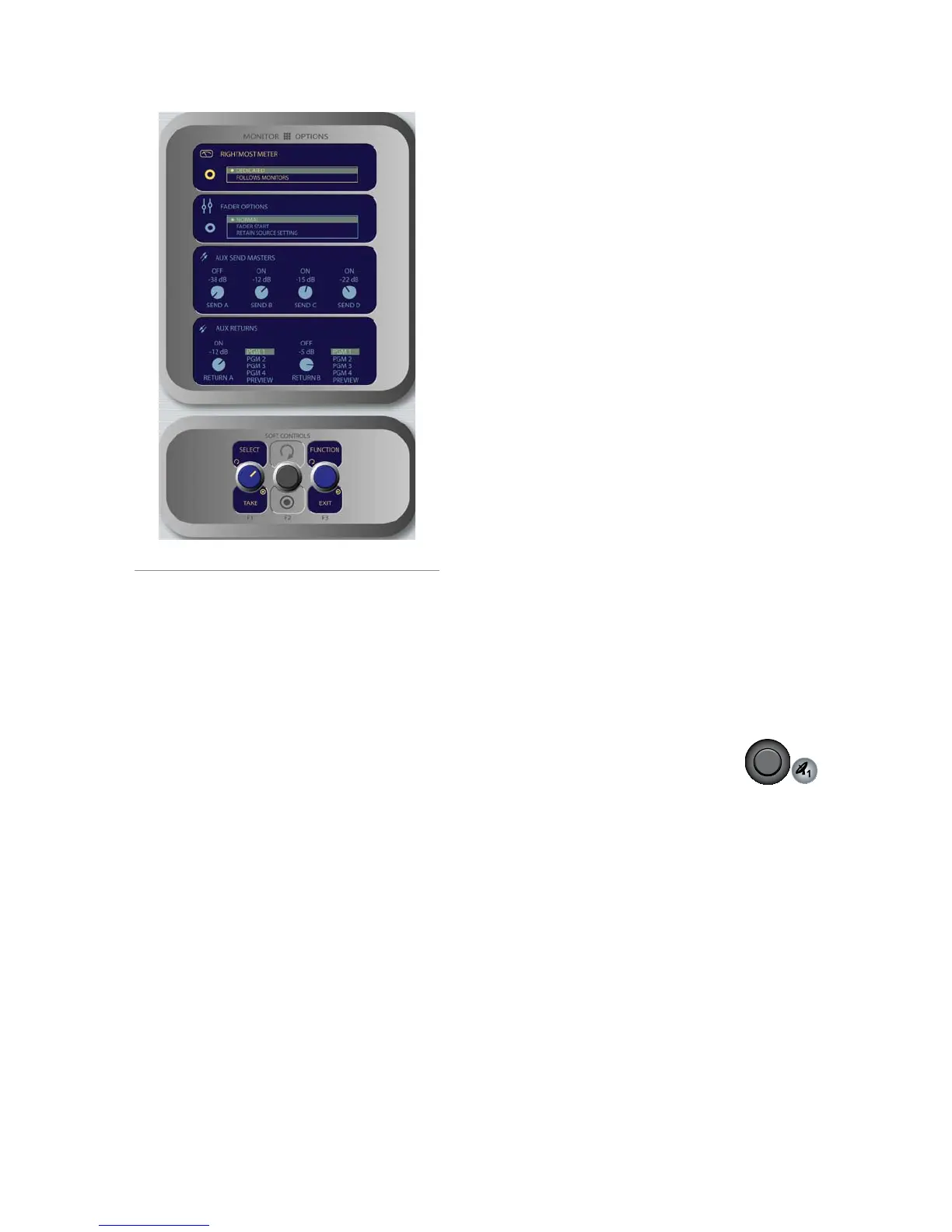
Follow Monitors means the meter will show
levels for any source assigned to Monitor 1.
When the Fader Options box is highlighted,
pressing the St. Mode SoftKnob selects between
fader-normal and European-style fader-start
channel activation methods.
Fader Normal: Selects the US method of re-
quiring talent to manually turn channels on
and off.
Fader Start: Selects the European conven-
tion of activating the channel and associated
machine logic when the fader is raised from
∞.
Retain Source Setting: Each individual
fader uses the settings specified in its Source
Profile.
Element features four stereo Aux Send buses for
use as utility, FX or IFB buses. When the knobs
in the Aux Send Masters box are highlighted,
the SEND A/B/C/D knob affects global gain
settings for the master levels of the four Aux
*
»
*
*
*
»
Send buses.
The Send A/B/C/D SoftKnobs, when ro-
tated, set the Master Send Gain for each Aux
Send bus. Pushing the knob toggles the se-
lected Aux Send Master On or Off.
Pushing the Preview knob sends the high-
lighted Aux Send mix to the Preview chan-
nel. Push to preview; release to end preview.
Element features two stereo Aux Return buses
whose output can be applied to any of the four
PGM buses. When the knobs in the Aux Returns
box are highlighted, the Return A/B knob af-
fects global gain settings for the master levels of
the two Aux Return buses.
The Return A/B SoftKnobs, when rotated,
set the Master Send Gain for each Aux Send
bus. Pushing the knob toggles the selected
Aux Return Master On or Off.
Rotate the adjacent Assign/Take knob to
choose which of the four Program buses (or
the Preview bus) to assign the output of the
selected Aux Return. Push the knob to Take
the assgnment.
Pressing the Function/Exit SoftKnob at any
time returns you to Element’s main meter screen.
Monitor 1 Knob + Source Keys
This knob, at the bottom left of the Monitor section,
controls the selection and volume of the source heard
in the Monitor 1 speakers (typically the Control Room
monitors).
Rotate the knob to vary the gain of the Monitor
1 speakers.
Use the Direct Selection Keys in the column di-
rectly above the Monitor 1 knob to send the out-
put of Program 1 - Program 4 or the two Ex-
ternal monitor sources to the Monitor 1 speakers.
These keys light to denote the selected source.
You can listen to any frequently-used audio
stream in your facility instantly (such as a net-
work feed, off-the-air monitor or another studio’s
Program output) by assigning it to one of the two
*
*
»
*
*
»
•
»
»
»
Figure 4-30: Monitor Options menu screen #2.



 To Next Page