106
Clinician's Guide
Baseline Comparison Results
The Baseline Comparison feature allows the user to designate a Therapy Session as a Baseline to which
all future Therapy Sessions can be compared. The Baseline Therapy Session consists of two parts: the
Results generated during the Baseline Therapy Session, and the Parameter Options used to generate the
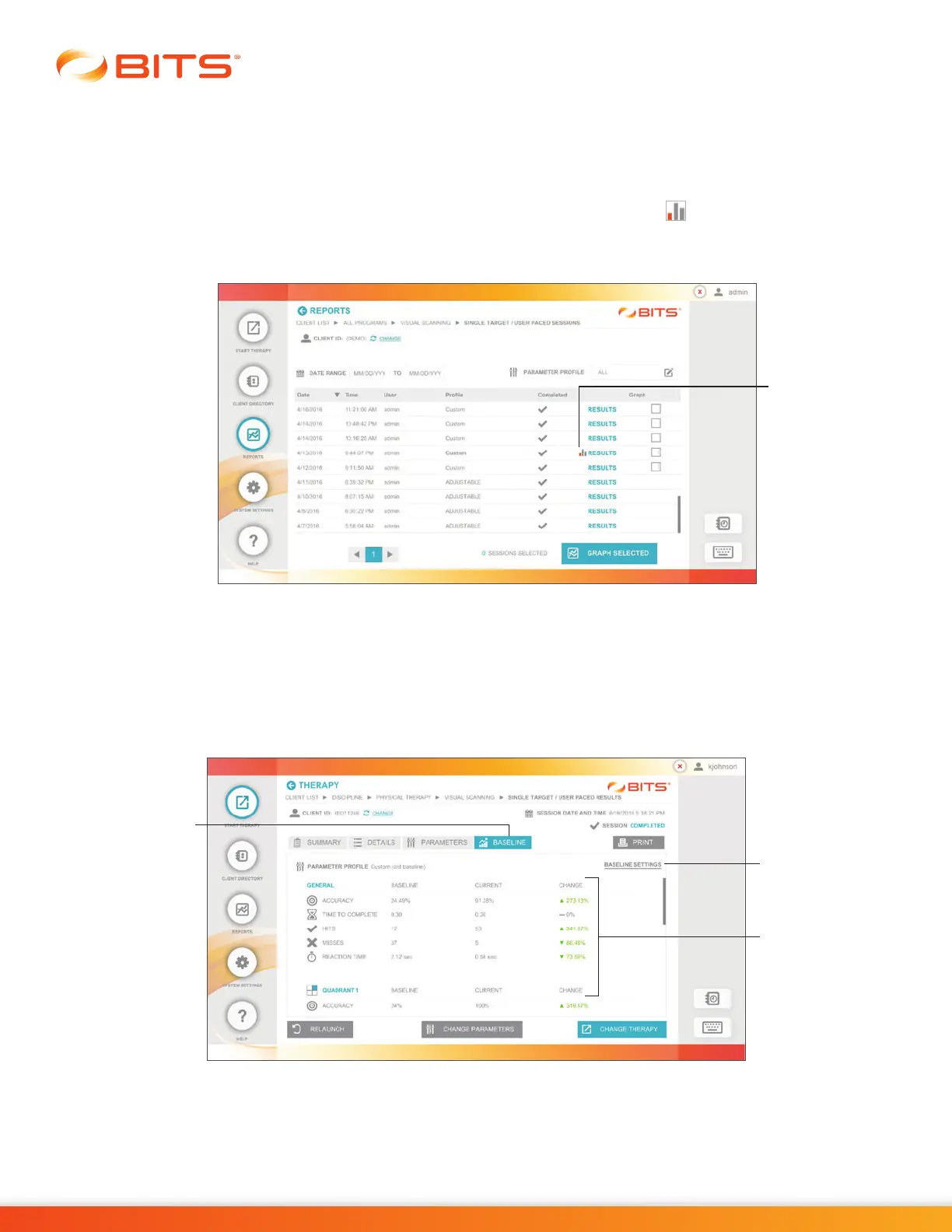
Results. After a Baseline Therapy Session has been saved, the baseline icon will be used to identify it
in the Results Sessions List. See Figure 19-18. All future Therapy Sessions that are to be compared with
the Baseline Therapy Session must be performed using that Baseline Parameter Profile.
Figure 19-18: Baseline Icon in Results Sessions List
Baseline Comparison Results are displayed in the Baseline Tab in the Results Screen. The Results include
both General and, where applicable, Quadrant Results. For each Result displayed, the value of both
the Baseline Session and the Current Session are provided. The changes between the Current Session
Results and the Baseline Session Results are displayed with a green up or down arrow for an improved
result, or with a red up or down arrow for a less desirable result. See Figure 19-19.
Figure 19-19: Results Screen, Baseline Tab
Baseline
Settings
Baseline
Tab
Green and
Red Arrows
Baseline
icon



 To Next Page