16
Clinician's Guide
Discipline Menu
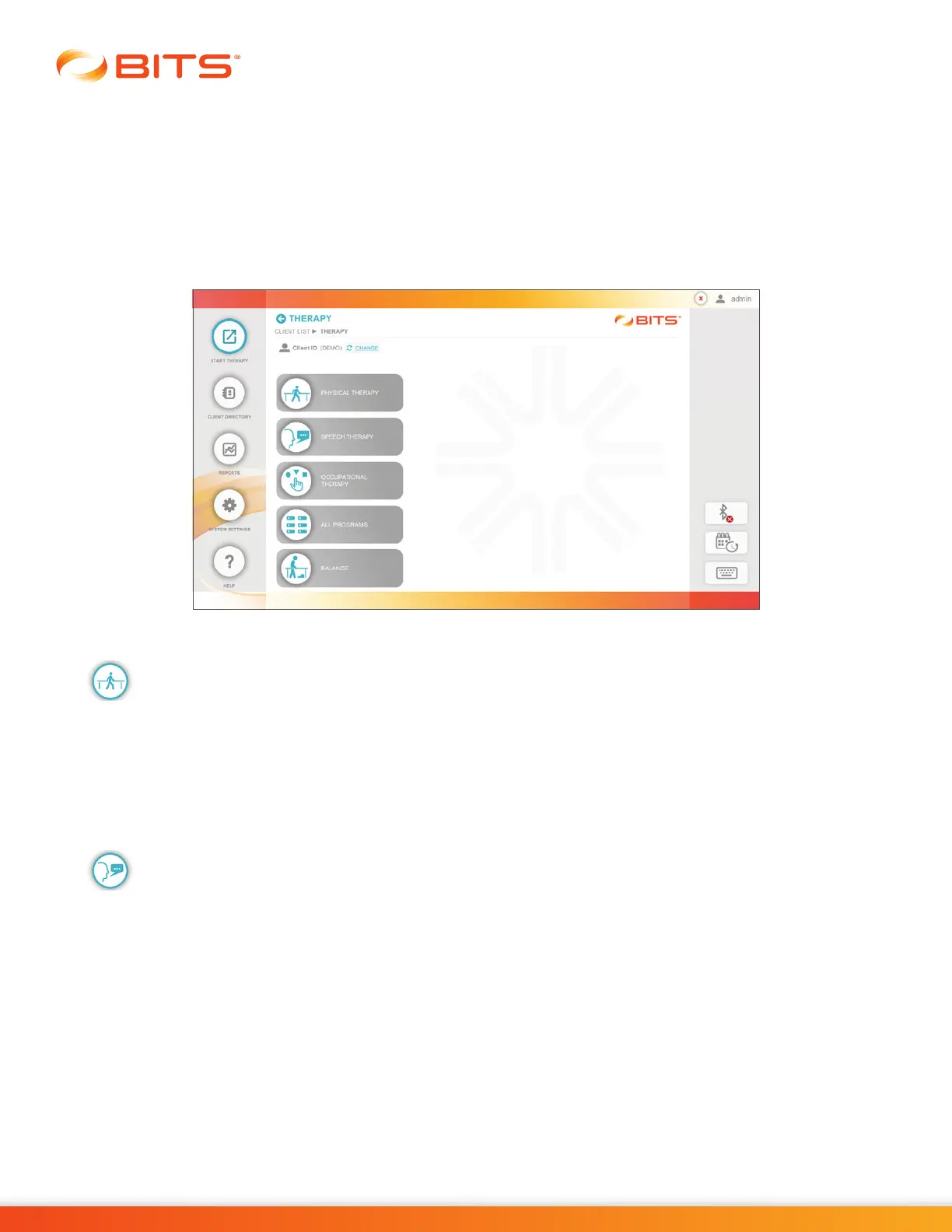
Within the Start Therapy Module, the Discipline Menu divides the BITS Therapy Programs into groups for
a particular application (Discipline). See Figure 4-2. Selecting a Discipline Menu Button opens a screen
displaying the available therapy categories found in the selected discipline.
The Discipline Menu can be accessed after the Start Therapy Button has been pressed and a client has
been selected from the Client List. Refer to the "Client Directory" and "Start Therapy" sections of this
guide for more information.
Figure 4-2: Discipline Menu Screen
Physical Therapy
The Physical Therapy Discipline, features the therapy categories listed below. To access the Physical
Therapy Discipline, press the Physical Therapy Button. See Figure 4-2.
• Visual Scanning • Visual Motor
• Cognitive • Assessments
Speech Therapy
The Speech Therapy Discipline, features the therapy categories listed below. To access the Speech
Therapy Discipline, press the Speech Therapy Button. See Figure 4-2.
• Visual Scanning • Charts
• Cognitive • Assessments
• Visual Motor



 To Next Page