94
Clinician's Guide
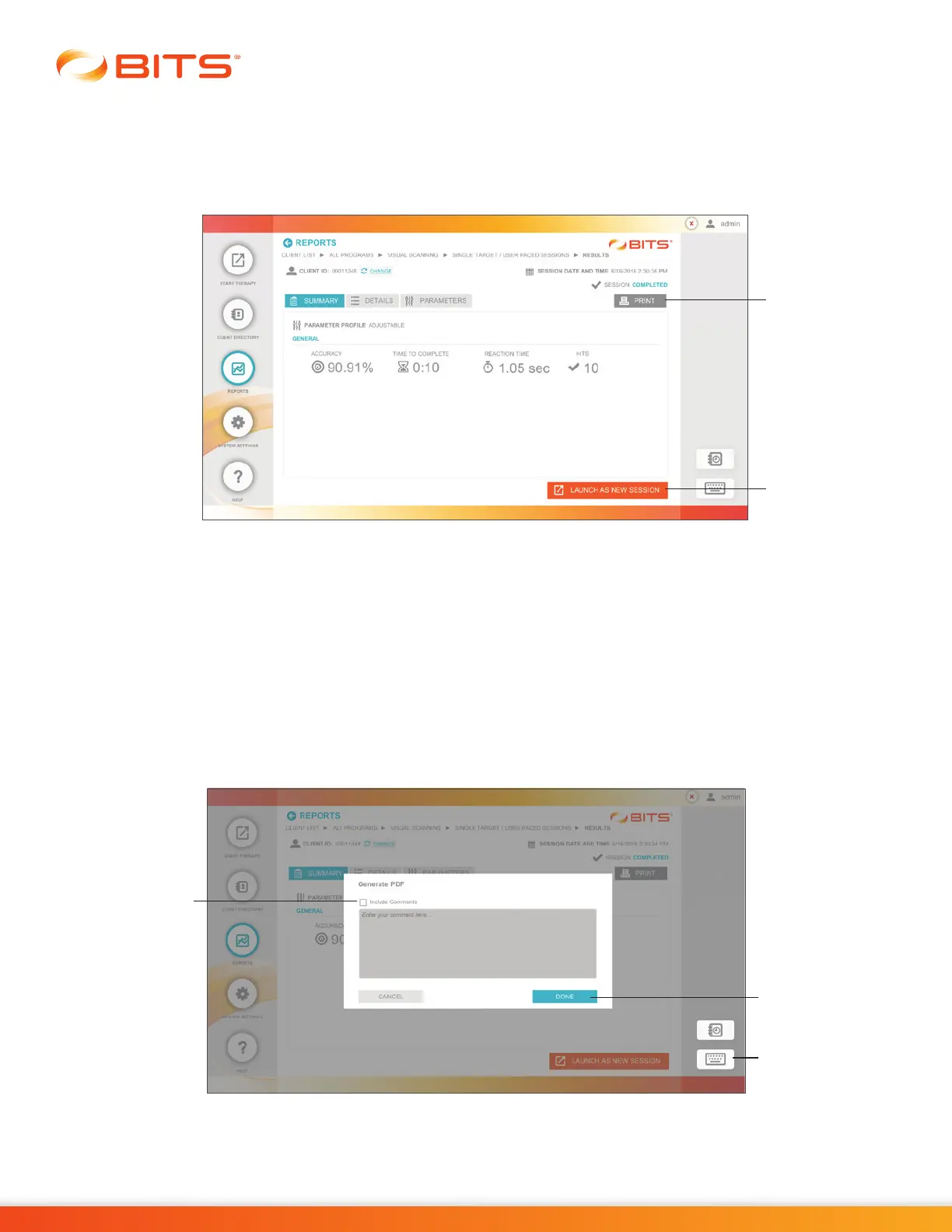
The Session Results Screen contains five tabs labeled: Summary, Details, Balance Parameters, and
sometimes Baseline. See Figure 19-7. This screen is similar to the Results Screen that appears at the
end of a therapy session. The content of each of these tabs differs depending on the Therapy Program
for which the session was performed. Definitions of the content found on the Results Screen for each of
the therapy programs are defined in Chapter 18 of this guide.
Figure 19-7: Example of a Results Screen in the Reports Module
Printing a Report
Therapy results displayed on the Results Screens in the Reports Module and at the end of each therapy
session can be printed to a PDF Report.
1. From The Results Screen, press the Print Button. See Figure 19-7.
2. The Generate PDF pop-up window will open. See Figure 19-8. Comments can be added to the
report by selecting the Include Comments Box and typing them into the text box provided. Press the
Done Button to generate the PDF Report.
Figure 19-8: Generate PDF Pop Up Window
Done
Button
Keyboard
Icon
Include
Comments
Box
Print
Button
Launch As New
Session Button



 To Next Page