8. Dismantling of elements
8.1. Dismantling of housing
e main cover, side housings, doors and rear panel can be removed separately, without having to dismantle the others.
To dismantle all the housings and panels, only one tool is required:
T20 torx key with a minimum length of 40 mm
To dismantle the housings and panels follow the dismantling process in reverse.
8.1.1. Removing the rear cover
To remove the rear cover, proceed as follows:
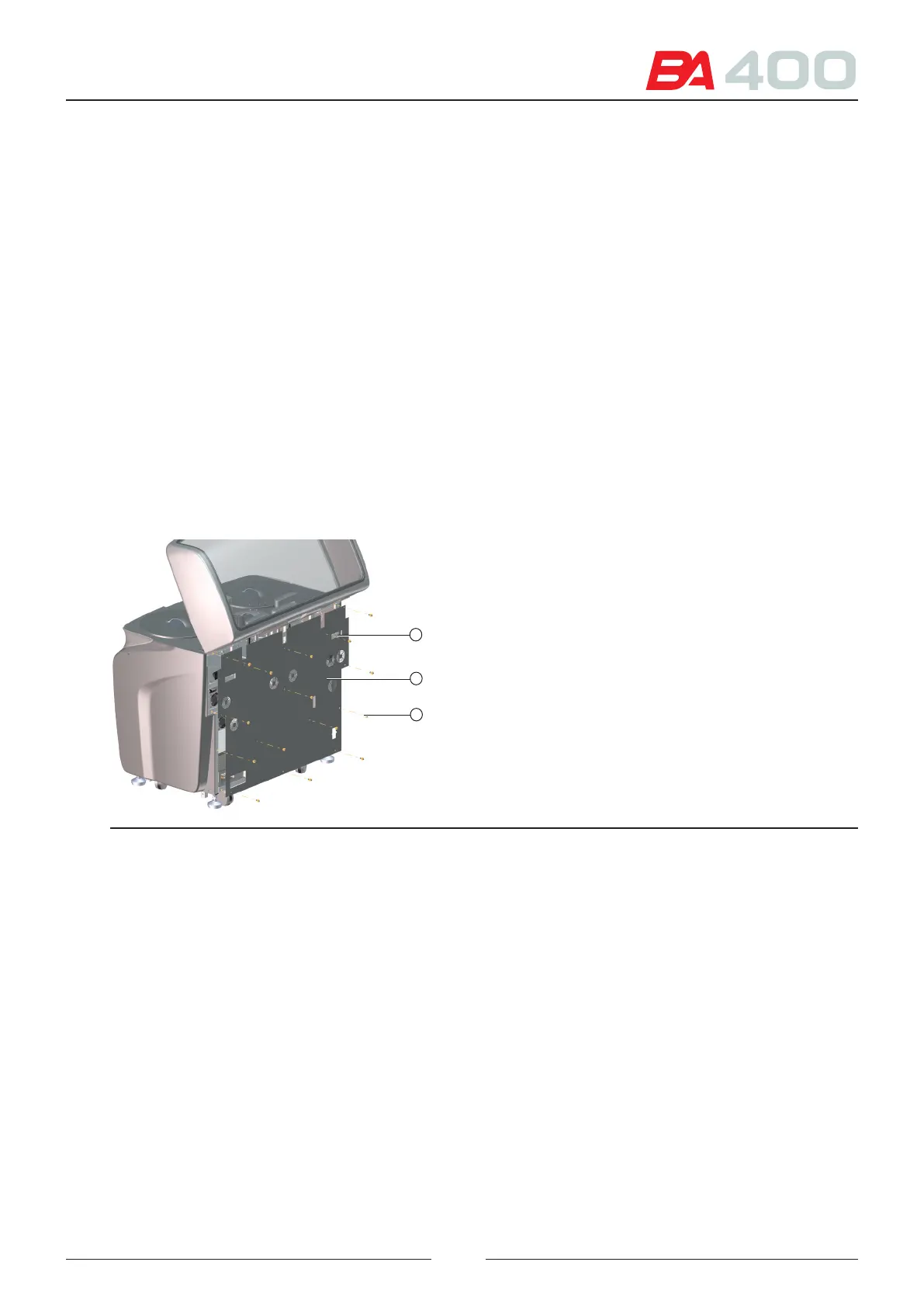
1. Remove the 14 torx screws and their washers (3).
2. Grasp the rear panel (2) using the 2 grips (1).
Figure 8.32 Removing the rear cover
3
2
1
8.1.2. Removing the top cover
To remove the top cover, proceed as follows:
1. Open the cover and remove the cover sensor tab and the 2 pistons.
2. Close the cover and turn the analyser
3. Remove the 10 torx screws and their washers from the hinges.
4. e cover can now be raised and changed.
8.1.3. Removing the side housings
To remove the housing on the right side, proceed as follows:
1. Remove the 3 screws from the rear side of the top tray ().
2. Open the right door and remove the 2 internal screws ( ).
97



 To Next Page