6. Service programme
e service programme enables the analyser to be adjusted and checked, and is also used to locate failures in the
analyser.
6.1. Identification of the programme parts.
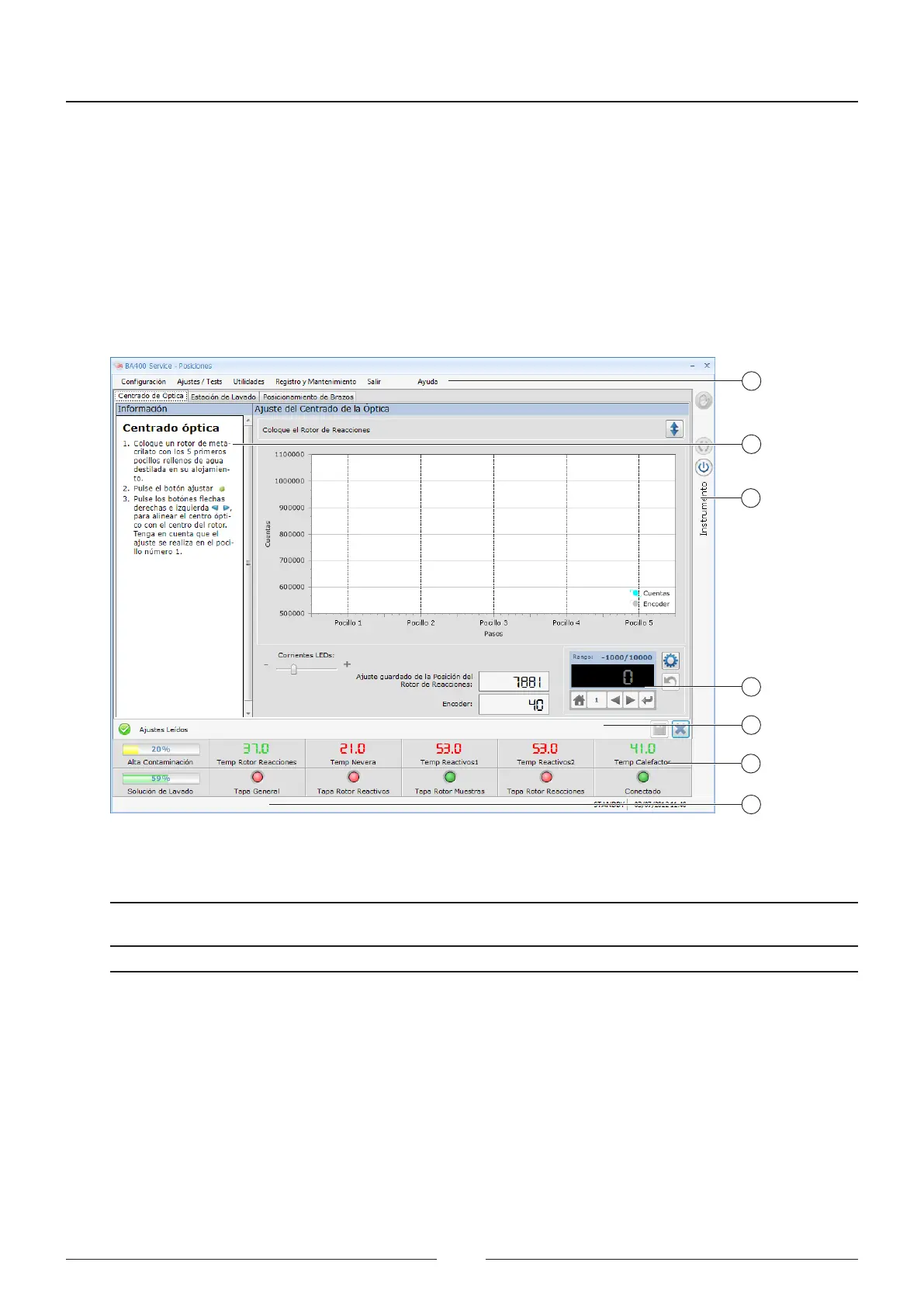
e programme screen has two parts which are common to all the menus. See Figure 6.1
1
2
3
4
5
6
6
1 – Menu bar
2 – Help panel
3 – Lateral bar
4 – Adjustment panel
5 – Status icons
6 – Message lines
Figure 6.3 Screen format
Name Description
Menu bar is gives access to the programme menus.
Help panel An incrusted help screen indicates the adjustment process for each type of adjustment
on a step-by-step basis.
Lateral bar Analyser operation icons.
Adjustment panel Panel with dierent options for adjusting the positioning.
Status icons Icons that permanently indicate the status of certain elements in the analyser.
Message line Status line indicating messages for executing actions. e messages are shown in 2
locations.
Service Manual
66



 To Next Page